How to view sudo logs
Sudo audit reviews usually start after a privilege change, a failed maintenance command, or an incident handoff where the question is who invoked sudo and what the policy recorded. The log surface can be the system journal, a distro auth log, or a configured sudoers log file, so checking only one path can look like missing evidence even when the attempt was logged somewhere else.
The sudoers policy logs successful and unsuccessful sudo attempts through syslog by default, and it can also write event logs to a local file when the logfile default is configured. Systemd hosts may expose those syslog events through journalctl, while traditional syslog setups commonly store them in /var/log/auth.log on Debian and Ubuntu or /var/log/secure on Red Hat-family systems.
Sudo event logs show the invoking user, working directory, run-as user, command, and session or authentication messages. They do not record the command's terminal input or output unless sudo I/O logging is enabled, and I/O sessions are reviewed with sudoreplay rather than by reading the auth log alone.
Related: Enable sudo command logging to a file
Related: Enable sudo I/O logging
Related: Check sudoers syntax with visudo
Steps to view sudo logs:
- Run a harmless sudo command when you need a fresh event to confirm the active log surface.
$ sudo /usr/bin/id
uid=0(root) gid=0(root) groups=0(root)
Skip this step when you are auditing an existing event. Use a command that is already allowed by policy so the log entry proves where sudo writes normal command attempts.
- Check the system journal on hosts where systemd-journald stores syslog events.
$ sudo journalctl -t sudo --since today --no-pager
Jun 05 01:53:30 server sudo[8123]: admin : TTY=pts/0 ; PWD=/home/admin ; USER=root ; COMMAND=/usr/bin/id
Jun 05 01:53:30 server sudo[8123]: pam_unix(sudo:session): session opened for user root(uid=0) by admin(uid=1001)
Jun 05 01:53:30 server sudo[8123]: pam_unix(sudo:session): session closed for user root
If this command returns no entries, the host may send sudo events only to a syslog file, may rotate older entries out of the journal, or may use a different logging stack.
- Check the Debian or Ubuntu auth log when the journal is empty or the retained audit source is a syslog file.
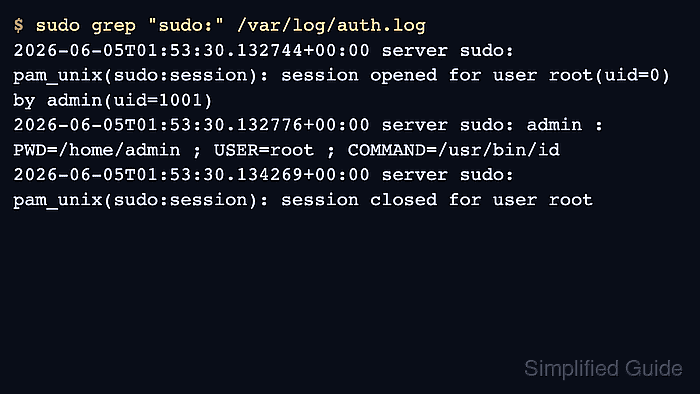
$ sudo grep "sudo:" /var/log/auth.log
2026-06-05T01:53:30.132744+00:00 server sudo: pam_unix(sudo:session): session opened for user root(uid=0) by admin(uid=1001)
2026-06-05T01:53:30.132776+00:00 server sudo: admin :  PWD=/home/admin ; USER=root ; COMMAND=/usr/bin/id
2026-06-05T01:53:30.134269+00:00 server sudo: pam_unix(sudo:session): session closed for user root
The decisive command event is the line with PWD=, USER=, and COMMAND=. Session-open and session-close lines show the PAM session around the command.
Reading a protected log with sudo can create another sudo event for the log-read command itself. Ignore that extra line when you are confirming the earlier test command.
- Check the Red Hat-family secure log on systems that use that auth-log path.
$ sudo grep "sudo:" /var/log/secure
Jun  5 01:53:30 server sudo[8123]: admin : TTY=pts/0 ; PWD=/home/admin ; USER=root ; COMMAND=/usr/bin/id
Jun  5 01:53:30 server sudo[8123]: pam_unix(sudo:session): session opened for user root(uid=0) by admin(uid=1001)
Jun  5 01:53:30 server sudo[8123]: pam_unix(sudo:session): session closed for user root
If /var/log/secure does not exist, confirm the host's syslog or audit configuration before assuming sudo did not log the attempt.
- Read the configured sudoers log file when the host uses the logfile default.
$ sudo cat /var/log/sudo-commands.log
Jun  5 01:53:30 2026 : admin : PWD=/home/admin ; USER=root ; COMMAND=/usr/bin/id
Jun  5 01:54:02 2026 : admin : PWD=/home/admin ; USER=root ; COMMAND=/usr/bin/whoami
The sudoers logfile setting points to a sudo event log file, not the system syslog file. If the file does not exist, file logging may not be configured.
If visudo reports unknown setting: 'logfile', the active sudo implementation may not support upstream sudo.ws file-log defaults. Use the journal or auth-log path until the host is moved to a supported sudo implementation.
- Identify denied commands or authentication failures by reading the message text around the sudo event.
$ sudo grep "sudo:" /var/log/auth.log
2026-06-05T02:10:14.418001+00:00 server sudo: admin : user NOT in sudoers ; TTY=pts/0 ; PWD=/home/admin ; USER=root ; COMMAND=/usr/bin/id
2026-06-05T02:12:09.882740+00:00 server sudo: pam_unix(sudo:auth): authentication failure; logname=admin uid=1001 euid=0 tty=/dev/pts/0 ruser=admin rhost= user=admin
A denied-command line usually names the user, working directory, run-as user, and command. Authentication failures may appear as PAM messages before sudo records or rejects the command attempt.
- Look for a TSID= field only when sudo I/O logging is enabled.
$ sudo grep "TSID=" /var/log/auth.log
2026-06-05T02:20:11.540608+00:00 server sudo: admin : TTY=pts/0 ; PWD=/home/admin ; USER=root ; TSID=000001 ; COMMAND=/usr/bin/vi /etc/hosts
The TSID= value identifies an I/O log session. Use sudoreplay to list or replay that session instead of expecting the auth log to contain terminal input and output.
Related: How to enable sudo I/O logging