How to enable sudo command logging to a file
Writing sudo command events to a dedicated file gives administrators a local audit trail when the default auth log or journal is noisy, forwarded elsewhere, or difficult to hand to reviewers. A separate file keeps allowed and denied sudo attempts visible without changing the sudoers rules that grant access.
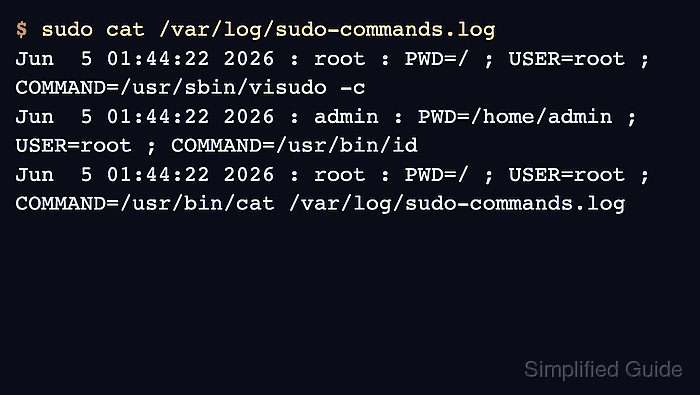
The logfile sudoers Defaults setting enables local file-based event logging for sudo command attempts. It records the invoking user, working directory, run-as user, and command path in the sudo event-log format; it does not record terminal input or command output streams.
Use visudo for the drop-in and keep a root console or recovery session open while changing policy. The logfile, log_year, and loglinelen defaults require the upstream sudoers policy; if visudo reports those names as unknown, switch to a distro-supported sudo.ws package or alternative before saving.
Related: View sudo logs
Related: Enable sudo I/O logging
Related: Check sudoers syntax with visudo
Related: Create a sudoers drop-in file
Steps to enable sudo command logging to a file:
- Confirm the active sudo implementation before relying on file logging defaults.
$ sudo -V
Sudo version 1.9.17p2
##### snipped #####
If sudo -V identifies sudo-rs or visudo reports unknown setting: 'logfile', do not save the drop-in. Use the distribution-supported upstream sudo.ws implementation before applying these sudoers defaults.
- Open a dedicated sudoers drop-in for the command log file.
$ sudo visudo -f /etc/sudoers.d/command-log
Use a file name without dots or backup suffixes. Sudo skips some included files under /etc/sudoers.d, including names that contain a dot or end with ~.
Related: How to create a sudoers drop-in file
- Add the file logging defaults to the drop-in.
- /etc/sudoers.d/command-log
Defaults logfile="/var/log/sudo-commands.log"
Defaults log_year
Defaults loglinelen=0
Setting Effect logfile="/var/log/sudo-commands.log" Writes sudo event logs to the named local file while the normal syslog target remains active unless the policy disables it separately. log_year Adds the four-digit year to file log timestamps. loglinelen=0 Disables sudo's default file-log line wrapping so each event stays on one line. Choose a path that root can create and write. Without ignore_logfile_errors, sudo may refuse a command when it cannot write the configured event log file.
- Validate the complete sudoers policy after saving the drop-in.
$ sudo visudo -c
/etc/sudoers: parsed OK
/etc/sudoers.d/README: parsed OK
/etc/sudoers.d/command-log: parsed OK
Do not stop after checking only the new drop-in. The full policy check proves the main sudoers file and included files parse together.
- Run a harmless sudo command from the account that should appear in the log.
$ sudo /usr/bin/id
uid=0(root) gid=0(root) groups=0(root)
No daemon reload is needed. New sudo invocations read the sudoers policy when they start.
- Read the sudo command log file and confirm the test command appears.
$ sudo cat /var/log/sudo-commands.log
Jun  5 01:44:22 2026 : admin : PWD=/home/admin ; USER=root ; COMMAND=/usr/bin/id
Jun  5 01:44:22 2026 : root : PWD=/ ; USER=root ; COMMAND=/usr/bin/cat /var/log/sudo-commands.log
The log read can create its own sudo entry when the file is viewed with sudo cat. The entry for the normal admin account and /usr/bin/id proves command file logging is active.
Related: How to view sudo logs
- Add the new log file to local log rotation if the system does not already rotate it.
$ sudoedit /etc/logrotate.d/sudo-commands
/var/log/sudo-commands.log {
    weekly
    rotate 12
    compress
    missingok
    notifempty
    create 0600 root root
}
Match the rotation period and retention count to the host's audit-retention policy. The create line keeps the replacement log owned by root and readable only by root.