How to extract a public key from an SSH private key
A missing .pub file should not force a new SSH identity when the private key is still available. OpenSSH stores enough public material inside the private key for ssh-keygen to derive the matching public key again, so a login handoff can continue without replacing keys on every server.
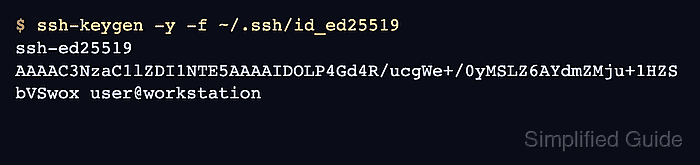
The ssh-keygen -y command reads the private key named by -f and writes the public key line to standard output. The line begins with the key type, followed by base64 key data and an optional comment, which is the format accepted by authorized_keys and most access request forms.
Only handle the private key on a trusted machine, even though the extracted public key can be shared with systems that should trust the key. Encrypted private keys prompt for the passphrase before extraction, and comparing fingerprints after saving the .pub file proves that the saved public key belongs to the same identity.
Steps to extract a public key from an SSH private key:
- Check the private key file and owner-only mode.
$ ls -l ~/.ssh/id_ed25519
-rw------- 1 user user 411 Jun 13 11:41 /home/user/.ssh/id_ed25519
Use the private key path that already exists on the client, such as ~/.ssh/id_rsa or a named deployment key. The private key should not be readable by group or other users.
Related: How to fix the SSH unprotected private key file warning - Print the matching public key to the terminal.
$ ssh-keygen -y -f ~/.ssh/id_ed25519
ssh-ed25519 AAAAC3NzaC1lZDI1NTE5AAAAIDOLP4Gd4R/ucgWe+/0yMSLZ6AYdmZMju+1HZSbVSwox user@workstation
Encrypted private keys prompt for the local passphrase before output appears. The passphrase is not copied into the public key.
- Print the fingerprint from the private key before writing the .pub file.
$ ssh-keygen -lf ~/.ssh/id_ed25519
256 SHA256:/AYR+lrdmAxs6b5A1yqdkpHWxnzrfYcwX+CuD3ZTA8o user@workstation (ED25519)
ssh-keygen can read the public identity stored with the private key for this fingerprint check.
- Save the extracted public key next to the private key.
$ ssh-keygen -y -f ~/.ssh/id_ed25519 > ~/.ssh/id_ed25519.pub
This replaces any existing .pub file at that path. Choose another output filename when an older public-key file must be preserved.
- Display the saved public key line before using it.
$ cat ~/.ssh/id_ed25519.pub
ssh-ed25519 AAAAC3NzaC1lZDI1NTE5AAAAIDOLP4Gd4R/ucgWe+/0yMSLZ6AYdmZMju+1HZSbVSwox user@workstation
Copy only the .pub line to tickets, deployment systems, or remote authorized_keys files. Never copy private key file contents into a server, ticket, chat, or browser form.
- Verify that the saved public key has the same fingerprint.
$ ssh-keygen -lf ~/.ssh/id_ed25519.pub
256 SHA256:/AYR+lrdmAxs6b5A1yqdkpHWxnzrfYcwX+CuD3ZTA8o user@workstation (ED25519)
If the fingerprints differ, stop and rebuild the .pub file from the trusted private key before installing or approving access.