How to show the last SSH login in Linux
After an access handoff, password reset, or suspicious alert, the fastest first check is the last successful login for the account. The login record shows whether the newest session came through SSH, when it happened, and which remote address reached the server.
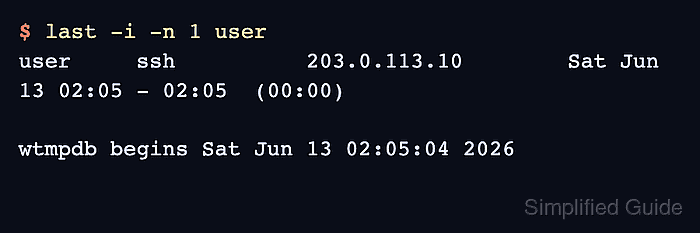
On Linux, last reads the host login-accounting database and prints records from newest to oldest. Current Ubuntu releases may store those records through wtmpdb, while many other systems still expose the same view through /var/log/wtmp; the last command keeps the operator check consistent.
lastlog2 reports the single most recent login saved for an account on current Ubuntu systems. Older distributions may provide lastlog -u user instead, and either view depends on PAM login accounting being enabled and on the local retention window still containing the record.
Steps to show the last SSH login in Linux:
- Open a terminal on the SSH server with an account that can read login records.
- Show the newest login record for the target account.
$ last -i -n 1 user
user     ssh          203.0.113.10        Sat Jun 13 02:05 - 02:05  (00:00)

wtmpdb begins Sat Jun 13 02:05:04 2026
Replace user with the account name to check. The -i option keeps the source address numeric, and -n 1 shows only the newest matching record.
- Read the login row.
The columns show the account, service or terminal, remote address, login time, logout time, and session length. On older last output, interactive SSH sessions may appear as pts/N with a remote address, while local console logins usually appear as tty or seat entries.
- Confirm the account's saved last-login record when the host provides lastlog2.
$ lastlog2 user
Username         Port     From                                       Latest
user             ssh      203.0.113.10                               Sat Jun 13 02:05:04 +0000 2026
lastlog2 shows only the latest login per account. On systems that still use the legacy command, run sudo lastlog -u user for the same account-level check.
- Expand the last window when the newest row is a local console login or an older SSH session is needed.
$ last -i -n 5 user
Use the newest row whose service or terminal and remote address match the SSH access being investigated. The final wtmpdb begins or wtmp begins line marks the oldest login-accounting record available on that host.