How to enable SSH client keepalive
Idle SSH sessions often disappear when a firewall, NAT device, or VPN path removes a quiet connection before the remote shell is finished. Client keepalive makes the local OpenSSH client send encrypted server-alive checks during quiet periods so the connection keeps visible traffic on paths that drop silent sessions.
The OpenSSH client reads command-line options first, then ~/.ssh/config, then /etc/ssh/ssh_config, and uses the first value it gets for each setting. A Host block matches the host name or alias used on the ssh command line, so host-specific entries should appear before broader defaults such as Host *. ServerAliveInterval sends the encrypted check after the server has been silent for the chosen number of seconds, while ServerAliveCountMax limits how many missed replies are allowed before the client closes the session.
ServerAliveInterval is disabled by default even when TCPKeepAlive remains enabled. TCP keepalive uses lower-level network probes, while server-alive messages travel inside the encrypted SSH session and are the setting most often used for idle-session drops. Check the merged settings with ssh -G before reconnecting, and if the session still drops at the same fixed timeout, inspect server-side idle policy or the network path instead of raising client intervals indefinitely.
Steps to enable SSH client keepalive:
- Create the per-user SSH configuration directory if it does not already exist.
$ mkdir -p ~/.ssh
- Restrict the configuration directory to the current account.
$ chmod 700 ~/.ssh
OpenSSH can ignore per-user configuration or key files when the directory is writable by other users.
- Open the per-user client configuration file in a text editor.
$ nano ~/.ssh/config
Use /etc/ssh/ssh_config only when the same keepalive policy must apply to every user on the machine.
- Add or update a Host block for the SSH destination that loses idle sessions.
Host host.example.net
  HostName host.example.net
  User user
  ServerAliveInterval 60
  ServerAliveCountMax 3
Replace host.example.net with the host name, IP address, or alias used on the ssh command line. Keep existing lines such as Port, IdentityFile, or ProxyJump when the host block already has them. With ServerAliveInterval 60 and ServerAliveCountMax 3, the client closes the session after about three minutes if the server stops answering keepalive requests.
- Save the file after the keepalive block is in place.
Use Host * instead of a named destination only when every SSH connection from this client should inherit the same keepalive values.
- Restrict the client configuration file after saving it.
$ chmod 600 ~/.ssh/config
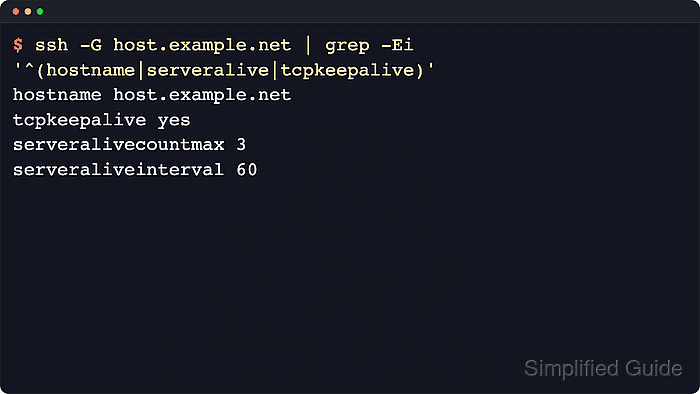
- Show the merged client configuration for the target host and confirm that the keepalive values are active.
$ ssh -G host.example.net
host host.example.net
user user
hostname host.example.net
port 22
##### snipped #####
tcpkeepalive yes
##### snipped #####
serveralivecountmax 3
serveraliveinterval 60
##### snipped #####
ssh -G prints the effective configuration after evaluating the matching Host and Match blocks, then exits. If serveraliveinterval still shows 0, the wrong host name matched or a broader block took precedence earlier in the file.
- Connect using the configured host entry and leave the session idle longer than the previous failure window to confirm that the client now keeps it alive.
$ ssh host.example.net
Client keepalive cannot override a server policy that deliberately closes idle sessions after a fixed limit. If the connection still drops at the same exact timeout, inspect the server-side timeout settings instead.