Table of Contents
How to change SSH ciphers
Changing the SSH cipher list changes which encryption algorithms can protect remote shells, SFTP transfers, and forwarded traffic. Treat it as an access-impacting security policy change because clients that do not share at least one allowed cipher will fail during connection setup.
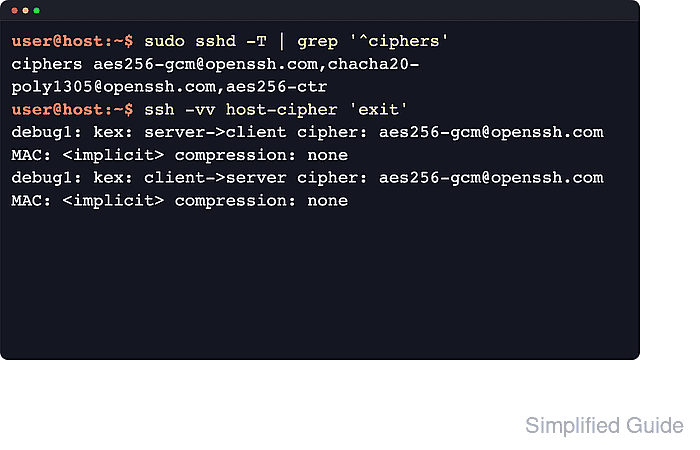
OpenSSH negotiates one cipher for each traffic direction after the client and server exchange their algorithm lists. ssh -Q cipher shows names compiled into the local build, sshd -T shows the effective server policy after defaults and included files are parsed, and ssh -G shows the effective client policy for a specific host.
Use a small server-side snippet when the packaged /etc/ssh/sshd_config includes /etc/ssh/sshd_config.d/*.conf, and keep a second administrative session or console open until a separate client has tested the new policy. The Ciphers directive replaces the default list unless it starts with +, -, or ^, so confirm the final order before restarting the daemon.
Steps to change SSH ciphers on the server:
- Open a terminal on the SSH server with an account that can use sudo.
- List the ciphers supported by the installed OpenSSH build.
$ ssh -Q cipher
3des-cbc
aes128-cbc
aes192-cbc
aes256-cbc
aes128-ctr
aes192-ctr
aes256-ctr
aes128-gcm@openssh.com
aes256-gcm@openssh.com
chacha20-poly1305@openssh.com
Supported names are not the same as the current default policy. Legacy names can appear here even when sshd no longer offers them by default.
- Check the current effective server cipher policy.
$ sudo sshd -T
port 22
addressfamily any
listenaddress [::]:22
listenaddress 0.0.0.0:22
##### snipped #####
ciphers chacha20-poly1305@openssh.com,aes128-gcm@openssh.com,aes256-gcm@openssh.com,aes128-ctr,aes192-ctr,aes256-ctr
##### snipped #####
sshd -T prints the parsed server configuration. Use the ciphers line from this output as the before-and-after proof for the daemon policy.
Related: How to view SSH server configuration - Confirm whether the packaged server config loads snippet files.
$ cat /etc/ssh/sshd_config
# This is the sshd server system-wide configuration file.
##### snipped #####
Include /etc/ssh/sshd_config.d/*.conf
##### snipped #####
On current Ubuntu and Debian packages, snippets under /etc/ssh/sshd_config.d are included near the start of the main file. If the Include line is absent, edit /etc/ssh/sshd_config instead.
- Back up the current server config before changing the cipher policy.
$ sudo cp /etc/ssh/sshd_config /etc/ssh/sshd_config.backup
A bad cipher list can block new SSH logins. Keep the current session open and make sure console, rescue, or another administrative path is available.
- Open the server config location that should carry the Ciphers directive.
$ sudoedit /etc/ssh/sshd_config.d/10-ciphers.conf
- Add one active Ciphers line with the policy that the server should offer.
/etc/ssh/sshd_config.d/10-ciphers.conf
Ciphers aes256-gcm@openssh.com,chacha20-poly1305@openssh.com,aes256-ctr
Use one active Ciphers directive for the final server policy. A list that begins with + appends names to the defaults, - removes names from the defaults, and ^ moves names to the front of the default order.
- Validate the updated SSH daemon configuration.
$ sudo sshd -t
No output means the configuration parsed successfully.
Related: How to test SSH server configuration - Restart the SSH service so the daemon reads the updated cipher list.
$ sudo systemctl restart ssh
On RHEL-family systems, the unit is commonly named sshd, so the equivalent command is sudo systemctl restart sshd.
Related: How to manage the SSH server service with systemctl - Confirm that the daemon now exposes the updated cipher policy.
$ sudo sshd -T
port 22
addressfamily any
listenaddress [::]:22
listenaddress 0.0.0.0:22
##### snipped #####
ciphers aes256-gcm@openssh.com,chacha20-poly1305@openssh.com,aes256-ctr
##### snipped #####
- From a separate client, open a verbose test connection and check the negotiated cipher.
$ ssh -vv user@host.example.net 'exit'
##### snipped #####
debug1: kex: server->client cipher: aes256-gcm@openssh.com MAC: <implicit> compression: none
debug1: kex: client->server cipher: aes256-gcm@openssh.com MAC: <implicit> compression: none
##### snipped #####
The two kex lines show the cipher selected for the session. If the client and server no longer share a cipher, the connection fails with a no matching cipher found negotiation error.
Steps to change SSH ciphers on the client:
- Open the per-user OpenSSH client config file, or create it if it does not already exist.
$ nano ~/.ssh/config
A host-specific override changes the cipher order for one target without affecting every other SSH connection from the client. Use /etc/ssh/ssh_config only when every user on that system should share the same client policy.
- Add or update a host block with the cipher list that should be offered for that target.
~/.ssh/config
Host host-cipher
  HostName host.example.net
  User user
  Ciphers aes256-gcm@openssh.com,chacha20-poly1305@openssh.com,aes256-ctr
- Restrict access to the per-user SSH config file.
$ chmod 600 ~/.ssh/config
OpenSSH expects private per-user config files to be writable only by the account that owns them.
- Show the effective client cipher policy for that host alias.
$ ssh -G host-cipher
host host-cipher
user user
hostname host.example.net
port 22
##### snipped #####
ciphers aes256-gcm@openssh.com,chacha20-poly1305@openssh.com,aes256-ctr
##### snipped #####
ssh -G prints the final client configuration after the matching Host block has been applied.
Related: How to show SSH client configuration - Make a verbose test connection and confirm the cipher that was actually negotiated.
$ ssh -vv host-cipher 'exit'
##### snipped #####
debug1: kex: server->client cipher: aes256-gcm@openssh.com MAC: <implicit> compression: none
debug1: kex: client->server cipher: aes256-gcm@openssh.com MAC: <implicit> compression: none
##### snipped #####
The server→client cipher and client→server cipher lines confirm that the client preference and server policy still overlap.