Weak key exchange support lets an SSH server keep accepting session setup methods that no longer match a hardened remote-access policy. Removing finite-field Diffie-Hellman and SHA-1 key exchange fallbacks reduces downgrade exposure and gives scanners a clear server-side policy to inspect.
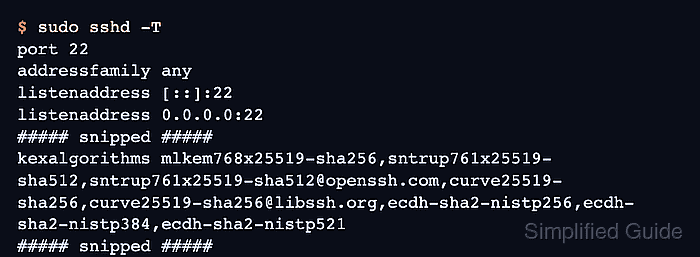
OpenSSH controls the server offer with the KexAlgorithms directive. Current OpenSSH server defaults prefer ML-KEM hybrid, sntrup hybrid, Curve25519, and ECDH choices, while older builds or explicit local overrides can still expose Diffie-Hellman groups. The supported-name inventory from ssh -Q KexAlgorithms is broader than the daemon default, so use sshd -T as the runtime source of truth.
A strict key exchange policy can block older clients, embedded appliances, and vendor libraries that only support finite-field Diffie-Hellman. Keep an existing SSH session or console path open, apply the change in a small drop-in or one clearly documented line, test with sshd -t, reload only after the syntax check passes, and verify that a new client negotiates one of the remaining algorithms.
Related: How to change SSH ciphers
Related: How to enforce strong SSH MAC algorithms
Tool: SSH Algorithm Policy Checker
Steps to enforce strong SSH key exchange algorithms:
- Open a terminal on the SSH server with privileges to edit the daemon configuration.
$ whoami
user
- List the key exchange algorithms supported by the installed OpenSSH build.
$ ssh -Q KexAlgorithms
diffie-hellman-group1-sha1
diffie-hellman-group14-sha1
diffie-hellman-group14-sha256
diffie-hellman-group16-sha512
diffie-hellman-group18-sha512
diffie-hellman-group-exchange-sha1
diffie-hellman-group-exchange-sha256
ecdh-sha2-nistp256
ecdh-sha2-nistp384
ecdh-sha2-nistp521
curve25519-sha256
curve25519-sha256@libssh.org
sntrup761x25519-sha512
sntrup761x25519-sha512@openssh.com
mlkem768x25519-sha256
This command shows what the local binaries know how to parse. It does not prove that sshd offers every listed algorithm to clients.
- Inspect the main daemon configuration file for an included drop-in directory.
$ sudo less /etc/ssh/sshd_config
# This is the sshd server system-wide configuration file.  See
# sshd_config(5) for more information.
##### snipped #####
Include /etc/ssh/sshd_config.d/*.conf
Use the drop-in path when the Include line is active. If the server does not load /etc/ssh/sshd_config.d/*.conf, make the same KexAlgorithms change in /etc/ssh/sshd_config.
Related: How to view SSH server configuration
- Print the effective key exchange policy before changing it.
$ sudo sshd -T
port 22
addressfamily any
listenaddress [::]:22
listenaddress 0.0.0.0:22
##### snipped #####
kexalgorithms mlkem768x25519-sha256,sntrup761x25519-sha512,sntrup761x25519-sha512@openssh.com,curve25519-sha256,curve25519-sha256@libssh.org,ecdh-sha2-nistp256,ecdh-sha2-nistp384,ecdh-sha2-nistp521
##### snipped #####
The lower-case kexalgorithms line is the daemon's parsed policy after defaults, includes, and local overrides are applied.
- Back up the main SSH daemon configuration file.
$ sudo cp /etc/ssh/sshd_config /etc/ssh/sshd_config.bak.$(date +%Y%m%d-%H%M%S)
Keep a console, recovery shell, or another active SSH session available. A bad daemon policy can prevent new logins until the file is corrected locally.
- Open the local key exchange policy file.
$ sudoedit /etc/ssh/sshd_config.d/90-kex-algorithms.conf
Use /etc/ssh/sshd_config instead when the server does not include drop-in files.
- Add a subtractive KexAlgorithms policy that removes finite-field Diffie-Hellman methods from the server defaults.
KexAlgorithms -diffie-hellman-group1-sha1,-diffie-hellman-group14-sha1,-diffie-hellman-group-exchange-sha1,-diffie-hellman-group14-sha256,-diffie-hellman-group16-sha512,-diffie-hellman-group18-sha512,-diffie-hellman-group-exchange-sha256
The leading minus removes matching names from the default set instead of replacing the entire list. This keeps current ML-KEM, sntrup, Curve25519, and ECDH defaults while excluding older Diffie-Hellman groups.
- Remove conflicting KexAlgorithms lines from other active daemon configuration files.
Do not leave a separate allowlist that re-adds one of the removed diffie-hellman-* names. The later sshd -T check confirms which policy actually won.
- Test the SSH daemon configuration.
$ sudo sshd -t
No output means the daemon parsed the files and host-key settings successfully.
Related: How to test SSH server configuration
- Reload the SSH service to apply the new key exchange policy.
$ sudo systemctl reload ssh
Use sudo systemctl reload sshd on systems that package the service as sshd instead of ssh.
- Confirm that the effective daemon policy no longer offers finite-field Diffie-Hellman key exchange methods.
$ sudo sshd -T
port 22
addressfamily any
listenaddress [::]:22
listenaddress 0.0.0.0:22
##### snipped #####
kexalgorithms mlkem768x25519-sha256,sntrup761x25519-sha512,sntrup761x25519-sha512@openssh.com,curve25519-sha256,curve25519-sha256@libssh.org,ecdh-sha2-nistp256,ecdh-sha2-nistp384,ecdh-sha2-nistp521
##### snipped #####
The kexalgorithms line should not contain diffie-hellman-group* or diffie-hellman-group-exchange-* entries after the reload.
- Test a new client connection with verbose logging.
$ ssh -vv user@host.example.net 'exit'
OpenSSH_10.2p1 Ubuntu-2ubuntu3.2, OpenSSL 3.5.5 27 Jan 2026
##### snipped #####
debug1: kex: algorithm: mlkem768x25519-sha256
##### snipped #####
The kex: algorithm line should show one of the algorithms still present in the server's effective KexAlgorithms list.

Mohd Shakir Zakaria is a cloud architect with deep roots in software development and open-source advocacy. Certified in AWS, Red Hat, VMware, ITIL, and Linux, he specializes in designing and managing robust cloud and on-premises infrastructures.


