How to configure Snort detection_filter thresholds
High-volume Snort rules can create alert noise when one host repeats the same match many times. detection_filter keeps a rule quiet until the same source or destination crosses a hit count inside a time window, which fits burst probes, repeated payload attempts, and other rate-shaped detections.
In Snort 3, detection_filter is a post-detection rule option rather than a global event policy. Snort evaluates the rule header and payload options first, then applies the filter before generating an event. Only one detection_filter option belongs in a rule.
Use by_src when the repeated behavior belongs to the client or attacker address. Use by_dst when the protected destination should own the count, such as a server receiving repeated attempts from many sources. Validate the edited rule and replay representative traffic before deploying the threshold to a running sensor.
Related: How to create a local Snort rule
Related: How to suppress a Snort signature ID
Steps to configure Snort detection_filter thresholds:
- Confirm the detection_filter option syntax in the installed Snort build.
$ snort --help-module detection_filter

detection_filter


Help: rule option to require multiple hits before a rule generates an event

Type: ips_option

Usage: detect

Configuration:

enum detection_filter.track: track hits by source or destination IP address { 'by_src' | 'by_dst' }
int detection_filter.count: hits in interval before allowing the rule to fire { 1:max32 }
int detection_filter.seconds: length of interval to count hits { 1:max32 }
- Choose the tracking side and time window for the rule.
count 3,seconds 10 means three matching hits are counted inside ten seconds before a later matching hit can generate an event.
- Open the local rule file.
$ sudo vi /usr/local/etc/snort/rules/local.rules
Related: How to create a local Snort rule
- Add detection_filter to the rule options.
alert udp any any -> any 31338 (msg:"LOCAL UDP detection_filter test"; content:"BURST"; detection_filter:track by_src,count 3,seconds 10; sid:1000002; rev:1;)
by_src groups the hits by source IP address. Use by_dst when repeated attempts against the same destination should share one threshold.
- Validate the configuration and local rule file.
$ sudo snort -c /usr/local/etc/snort/snort.lua \
    -R /usr/local/etc/snort/rules/local.rules -T
Loading /usr/local/etc/snort/snort.lua:
##### snipped #####
Loading /usr/local/etc/snort/rules/local.rules:
Finished /usr/local/etc/snort/rules/local.rules:
##### snipped #####
Snort successfully validated the configuration (with 0 warnings).
o")~   Snort exiting
Related: How to test Snort configuration
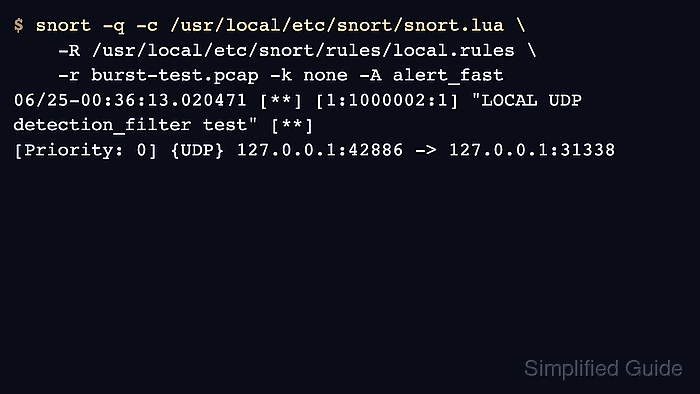
- Replay traffic that crosses the threshold.
$ sudo snort -q -c /usr/local/etc/snort/snort.lua \
    -R /usr/local/etc/snort/rules/local.rules \
    -r burst-test.pcap -k none -A alert_fast
Use a pcap with more matching packets than count. A pcap with four matching packets should produce one alert when count is 3.
Related: How to run Snort against a packet capture - Confirm the thresholded alert appears.
06/25-00:36:13.020471 [**] [1:1000002:1] "LOCAL UDP detection_filter test" [**] [Priority: 0] {UDP} 127.0.0.1:42886 -> 127.0.0.1:31338 - Tune count and seconds with representative traffic.
A threshold that is too low still floods alerts. A threshold that is too high can hide low-and-slow activity.