How to build semantic search with Sentence Transformers
Keyword matching misses support records when a user describes the same problem with different words. Sentence Transformers converts queries and documents into embeddings, allowing an application to rank documents by meaning instead of shared terms.
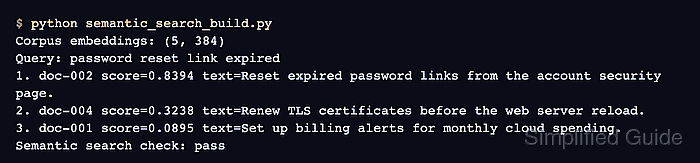
For a corpus that fits in memory, document embeddings can be calculated once and reused for every query. The semantic_search() helper compares a query embedding with those stored vectors and returns corpus positions plus similarity scores.
The application records keep their own IDs beside the searchable text because a corpus position is only an index into the current list. The final check deliberately fails unless the password-reset record ranks first, while larger corpora can keep the same query/document boundary and move their vectors into a dedicated index.
Steps to build semantic search with Sentence Transformers:
- Create semantic_search_build.py with the initial search inputs.
- semantic_search_build.py
from sentence_transformers import SentenceTransformer, util

documents = [
    {"id": "doc-001", "text": "Set up billing alerts for monthly cloud spending."},
    {"id": "doc-002", "text": "Reset expired password links from the account security page."},
    {"id": "doc-003", "text": "Rotate SSH keys for production deployment hosts."},
    {"id": "doc-004", "text": "Renew TLS certificates before the web server reload."},
    {"id": "doc-005", "text": "Export customer invoices from the finance dashboard."},
]
query = "password reset link expired"
The script requires a Python environment with Sentence Transformers installed.
Related: How to install Sentence Transformers with pip - Add the model and corpus-embedding stage below the query assignment.
model = SentenceTransformer("sentence-transformers/all-MiniLM-L6-v2")
corpus = [document["text"] for document in documents]
corpus_embeddings = model.encode_document(
    corpus,
    convert_to_tensor=True,
    normalize_embeddings=True,
    show_progress_bar=False,
)
encode_document() applies a model's document prompt or document route when one is defined; models without that specialization produce the same embeddings as encode().
- Append query encoding and top-three retrieval below the corpus embedding block.
query_embedding = model.encode_query(
    query,
    convert_to_tensor=True,
    normalize_embeddings=True,
    show_progress_bar=False,
)
hits = util.semantic_search(
    query_embedding,
    corpus_embeddings,
    top_k=3,
)[0]
semantic_search() uses cosine similarity by default and returns one ranked hit list for each query.
- Append ranked output and a failing top-result check below the search call.
print(f"Corpus embeddings: {tuple(corpus_embeddings.shape)}")
print(f"Query: {query}")
for rank, hit in enumerate(hits, start=1):
    document = documents[hit["corpus_id"]]
    print(
        f"{rank}. {document['id']} score={hit['score']:.4f} "
        f"text={document['text']}"
    )

top_document = documents[hits[0]["corpus_id"]]
if top_document["id"] != "doc-002":
    raise SystemExit("Semantic search check: failed")
print("Semantic search check: passed")
- Compare the assembled source with the completed semantic search script.
- semantic_search_build.py
from sentence_transformers import SentenceTransformer, util

documents = [
    {"id": "doc-001", "text": "Set up billing alerts for monthly cloud spending."},
    {"id": "doc-002", "text": "Reset expired password links from the account security page."},
    {"id": "doc-003", "text": "Rotate SSH keys for production deployment hosts."},
    {"id": "doc-004", "text": "Renew TLS certificates before the web server reload."},
    {"id": "doc-005", "text": "Export customer invoices from the finance dashboard."},
]
query = "password reset link expired"

model = SentenceTransformer("sentence-transformers/all-MiniLM-L6-v2")
corpus = [document["text"] for document in documents]
corpus_embeddings = model.encode_document(
    corpus,
    convert_to_tensor=True,
    normalize_embeddings=True,
    show_progress_bar=False,
)

query_embedding = model.encode_query(
    query,
    convert_to_tensor=True,
    normalize_embeddings=True,
    show_progress_bar=False,
)
hits = util.semantic_search(
    query_embedding,
    corpus_embeddings,
    top_k=3,
)[0]

print(f"Corpus embeddings: {tuple(corpus_embeddings.shape)}")
print(f"Query: {query}")
for rank, hit in enumerate(hits, start=1):
    document = documents[hit["corpus_id"]]
    print(
        f"{rank}. {document['id']} score={hit['score']:.4f} "
        f"text={document['text']}"
    )

top_document = documents[hits[0]["corpus_id"]]
if top_document["id"] != "doc-002":
    raise SystemExit("Semantic search check: failed")
print("Semantic search check: passed")
- Run the completed semantic search script.
$ python semantic_search_build.py
Corpus embeddings: (5, 384)
Query: password reset link expired
1. doc-002 score=0.8394 text=Reset expired password links from the account security page.
2. doc-004 score=0.3238 text=Renew TLS certificates before the web server reload.
3. doc-001 score=0.0895 text=Set up billing alerts for monthly cloud spending.
Semantic search check: passed
The exact scores can change with a different model or corpus, but the highest-ranked ID should still belong to the document that matches the query intent.
- Confirm the final line reports Semantic search check: passed.