Retrieval systems compare short search queries with document passages that carry more context. Sentence Transformers keeps those two roles explicit so prompt-aware and routed models can apply the representation path intended for each side of the search.
The role-specific encode_query() and encode_document() methods are specialized forms of encode(). They select saved query or document prompts and matching Router tasks when a model defines them; a model without either feature can return the same embeddings from all three methods.
Both sides must use compatible dimensions and encoding options before similarity scoring. The sample keeps normalization consistent, ranks three documents against one query, and stops with an assertion failure unless the password-reset passage is the top match.
Steps to encode query and document embeddings with Sentence Transformers:
- Create query_document_encode.py with the model and retrieval inputs.
- query_document_encode.py
from sentence_transformers import SentenceTransformer


model = SentenceTransformer("sentence-transformers/all-MiniLM-L6-v2")
query = "How do I reset a forgotten password?"
documents = [
    "Generate quarterly revenue charts from a CSV export.",
    "Reset a lost account password from the profile security page.",
    "Tune the database connection pool for a busy API server.",
]
The selected model is a small English baseline for sentences and short paragraphs. A production index needs a model evaluated against its own query and document corpus.
Related: How to choose a Sentence Transformers model for semantic search - Append the role-specific encoding calls below the document list.
- query_document_encode.py
document_embeddings = model.encode_document(
    documents,
    normalize_embeddings=True,
    show_progress_bar=False,
)
query_embedding = model.encode_query(
    [query],
    normalize_embeddings=True,
    show_progress_bar=False,
)
normalize_embeddings=True puts both sets of vectors on the same unit-length scale. Matching normalization, precision, device, and truncation settings keep the full document index compatible with its queries.
Related: How to normalize embeddings with Sentence Transformers - Append the similarity ranking and assertions below the encoding calls.
- query_document_encode.py
scores = model.similarity(query_embedding, document_embeddings)[0]
best_index = int(scores.argmax())

assert query_embedding.shape[1] == document_embeddings.shape[1]
assert best_index == 1

print(f"query shape: {query_embedding.shape}")
print(f"document shape: {document_embeddings.shape}")
print(f"top match: doc-{best_index + 1}")
print(f"score: {scores[best_index]:.3f}")
print(f"text: {documents[best_index]}")
The first assertion rejects incompatible vector dimensions. The second rejects any ranking that does not place the password-reset passage first.
- Run the completed script to verify the query-to-document match.
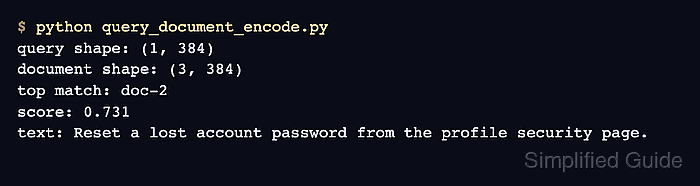
$ python query_document_encode.py
query shape: (1, 384)
document shape: (3, 384)
top match: doc-2
score: 0.731
text: Reset a lost account password from the profile security page.
The matching 384-column shapes are compatible for scoring, and doc-2 is the intended password-reset passage.

Mohd Shakir Zakaria is a cloud architect with deep roots in software development and open-source advocacy. Certified in AWS, Red Hat, VMware, ITIL, and Linux, he specializes in designing and managing robust cloud and on-premises infrastructures.


