How to quantize embeddings with Sentence Transformers
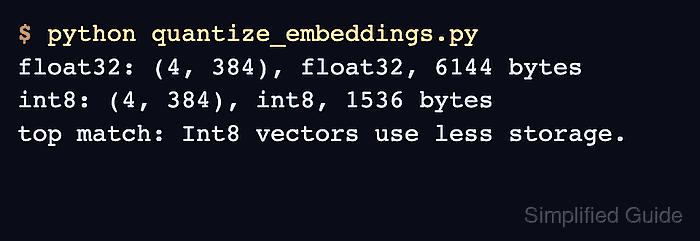
Dense embedding collections can outgrow memory and storage long before their text corpus becomes difficult to manage. Scalar quantization replaces each 32-bit floating-point value with an 8-bit integer, reducing the vector array to one quarter of its original size while preserving its row count and dimensions.
Embedding quantization is separate from model quantization. The model still produces floating-point semantic vectors, while quantize_embeddings() converts those vectors for an index or search backend that supports signed int8 data.
Scalar quantization maps each embedding dimension against minimum and maximum calibration values. Build those ranges from texts that represent the production corpus, save them beside the quantized array, and reuse the same ranges whenever later embeddings must share its integer scale.
Steps to quantize embeddings with Sentence Transformers:
- Create quantize_embeddings.py with the model, corpus, and floating-point encoding stage.
- quantize_embeddings.py
from pathlib import Path

import numpy as np
from sentence_transformers import SentenceTransformer
from sentence_transformers.util.quantization import quantize_embeddings


model = SentenceTransformer("sentence-transformers/all-MiniLM-L6-v2")
corpus = [
    "Int8 embeddings use one byte per dimension.",
    "Binary embeddings use one bit per dimension.",
    "Cross-encoders rerank retrieved passages.",
    "Vector databases store embeddings for search.",
]
float_embeddings = model.encode(
    corpus,
    normalize_embeddings=True,
    show_progress_bar=False,
)
- Append representative calibration embeddings and per-dimension ranges to quantize_embeddings.py.
calibration_sentences = corpus + [
    f"Document {number} describes compact semantic search vectors."
    for number in range(128)
]
calibration_embeddings = model.encode(
    calibration_sentences,
    normalize_embeddings=True,
    show_progress_bar=False,
)
ranges = np.vstack(
    (
        calibration_embeddings.min(axis=0),
        calibration_embeddings.max(axis=0),
    )
)
Production calibration should use a larger, representative sample from the real corpus instead of generated sentences.
- Append the quantization and file-storage stage to quantize_embeddings.py.
int8_embeddings = quantize_embeddings(
    float_embeddings,
    precision="int8",
    ranges=ranges,
)
embedding_path = Path("corpus_embeddings_int8.npy")
range_path = Path("corpus_int8_ranges.npy")
np.save(embedding_path, int8_embeddings)
np.save(range_path, ranges)
- Append the shape, data type, and storage report to quantize_embeddings.py.
print(
    f"float32: shape={float_embeddings.shape}, "
    f"dtype={float_embeddings.dtype}, bytes={float_embeddings.nbytes}"
)
print(
    f"int8: shape={int8_embeddings.shape}, "
    f"dtype={int8_embeddings.dtype}, bytes={int8_embeddings.nbytes}"
)
print(f"ranges: shape={ranges.shape}, dtype={ranges.dtype}")
print(f"saved: {embedding_path}, {range_path}")
- Run the completed quantization script.
$ python quantize_embeddings.py
float32: shape=(4, 384), dtype=float32, bytes=6144
int8: shape=(4, 384), dtype=int8, bytes=1536
ranges: shape=(2, 384), dtype=float32
saved: corpus_embeddings_int8.npy, corpus_int8_ranges.npy
The first run downloads the selected model when it is not already in the local cache.
- Load the saved embedding array in a fresh Python process to confirm its shape, data type, and byte count.
$ python -c 'import numpy as np; vectors=np.load("corpus_embeddings_int8.npy"); print(f"loaded: shape={vectors.shape}, dtype={vectors.dtype}, bytes={vectors.nbytes}"); assert vectors.shape == (4, 384) and vectors.dtype == np.int8'
loaded: shape=(4, 384), dtype=int8, bytes=1536
The assertion fails if the saved array does not contain four 384-dimensional signed 8-bit embeddings.