How to normalize embeddings with Sentence Transformers
Embedding search often compares vector direction rather than vector length. Normalizing Sentence Transformers output makes each embedding unit length, so dot-product scoring behaves like cosine-style similarity and vector magnitude does not pull the ranking.
SentenceTransformer.encode() can apply L2 normalization during encoding with normalize_embeddings=True. Use the same setting for document embeddings and query embeddings before storing vectors in FAISS, a vector database, or an in-memory matrix that uses inner product search.
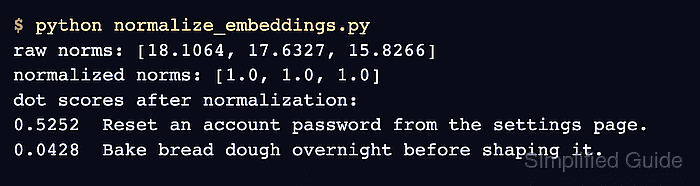
During development, printing raw and normalized vector lengths catches mismatched query and document handling before the vectors are written to an index. A normalized vector should have a length close to 1.0, and the dot-product scores should still rank the most related document above unrelated text.
Steps to normalize Sentence Transformers embeddings:
- Create a small normalization check script in the project that generates raw vectors, normalized vectors, and dot-product scores.
from sentence_transformers import SentenceTransformer
import numpy as np

model = SentenceTransformer("sentence-transformers/paraphrase-albert-small-v2")
query = "How do I reset a password?"
documents = [
    "Reset an account password from the settings page.",
    "Bake bread dough overnight before shaping it.",
]

texts = [query, *documents]
raw = model.encode(texts, normalize_embeddings=False, show_progress_bar=False)
normalized = model.encode(texts, normalize_embeddings=True, show_progress_bar=False)

print("raw norms:", [round(float(np.linalg.norm(vector)), 4) for vector in raw])
print("normalized norms:", [round(float(np.linalg.norm(vector)), 4) for vector in normalized])
print("dot scores after normalization:")

for score, document in zip(normalized[0] @ normalized[1:].T, documents):
    print(f"{float(score):.4f}  {document}")
The first call exists only to show the before-and-after vector lengths. New retrieval code normally keeps only the normalized encode call.
- Run the script.
$ python normalize_embeddings.py
raw norms: [18.1064, 17.6327, 15.8266]
normalized norms: [1.0, 1.0, 1.0]
dot scores after normalization:
0.5252  Reset an account password from the settings page.
0.0428  Bake bread dough overnight before shaping it.
- Check that every value on the normalized norm line is close to 1.0.
The exact raw norm values can differ by model. The normalized line is the important saved-state check because it proves normalize_embeddings=True changed the vectors into unit-length embeddings.
- Check that the dot-product scores rank the related password-reset sentence above the unrelated bread sentence.
When the normalized vectors are stored in an inner-product index, encode incoming queries with the same normalize_embeddings=True setting before searching.
- Replace the temporary comparison script with the normalized retrieval path used by the application.
query_embedding = model.encode(query, normalize_embeddings=True, show_progress_bar=False)
document_embeddings = model.encode(documents, normalize_embeddings=True, show_progress_bar=False)
scores = document_embeddings @ query_embedding