How to refresh chatbot embeddings with Sentence Transformers
Chatbot retrieval indexes become stale when source text changes while the stored vector still represents the previous wording. Content hashes let an indexing job identify those changed records, refresh their embeddings, and retain vectors for documents whose text is unchanged.
Sentence Transformers provides encode_document() for knowledge passages and encode_query() for incoming questions. The selected Multi-QA MiniLM model is designed for semantic search, and normalized embeddings allow a dot product to rank the closest stored passage.
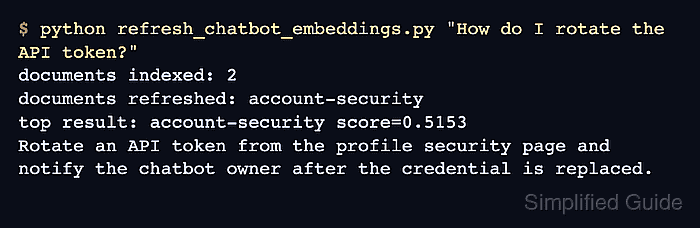
The local source records live in chatbot_docs.jsonl, while chatbot_embeddings.npz stores their ids, SHA-256 content hashes, text, and vectors. Updating the account-security passage should refresh only that record, return the new API-token text for a matching question, and reuse every vector on the next unchanged run.
Steps to refresh chatbot embeddings with Sentence Transformers:
- Create the initial chatbot knowledge source file.
- chatbot_docs.jsonl
{"id":"billing","text":"Update the billing contact from Account settings after finance approves the change."}
{"id":"account-security","text":"Reset an account password from the profile security page and send the user a confirmation email."}
- Define the refresh script foundation for loading source records.
- refresh_chatbot_embeddings.py
import hashlib
import json
import sys
from pathlib import Path

import numpy as np
from sentence_transformers import SentenceTransformer

SOURCE = Path("chatbot_docs.jsonl")
INDEX = Path("chatbot_embeddings.npz")
MODEL_NAME = "sentence-transformers/multi-qa-MiniLM-L6-cos-v1"


def load_documents(path):
    return [json.loads(line) for line in path.read_text().splitlines() if line.strip()]


def text_hash(text):
    return hashlib.sha256(text.encode("utf-8")).hexdigest()
The content hash marks a record for re-embedding when its exact UTF-8 text changes.
- Append the saved-index loader below text_hash().
def load_existing_index(path):
    if not path.exists():
        return {}
    with np.load(path) as data:
        return {
            str(doc_id): {"hash": str(doc_hash), "embedding": embedding.copy()}
            for doc_id, doc_hash, embedding in zip(
                data["ids"], data["hashes"], data["embeddings"]
            )
        }
- Append the change-selection section below load_existing_index().
def refresh_index(query):
    documents = load_documents(SOURCE)
    previous = load_existing_index(INDEX)
    hashes = {document["id"]: text_hash(document["text"]) for document in documents}
    changed = [
        document
        for document in documents
        if document["id"] not in previous
        or previous[document["id"]]["hash"] != hashes[document["id"]]
    ]

    model = SentenceTransformer(MODEL_NAME)
    refreshed_vectors = {}
    if changed:
        vectors = model.encode_document(
            [document["text"] for document in changed],
            normalize_embeddings=True,
            show_progress_bar=False,
        )
        refreshed_vectors = {
            document["id"]: vector for document, vector in zip(changed, vectors)
        }
encode_document() receives only new or changed passages, so an unchanged record keeps its vector from the saved index.
- Complete refresh_index() with stored-vector query ranking.
    embeddings = [
        refreshed_vectors[document["id"]]
        if document["id"] in refreshed_vectors
        else previous[document["id"]]["embedding"]
        for document in documents
    ]
    matrix = np.vstack(embeddings)
    np.savez(
        INDEX,
        ids=np.array([document["id"] for document in documents]),
        hashes=np.array([hashes[document["id"]] for document in documents]),
        texts=np.array([document["text"] for document in documents]),
        embeddings=matrix,
    )

    query_embedding = model.encode_query(
        query,
        normalize_embeddings=True,
        show_progress_bar=False,
    )
    scores = matrix @ query_embedding
    best = int(np.argmax(scores))

    print(f"documents indexed: {len(documents)}")
    print(
        "documents refreshed: "
        + (", ".join(document["id"] for document in changed) if changed else "none")
    )
    print(f"top result: {documents[best]['id']} score={float(scores[best]):.4f}")
    print(documents[best]["text"])
The saved arrays contain only current source ids, so removing a JSONL record also removes it from the rebuilt index.
- Save the consolidated refresh script with its command-line entry point.
- refresh_chatbot_embeddings.py
import hashlib
import json
import sys
from pathlib import Path

import numpy as np
from sentence_transformers import SentenceTransformer

SOURCE = Path("chatbot_docs.jsonl")
INDEX = Path("chatbot_embeddings.npz")
MODEL_NAME = "sentence-transformers/multi-qa-MiniLM-L6-cos-v1"


def load_documents(path):
    return [json.loads(line) for line in path.read_text().splitlines() if line.strip()]


def text_hash(text):
    return hashlib.sha256(text.encode("utf-8")).hexdigest()


def load_existing_index(path):
    if not path.exists():
        return {}
    with np.load(path) as data:
        return {
            str(doc_id): {"hash": str(doc_hash), "embedding": embedding.copy()}
            for doc_id, doc_hash, embedding in zip(
                data["ids"], data["hashes"], data["embeddings"]
            )
        }


def refresh_index(query):
    documents = load_documents(SOURCE)
    previous = load_existing_index(INDEX)
    hashes = {document["id"]: text_hash(document["text"]) for document in documents}
    changed = [
        document
        for document in documents
        if document["id"] not in previous
        or previous[document["id"]]["hash"] != hashes[document["id"]]
    ]

    model = SentenceTransformer(MODEL_NAME)
    refreshed_vectors = {}
    if changed:
        vectors = model.encode_document(
            [document["text"] for document in changed],
            normalize_embeddings=True,
            show_progress_bar=False,
        )
        refreshed_vectors = {
            document["id"]: vector for document, vector in zip(changed, vectors)
        }

    embeddings = [
        refreshed_vectors[document["id"]]
        if document["id"] in refreshed_vectors
        else previous[document["id"]]["embedding"]
        for document in documents
    ]
    matrix = np.vstack(embeddings)
    np.savez(
        INDEX,
        ids=np.array([document["id"] for document in documents]),
        hashes=np.array([hashes[document["id"]] for document in documents]),
        texts=np.array([document["text"] for document in documents]),
        embeddings=matrix,
    )

    query_embedding = model.encode_query(
        query,
        normalize_embeddings=True,
        show_progress_bar=False,
    )
    scores = matrix @ query_embedding
    best = int(np.argmax(scores))

    print(f"documents indexed: {len(documents)}")
    print(
        "documents refreshed: "
        + (", ".join(document["id"] for document in changed) if changed else "none")
    )
    print(f"top result: {documents[best]['id']} score={float(scores[best]):.4f}")
    print(documents[best]["text"])


if __name__ == "__main__":
    refresh_index(sys.argv[1])
- Build the first chatbot embedding index.
$ python refresh_chatbot_embeddings.py "How do I reset my password?"
documents indexed: 2
documents refreshed: billing, account-security
top result: account-security score=0.5508
Reset an account password from the profile security page and send the user a confirmation email.
The first run embeds both records because chatbot_embeddings.npz does not exist yet.
- Replace the changed account-security record in chatbot_docs.jsonl.
- chatbot_docs.jsonl
{"id":"billing","text":"Update the billing contact from Account settings after finance approves the change."}
{"id":"account-security","text":"Rotate an API token from the profile security page and notify the chatbot owner after the credential is replaced."}
- Refresh the chatbot index for the updated API-token question.
$ python refresh_chatbot_embeddings.py "How do I rotate the API token?"
documents indexed: 2
documents refreshed: account-security
top result: account-security score=0.4837
Rotate an API token from the profile security page and notify the chatbot owner after the credential is replaced.
Only account-security is re-embedded, while the index retains both chatbot knowledge records.
- Repeat the refresh to confirm unchanged source vectors are reused.
$ python refresh_chatbot_embeddings.py "How do I rotate the API token?"
documents indexed: 2
documents refreshed: none
top result: account-security score=0.4837
Rotate an API token from the profile security page and notify the chatbot owner after the credential is replaced.