A retrieval-augmented generation system can ground an answer only in passages that its retrieval layer finds. Sentence Transformers turns knowledge-base chunks and a question into comparable embeddings, allowing a small Python retriever to select evidence before a generator receives any context.
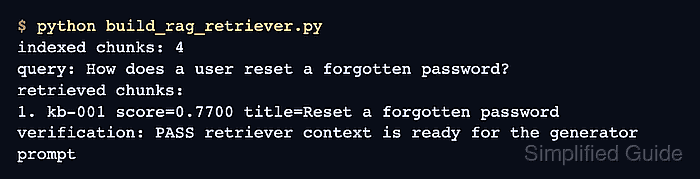
Short support questions and longer knowledge-base passages form an asymmetric search task. encode_query() and encode_document() keep those roles explicit, while semantic_search() returns the closest corpus entries in decreasing similarity order.
Stable chunk IDs keep every selected passage traceable when the retriever assembles a context block. The Python program exits with an error when the password-reset passage is not ranked first or is missing from that context, so an unrelated match cannot look like a successful result.
Steps to build a RAG retriever with Sentence Transformers:
- Install Sentence Transformers in the active Python environment.
$ python -m pip install --upgrade sentence-transformers
Sentence Transformers 5.6.0 requires Python 3.10 or newer. The first model load can download files from Hugging Face.
Related: How to install Sentence Transformers with pip - Initialize build_rag_retriever.py with the imports and embedding model.
- build_rag_retriever.py
from sentence_transformers import SentenceTransformer
from sentence_transformers.util import semantic_search


model = SentenceTransformer("sentence-transformers/all-MiniLM-L6-v2")
The all-MiniLM-L6-v2 model keeps this local prototype small while producing 384-dimensional dense embeddings.
- Append the traceable corpus with its retrieval question to build_rag_retriever.py.
chunks = [
    {
        "id": "kb-001",
        "title": "Reset a forgotten password",
        "text": "Open Account settings, send a reset email, and choose a new password.",
    },
    {
        "id": "kb-002",
        "title": "Download invoice receipts",
        "text": "Billing admins can download paid invoice receipts from billing history.",
    },
    {
        "id": "kb-003",
        "title": "Rotate API tokens",
        "text": "Create a replacement token, update the integration, and revoke the old token.",
    },
]

query = "How can a user reset a forgotten password?"
documents = [f"{chunk['title']}: {chunk['text']}" for chunk in chunks]
The stable IDs can later map retrieved context back to a page, record, ticket, or document section.
- Append the role-specific embedding stage to build_rag_retriever.py.
document_embeddings = model.encode_document(
    documents,
    normalize_embeddings=True,
    convert_to_tensor=True,
    show_progress_bar=False,
)
query_embedding = model.encode_query(
    [query],
    normalize_embeddings=True,
    convert_to_tensor=True,
    show_progress_bar=False,
)
normalize_embeddings=True places both embedding sets on the same unit-length scale for cosine-similarity retrieval.
- Append the ranked retrieval and RAG context stage to build_rag_retriever.py.
hits = semantic_search(query_embedding, document_embeddings, top_k=2)[0]
retrieved_chunks = [chunks[hit["corpus_id"]] for hit in hits]
context = "\n\n".join(
    f"[{chunk['id']}] {chunk['title']}\n{chunk['text']}"
    for chunk in retrieved_chunks
)
semantic_search() performs exact cosine-similarity search, which suits a local prototype or a smaller corpus. The related Qdrant workflow covers indexed vector retrieval.
- Append the result display and fail-capable checks to build_rag_retriever.py.
print(f"query: {query}")
print("retrieved chunks:")
for rank, hit in enumerate(hits, start=1):
    chunk = chunks[hit["corpus_id"]]
    print(f"{rank}. {chunk['id']} title={chunk['title']}")

print("\nrag context:")
print(context)

if retrieved_chunks[0]["id"] != "kb-001":
    raise SystemExit(f"unexpected top chunk: {retrieved_chunks[0]['id']}")
if "[kb-001] Reset a forgotten password" not in context:
    raise SystemExit("password-reset context is missing")
- Compare build_rag_retriever.py with the consolidated program.
- build_rag_retriever.py
from sentence_transformers import SentenceTransformer
from sentence_transformers.util import semantic_search


model = SentenceTransformer("sentence-transformers/all-MiniLM-L6-v2")

chunks = [
    {
        "id": "kb-001",
        "title": "Reset a forgotten password",
        "text": "Open Account settings, send a reset email, and choose a new password.",
    },
    {
        "id": "kb-002",
        "title": "Download invoice receipts",
        "text": "Billing admins can download paid invoice receipts from billing history.",
    },
    {
        "id": "kb-003",
        "title": "Rotate API tokens",
        "text": "Create a replacement token, update the integration, and revoke the old token.",
    },
]

query = "How can a user reset a forgotten password?"
documents = [f"{chunk['title']}: {chunk['text']}" for chunk in chunks]

document_embeddings = model.encode_document(
    documents,
    normalize_embeddings=True,
    convert_to_tensor=True,
    show_progress_bar=False,
)
query_embedding = model.encode_query(
    [query],
    normalize_embeddings=True,
    convert_to_tensor=True,
    show_progress_bar=False,
)

hits = semantic_search(query_embedding, document_embeddings, top_k=2)[0]
retrieved_chunks = [chunks[hit["corpus_id"]] for hit in hits]
context = "\n\n".join(
    f"[{chunk['id']}] {chunk['title']}\n{chunk['text']}"
    for chunk in retrieved_chunks
)

print(f"query: {query}")
print("retrieved chunks:")
for rank, hit in enumerate(hits, start=1):
    chunk = chunks[hit["corpus_id"]]
    print(f"{rank}. {chunk['id']} title={chunk['title']}")

print("\nrag context:")
print(context)

if retrieved_chunks[0]["id"] != "kb-001":
    raise SystemExit(f"unexpected top chunk: {retrieved_chunks[0]['id']}")
if "[kb-001] Reset a forgotten password" not in context:
    raise SystemExit("password-reset context is missing")
- Run build_rag_retriever.py to verify the assembled RAG context.
$ python build_rag_retriever.py
query: How can a user reset a forgotten password?
retrieved chunks:
1. kb-001 title=Reset a forgotten password
##### snipped #####

rag context:
[kb-001] Reset a forgotten password
Open Account settings, send a reset email, and choose a new password.

##### snipped #####
The first ranked entry and the first context block should both identify kb-001. A different first entry or a nonzero exit means the corpus, query, or embedding model needs review.

Mohd Shakir Zakaria is a cloud architect with deep roots in software development and open-source advocacy. Certified in AWS, Red Hat, VMware, ITIL, and Linux, he specializes in designing and managing robust cloud and on-premises infrastructures.


