How to switch windows and tabs in Selenium
Browser automation often crosses into another browsing context when a link opens a report, sign-in page, or document preview. The visible tab may change, but WebDriver continues addressing its selected window handle until the test switches context explicitly.
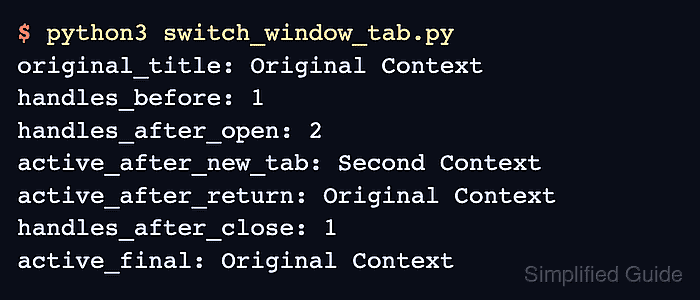
Each Selenium session assigns one persistent handle to every tab or window. Python exposes the selected handle through current_window_handle, the open set through window_handles, and the context change through switch_to.window(handle) without distinguishing between a tab and a separate window.
The starting page opens its destination with target=“_blank”, which lets the browser choose a new tab or window while WebDriver retains the original handle. Capturing the open-handle set before the click makes the new handle identifiable without assuming a fixed list position. Closing the selected context does not select another handle automatically. The final state should therefore show the original page selected again with one open handle, which also prevents later commands from raising NoSuchWindowException against the closed page.
Steps to switch Selenium windows and tabs:
- Create window-switch.html with a link that opens the destination in a new context.
- Create selenium-window-tab-switch.py with its Selenium dependencies and page URL.
- selenium-window-tab-switch.py
from pathlib import Path
import shutil

from selenium import webdriver
from selenium.webdriver.chrome.service import Service
from selenium.webdriver.common.by import By
from selenium.webdriver.support import expected_conditions as EC
from selenium.webdriver.support.ui import WebDriverWait


page_url = (Path(__file__).parent / "window-switch.html").resolve().as_uri()
- Append the headless Chrome session below page_url.
driver_path = shutil.which("chromedriver")
service = Service(driver_path) if driver_path else Service()

options = webdriver.ChromeOptions()
options.add_argument("--headless=new")
options.add_argument("--window-size=1280,720")

driver = webdriver.Chrome(service=service, options=options)
wait = WebDriverWait(driver, 10)
webdriver.Chrome() can use an installed compatible driver or let Selenium Manager resolve one on supported systems.
Related: How to install Selenium WebDriver for Python
Related: How to configure ChromeDriver for Selenium - Append the application-opened context switch below the wait declaration.
try:
    driver.get(page_url)
    original_handle = driver.current_window_handle
    known_handles = set(driver.window_handles)

    driver.find_element(By.ID, "open-report").click()
    wait.until(EC.new_window_is_opened(known_handles))

    new_handle = (set(driver.window_handles) - known_handles).pop()
    driver.switch_to.window(new_handle)
    wait.until(EC.title_is("Second Context"))

    print(f"opened_title: {driver.title}")
    print(f"handles_while_open: {len(driver.window_handles)}")
The set difference identifies the context created by the click without relying on handle order. EC.number_of_windows_to_be(2) is the stricter condition when the test requires exactly two open contexts.
- Append the return path and session cleanup below the open-context output.
    driver.close()
    driver.switch_to.window(original_handle)
    wait.until(EC.title_is("Original Context"))

    assert len(driver.window_handles) == 1
    print(f"returned_title: {driver.title}")
    print(f"handles_after_close: {len(driver.window_handles)}")
finally:
    driver.quit()
Closing the selected tab does not select another handle automatically. A later command can raise NoSuchWindowException until switch_to.window(original_handle) restores a valid context.
- Replace the work-in-progress script with this consolidated window-switch check.
- selenium-window-tab-switch.py
from pathlib import Path
import shutil

from selenium import webdriver
from selenium.webdriver.chrome.service import Service
from selenium.webdriver.common.by import By
from selenium.webdriver.support import expected_conditions as EC
from selenium.webdriver.support.ui import WebDriverWait


page_url = (Path(__file__).parent / "window-switch.html").resolve().as_uri()

driver_path = shutil.which("chromedriver")
service = Service(driver_path) if driver_path else Service()

options = webdriver.ChromeOptions()
options.add_argument("--headless=new")
options.add_argument("--window-size=1280,720")

driver = webdriver.Chrome(service=service, options=options)
wait = WebDriverWait(driver, 10)
try:
    driver.get(page_url)
    original_handle = driver.current_window_handle
    known_handles = set(driver.window_handles)

    driver.find_element(By.ID, "open-report").click()
    wait.until(EC.new_window_is_opened(known_handles))

    new_handle = (set(driver.window_handles) - known_handles).pop()
    driver.switch_to.window(new_handle)
    wait.until(EC.title_is("Second Context"))

    print(f"opened_title: {driver.title}")
    print(f"handles_while_open: {len(driver.window_handles)}")

    driver.close()
    driver.switch_to.window(original_handle)
    wait.until(EC.title_is("Original Context"))

    assert len(driver.window_handles) == 1
    print(f"returned_title: {driver.title}")
    print(f"handles_after_close: {len(driver.window_handles)}")
finally:
    driver.quit()
- Run the completed script to confirm one original context remains selected.
$ python3 selenium-window-tab-switch.py
opened_title: Second Context
handles_while_open: 2
returned_title: Original Context
handles_after_close: 1