How to use custom settings in Scrapy
Custom spider settings keep one Scrapy project usable across crawls that need different pacing, logging, cache, or timeout behavior. Putting those overrides on the spider avoids repeated edits in shared project settings and keeps one crawl from changing another.
Scrapy reads spider-local overrides from the custom_settings class attribute before the spider instance is created. Those values use spider priority, so they override settings.py for that crawl, while command-line -s values still override them for a single run.
Current Scrapy releases still support custom_settings, but the upstream docs prefer update_settings() when the spider must compute values, merge dictionaries such as FEEDS, or change priorities explicitly. Pre-crawler settings cannot come from a spider, and reactor-related settings should not vary per spider inside one process.
Steps to use custom settings in a Scrapy spider:
- Open the spider file that needs its own crawl behavior.
$ vi catalogdemo/spiders/catalog.py
In a default project layout, spider modules live under <project_name>/spiders/.
- Add a custom_settings dictionary as a class attribute on the spider.
import scrapy

class CatalogSpider(scrapy.Spider):
    name = "catalog"
    start_urls = ["https://catalog.example/"]
    custom_settings = {
        "CONCURRENT_REQUESTS": 4,
        "DOWNLOAD_DELAY": 1.5,
        "LOG_LEVEL": "INFO",
    }

    def parse(self, response):
        yield {"url": response.url}
Use custom_settings for fixed spider-only overrides such as DOWNLOAD_DELAY, DOWNLOAD_TIMEOUT, AUTOTHROTTLE_ENABLED, HTTPCACHE_ENABLED, or USER_AGENT. Related: How to override Scrapy settings from the command line
Keep custom_settings on the spider class itself. If the spider must calculate values or merge dictionaries such as FEEDS, switch to update_settings() instead.
- Run the spider from the project root that contains scrapy.cfg.
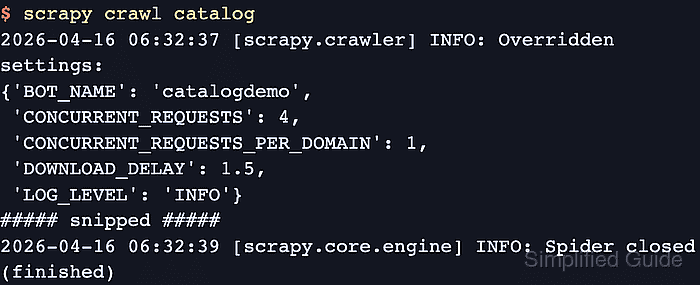
$ scrapy crawl catalog
scrapy settings –get reads project settings, not spider-local custom_settings, so verify this change from the crawl startup log instead.
- Confirm the crawl starts with the spider-specific values listed under Overridden settings.
$ scrapy crawl catalog
2026-04-22 10:59:01 [scrapy.crawler] INFO: Overridden settings:
{'CONCURRENT_REQUESTS': 4,
 'DOWNLOAD_DELAY': 1.5,
 'LOG_LEVEL': 'INFO'}
Seeing the spider-local keys in Overridden settings confirms that Scrapy loaded custom_settings before the crawl started.