Command-line overrides help when a Scrapy crawl needs a one-run change without editing project files. They fit short tests, slower pacing for a sensitive target, more verbose logging during debugging, or a temporary stop condition that should not become the project default.
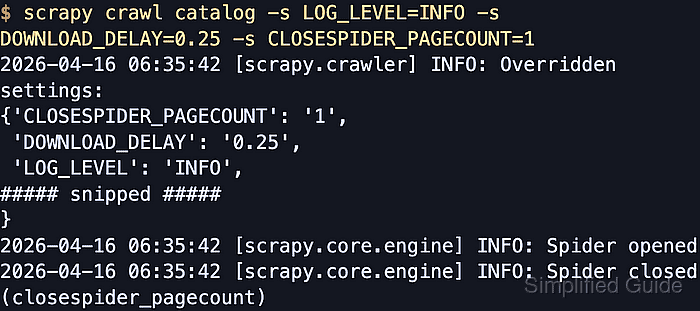
Scrapy gives command-line settings the highest precedence. Repeating -s NAME=VALUE or –set NAME=VALUE on commands such as scrapy crawl and scrapy settings overrides project and spider settings for that invocation, and the crawl startup log prints an Overridden settings section that shows the non-default values in effect.
The override disappears when the command exits. Shell quoting still applies, the startup banner can include inherited project values such as BOT_NAME or ROBOTSTXT_OBEY alongside the values passed on the command line, and long dict-style or component-priority settings are usually safer in settings.py or spider settings than in a fragile shell string.
Steps to override Scrapy settings from the command line:
- Change to the Scrapy project root before reading or overriding settings.
$ cd /srv/catalogdemo
Run project commands from the directory that contains scrapy.cfg so scrapy crawl and scrapy settings load the intended settings module.
- Read the current project value before testing an override.
$ scrapy settings --get DOWNLOAD_DELAY
1
A current scrapy startproject scaffold still writes DOWNLOAD_DELAY = 1 into settings.py, so a fresh project normally returns 1 here until that line is changed.
- Run the spider with one or more -s overrides for this crawl only.
$ scrapy crawl catalog -s LOG_LEVEL=INFO -s DOWNLOAD_DELAY=0.25 -s CLOSESPIDER_PAGECOUNT=1
2026-04-22 11:02:10 [scrapy.crawler] INFO: Overridden settings:
{'BOT_NAME': 'catalogdemo',
 'CLOSESPIDER_PAGECOUNT': '1',
 'CONCURRENT_REQUESTS_PER_DOMAIN': 1,
 'DOWNLOAD_DELAY': '0.25',
 'LOG_LEVEL': 'INFO',
##### snipped #####
}
2026-04-22 11:02:12 [scrapy.core.engine] INFO: Spider opened
2026-04-22 11:02:12 [scrapy.core.engine] INFO: Spider closed (closespider_pagecount)
Repeat -s NAME=VALUE for each extra override, or use the equivalent long form –set NAME=VALUE when the longer option is easier to read. The startup banner can include inherited project values in addition to the settings passed on the command line.
Long shell-escaped values, JSON-like dicts, and component-priority maps are error-prone on the command line. Move recurring or structured values into settings.py or spider settings instead of relying on fragile quoting.
- Read the resolved value directly when the setting needs to be checked without starting a crawl.
$ scrapy settings --get DOWNLOAD_DELAY --set DOWNLOAD_DELAY=0.25
0.25
Use scrapy settings –getbool, –getint, or –getfloat when a boolean or numeric value is clearer than the raw string form.
- Open the project settings or spider file only after the one-run test proves the value should persist.
$ vi catalogdemo/settings.py
Use settings.py when every spider in the project needs the same value, or use spider-specific settings when only one spider should inherit it. Related: How to use custom settings in Scrapy
Related: How to change the user agent for Scrapy spiders

Mohd Shakir Zakaria is a cloud architect with deep roots in software development and open-source advocacy. Certified in AWS, Red Hat, VMware, ITIL, and Linux, he specializes in designing and managing robust cloud and on-premises infrastructures.


