How to build a first crawler project with Scrapy
Building a first crawler project in Scrapy turns the framework from an empty install into a working scraper that creates a project, registers a spider, fetches a real page, and writes extracted data to disk. That gives later selector, pagination, and export changes a clean baseline instead of starting from isolated examples.
The current Scrapy workflow starts with scrapy startproject for the project skeleton and scrapy genspider for the first spider file. A simple first spider can still use start_urls as the shortcut to the default start() method, then read the page with CSS selectors and yield dictionaries that the built-in export system writes directly to disk.
Current generated projects still enable ROBOTSTXT_OBEY = True and set FEED_EXPORT_ENCODING = "utf-8" in settings.py, so the first crawl respects the site's robots policy and keeps exported text readable when the page includes curly quotes or non-ASCII author names. A first crawler should stay deliberately small: one target page, one parser, one export file, and separate follow-up work for pagination, login flows, or custom middleware.
Related: How to use CSS selectors in Scrapy
Related: How to export Scrapy items to JSON
Steps to build a first crawler project with Scrapy:
- Create the project skeleton in a working directory.
$ scrapy startproject quotesbot
New Scrapy project 'quotesbot', using template directory '##### snipped #####', created in:
     /home/user/quotesbot

 You can start your first spider with:
     cd quotesbot
     scrapy genspider example example.com
The generated project includes scrapy.cfg, the project package, a spiders/ directory, and a default settings.py file with robots.txt checks enabled.
- Change into the new project directory.
$ cd quotesbot
- Generate a basic spider file for the target site.
$ scrapy genspider quotes quotes.toscrape.com
Created spider 'quotes' using template 'basic' in module:
  quotesbot.spiders.quotes
genspider fills in name, allowed_domains, and an initial start_urls value so the first spider starts from a runnable skeleton instead of a blank file.
- Replace the generated spider with a parser that extracts one quote record per page block.
- quotesbot/spiders/quotes.py
import scrapy


class QuotesSpider(scrapy.Spider):
    name = "quotes"
    allowed_domains = ["quotes.toscrape.com"]
    start_urls = ["https://quotes.toscrape.com/page/1/"]

    def parse(self, response):
        for quote in response.css("div.quote"):
            yield {
                "text": quote.css("span.text::text").get(),
                "author": quote.css("small.author::text").get(),
                "tags": quote.css("div.tags a.tag::text").getall(),
            }
This first spider keeps the request flow simple by using one start_urls entry and one parse() callback. If the selector path needs testing first, use How to use Scrapy shell before rerunning the crawl.
- Run the spider and overwrite the export file with one complete JSON result.
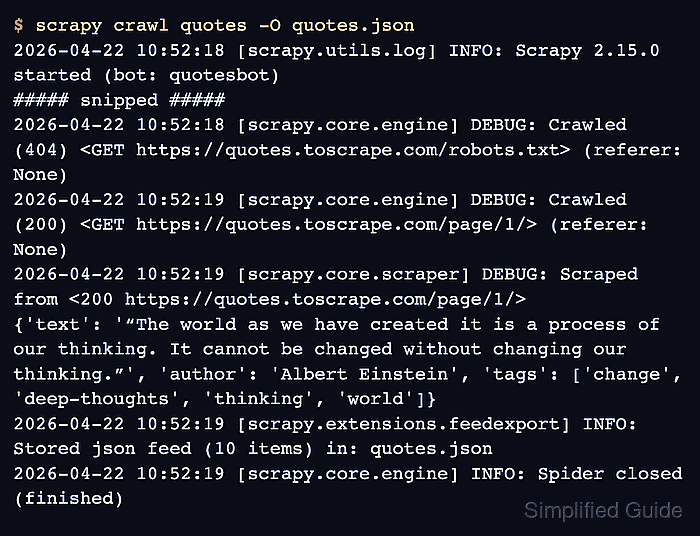
$ scrapy crawl quotes -O quotes.json
2026-04-22 10:52:18 [scrapy.utils.log] INFO: Scrapy 2.15.0 started (bot: quotesbot)
##### snipped #####
2026-04-22 10:52:18 [scrapy.core.engine] DEBUG: Crawled (404) <GET https://quotes.toscrape.com/robots.txt> (referer: None)
2026-04-22 10:52:19 [scrapy.core.engine] DEBUG: Crawled (200) <GET https://quotes.toscrape.com/page/1/> (referer: None)
2026-04-22 10:52:19 [scrapy.extensions.feedexport] INFO: Stored json feed (10 items) in: quotes.json
2026-04-22 10:52:19 [scrapy.core.engine] INFO: Spider closed (finished)
-O replaces any existing file with one fresh JSON array from the current run. The 404 on robots.txt is not a crawl failure here; it only shows that the site does not publish that file.
- Review the export file to confirm that the crawler wrote the expected fields and preserved UTF-8 text.
$ cat quotes.json
[
{"text": "“The world as we have created it is a process of our thinking. It cannot be changed without changing our thinking.”", "author": "Albert Einstein", "tags": ["change", "deep-thoughts", "thinking", "world"]},
{"text": "“It is our choices, Harry, that show what we truly are, far more than our abilities.”", "author": "J.K. Rowling", "tags": ["abilities", "choices"]},
##### snipped #####
{"text": "“A day without sunshine is like, you know, night.”", "author": "Steve Martin", "tags": ["humor", "obvious", "simile"]}
]
The first crawler project is complete once the file contains structured records instead of raw HTML. Expand it into pagination, richer items, or alternate export formats only after this single-page run stays clean.