How to filter a signal with a Butterworth filter in SciPy
A sampled signal can carry energy from the phenomenon of interest and from faster variation that obscures it. A low-pass Butterworth filter preserves slower content with a smooth passband while reducing frequencies above a chosen cutoff.
The scipy.signal.butter() function turns the filter order, cutoff, and sampling rate into coefficients. Requesting second-order sections with output=“sos” avoids the numerical sensitivity of transfer-function coefficients and produces the representation expected by sosfiltfilt().
The sosfiltfilt() function processes an array forward and backward, which cancels phase delay for offline analysis but uses future samples. A two-tone signal at 5 Hz and 40 Hz makes the attenuation measurable in the FFT; live or causal pipelines need sosfilt() instead.
Steps to filter a signal with a SciPy Butterworth filter:
- Create butterworth_filter.py with the imports and two-tone sampled signal.
- butterworth_filter.py
import numpy as np
from scipy.signal import butter, sosfiltfilt

sample_rate = 200.0
time = np.arange(0.0, 2.0, 1.0 / sample_rate)
raw = np.sin(2 * np.pi * 5 * time) + 0.5 * np.sin(2 * np.pi * 40 * time)
The sample_rate value must match measured data. Its 100 Hz Nyquist frequency is above the 12 Hz cutoff used here.
- Append the Butterworth design and forward-backward filter below the signal definition.
sos = butter(4, 12.0, btype="lowpass", fs=sample_rate, output="sos")
filtered = sosfiltfilt(sos, raw)
Supplying fs expresses the cutoff in hertz. For a Butterworth filter, the cutoff is the point where the passband gain falls by about 3 dB.
- Append the FFT amplitude comparison below the filtering call.
frequencies = np.fft.rfftfreq(raw.size, d=1 / sample_rate)
raw_amplitudes = np.abs(np.fft.rfft(raw)) * 2 / raw.size
filtered_amplitudes = np.abs(np.fft.rfft(filtered)) * 2 / filtered.size

for target in (5.0, 40.0):
    index = np.argmin(np.abs(frequencies - target))
    print(
        f"{target:>4.0f} Hz: raw={raw_amplitudes[index]:.3f}, "
        f"filtered={filtered_amplitudes[index]:.3f}"
    )
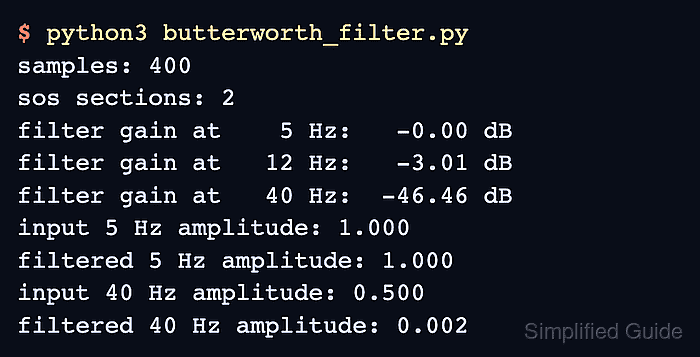
- Run butterworth_filter.py to confirm the retained and attenuated frequency components.
$ python3 butterworth_filter.py
   5 Hz: raw=1.000, filtered=1.000
  40 Hz: raw=0.500, filtered=0.002
The 5 Hz component keeps its input amplitude, while the 40 Hz component falls from 0.500 to 0.002 after filtering.