Local maxima in a sampled signal can represent real events or small fluctuations in the surrounding baseline. Peak criteria separate the pulses, beats, or sensor responses of interest from neighboring samples that do not meet the same amplitude and shape requirements.
The scipy.signal.find_peaks function returns the integer indexes of accepted peaks and a dictionary containing the properties used during filtering. height compares peak amplitude, distance sets the minimum spacing in samples, and prominence measures how far a peak rises above its surrounding baseline.
The input must be one-dimensional, and the returned indexes refer to positions in that original array. Remove or replace NaN values before detection because they can interrupt neighbor comparisons and produce unexpected peak properties.
Steps to find signal peaks with SciPy:
- Create peak_find.py with the SciPy import and one-dimensional sample signal.
- peak_find.py
import numpy as np
from scipy.signal import find_peaks

signal = np.array([
    0.0, 1.2, 0.1, 0.8, 0.2, 3.1,
    0.4, 0.7, 0.2, 2.5, 0.1,
])
- Append the peak-property filters below the signal definition in peak_find.py.
peaks, properties = find_peaks(
    signal,
    height=1.0,
    distance=3,
    prominence=1.0,
)
height and prominence use the signal's amplitude units, while distance counts samples and removes smaller neighboring peaks first.
- Append the detected indexes and properties below the find_peaks() call.
print("peak indexes:", peaks.tolist())
print("peak values:", signal[peaks].tolist())
print("prominences:", properties["prominences"].round(2).tolist())
print("peak gaps:", np.diff(peaks).tolist())
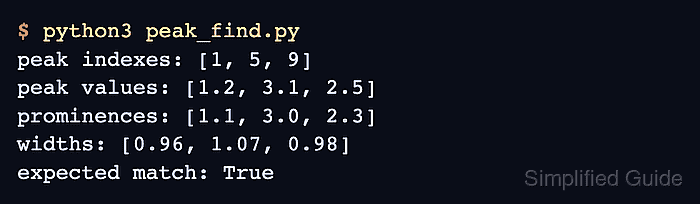
- Run peak_find.py to confirm the accepted peak positions and property values.
$ python3 peak_find.py
peak indexes: [1, 5, 9]
peak values: [1.2, 3.1, 2.5]
prominences: [1.1, 3.0, 2.3]
peak gaps: [4, 4]
Indexes 1, 5, and 9 point to the accepted values in the original signal. Both four-sample gaps satisfy the minimum distance of three samples.

Mohd Shakir Zakaria is a cloud architect with deep roots in software development and open-source advocacy. Certified in AWS, Red Hat, VMware, ITIL, and Linux, he specializes in designing and managing robust cloud and on-premises infrastructures.


