How to configure incoming email in Redmine
Redmine can turn messages sent to a support or project mailbox into issues and issue comments. Incoming mail intake is useful when users already report work by email, but the project team still needs those messages assigned, tracked, searched, and discussed inside Redmine.
The simplest production path for a remote mailbox is the redmine:email:receive_imap rake task. It logs in to an IMAP account, reads messages from a folder, maps the sender's From address to a Redmine user, and creates a new issue unless the subject references an existing issue number.
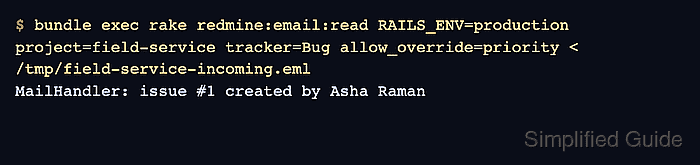
Test the parser with redmine:email:read before scheduling the mailbox poller. A raw-message smoke test proves the project identifier, tracker, sender account, permissions, and allowed email-body overrides without deleting or moving real mailbox messages.
Related: How to configure Redmine email delivery
Related: How to test Redmine email notifications
Related: How to create a Redmine project
Related: How to create a Redmine issue
Steps to configure Redmine incoming email with IMAP:
- Confirm the target project identifier, tracker, and sender account in Redmine.
Project identifier: field-service
Tracker: Bug
Sender user: Asha Raman <asha.raman@example.net>
Mailbox address: redmine@example.net
The sender email must match an active Redmine user who can add issues to the target project. Unknown users are ignored unless unknown_user=accept or unknown_user=create is deliberately added and the matching anonymous or non-member role has the required issue permission.
- Open a shell as the Redmine application user.
Run the rake tasks from the active Redmine application root. Source installs often use /opt/redmine or /var/www/redmine, while the official container image uses /usr/src/redmine.
- Check the current IMAP receiver options.
$ bundle exec rake -D redmine:email:receive_imap RAILS_ENV=production
rake redmine:email:receive_imap
    Read emails from an IMAP server.

    Available IMAP options:
      host=HOST                IMAP server host (default: 127.0.0.1)
      port=PORT                IMAP server port (default: 143)
      ssl=SSL                  Use SSL/TLS? (default: false)
      starttls=STARTTLS        Use STARTTLS? (default: false)
      username=USERNAME        IMAP account
      password=PASSWORD        IMAP password
      folder=FOLDER            IMAP folder to read (default: INBOX)
##### snipped #####
      project=PROJECT          identifier of the target project
      tracker=TRACKER          name of the target tracker
      allow_override=ATTRS     allow email content to set attributes values
##### snipped #####
Use ssl=1 for implicit TLS on port 993 or starttls=1 for STARTTLS on port 143. Do not use ssl=force unless certificate verification failure is the specific problem being diagnosed.
- Save a raw incoming-mail test message.
From: Asha Raman <asha.raman@example.net>
To: Redmine Support <redmine@example.net>
Subject: Pump controller status page returns 500
Message-ID: <field-service-500@example.net>
Date: Fri, 26 Jun 2026 12:00:00 +0000
Content-Type: text/plain; charset=UTF-8

The field service dashboard returns HTTP 500 when technicians open the pump controller status page.

Priority: High
Save the message as /tmp/field-service-incoming.eml on the Redmine host. The Priority line is honored only because the receive command allows priority to be overridden.
- Process the test message through the Redmine mail parser.
$ bundle exec rake redmine:email:read RAILS_ENV=production project=field-service tracker=Bug allow_override=priority < /tmp/field-service-incoming.eml
MailHandler: issue #1 created by Asha Raman
- Confirm the new issue in the target project.
Issue #1
Project: field-service
Tracker: Bug
Subject: Pump controller status page returns 500
Author: Asha Raman <asha.raman@example.net>
Priority: High
If the message is ignored, check the sender's Redmine account, project membership, Add issues permission, required custom fields without defaults, and whether the sender address matches the configured Redmine emission address.
Tool: Email Header Analyzer - Create processed-message folders in the IMAP mailbox.
INBOX
processed
failed
move_on_success and move_on_failure keep handled messages out of INBOX without silently deleting them from the mail server.
- Run the IMAP receiver once against the mailbox.
$ bundle exec rake redmine:email:receive_imap RAILS_ENV=production \
  host=imap.example.net \
  port=993 \
  ssl=1 \
  username=redmine@example.net \
  password='replace-with-mailbox-password' \
  folder=INBOX \
  project=field-service \
  tracker=Bug \
  allow_override=tracker,priority \
  move_on_success=processed \
  move_on_failure=failed
This command exposes the mailbox password to the shell history or process list on some systems. Use a restricted service account, an app password, and the deployment's secret-management pattern when the mailbox credential must not appear in a crontab or shell transcript.
- Schedule the IMAP receiver.
*/10 * * * * cd /opt/redmine && bundle exec rake --silent redmine:email:receive_imap RAILS_ENV=production host=imap.example.net port=993 ssl=1 username=redmine@example.net password='replace-with-mailbox-password' folder=INBOX project=field-service tracker=Bug allow_override=tracker,priority move_on_success=processed move_on_failure=failed
Keep the cron entry on one line. Use the active Redmine path, mailbox address, and project identifier for the running site.
- Confirm the scheduled run creates an issue and moves the source message.
Issue: Pump controller status page returns 500
Project: field-service
IMAP folder after processing: processed
Messages moved to failed or left in INBOX need review before the schedule is widened. Common causes include an unknown sender, missing project permission, a required custom field without a default value, an invalid tracker name, or a mailbox message from Redmine's own emission address.