How to run a training loop in PyTorch
Model parameters change only when data loading, automatic differentiation, and optimization meet in the right order. An explicit PyTorch loop keeps that order visible when a project needs custom loss accounting or batch-level behavior.
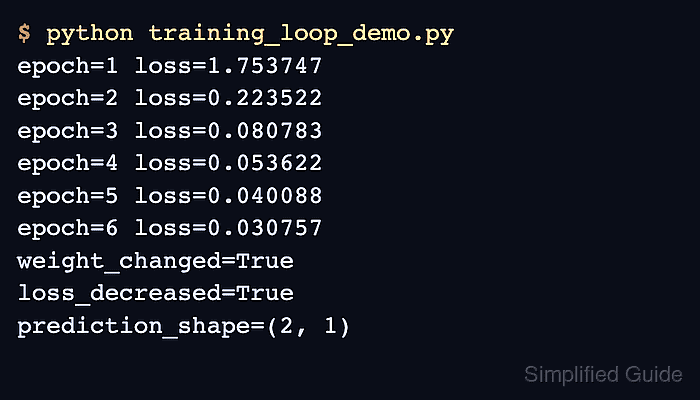
A small regression problem makes each part of the loop inspectable. A TensorDataset supplies eight indexed samples, while a DataLoader with batch_size=4 forms two mini-batches per epoch. MSELoss measures prediction error, and SGD updates a linear layer after every backward pass.
The completed run exposes three separate signals: falling mean loss, a positive L2 weight delta, and a prediction tensor with two rows. Together they show that training reduced error, changed model parameters, and left the model callable for inference.
Related: How to use a DataLoader in PyTorch
Related: How to set the Adam optimizer in PyTorch
Steps to run a PyTorch training loop:
- Create the initial PyTorch setup in training_loop_demo.py.
- training_loop_demo.py
import torch
from torch import nn
from torch.utils.data import DataLoader, TensorDataset


torch.manual_seed(23)

features = torch.tensor(
    [
        [-1.0, 0.0, 0.5],
        [-0.5, 0.25, 1.0],
        [0.0, -0.5, 0.25],
        [0.5, 0.75, -0.25],
        [1.0, -0.25, -0.5],
        [1.5, 0.5, 0.0],
        [2.0, -0.75, 0.75],
        [2.5, 1.0, -1.0],
    ],
    dtype=torch.float32,
)
targets = features @ torch.tensor([[0.8], [-0.4], [0.3]]) + 0.2

train_data = TensorDataset(features, targets)
train_loader = DataLoader(train_data, batch_size=4, shuffle=False)

model = nn.Sequential(nn.Linear(3, 1))
loss_fn = nn.MSELoss()
optimizer = torch.optim.SGD(model.parameters(), lr=0.08)
initial_weight = model[0].weight.detach().clone()
A fixed batch order makes the short loss trace reproducible. Shuffled sampling is usually preferable for a real map-style training dataset.
- Add the one-epoch training function below initial_weight.
def train_one_epoch(model, train_loader, loss_fn, optimizer):
    model.train()
    loss_total = 0.0
    sample_count = 0

    for batch_features, batch_targets in train_loader:
        optimizer.zero_grad(set_to_none=True)
        predictions = model(batch_features)
        loss = loss_fn(predictions, batch_targets)
        loss.backward()
        optimizer.step()

        loss_total += loss.item() * batch_features.size(0)
        sample_count += batch_features.size(0)

    return loss_total / sample_count
zero_grad() prevents gradients from earlier batches from accumulating, while backward() populates the current gradients before step() updates the parameters.
Related: How to zero gradients in PyTorch - Append the epoch driver with its outcome checks below train_one_epoch().
epoch_losses = []

for epoch in range(1, 7):
    mean_loss = train_one_epoch(
        model,
        train_loader,
        loss_fn,
        optimizer,
    )
    epoch_losses.append(mean_loss)
    print(f"epoch={epoch} mean_loss={mean_loss:.6f}")

model.eval()
with torch.inference_mode():
    sample_prediction = model(features[:2])

weight_delta = torch.linalg.vector_norm(
    model[0].weight.detach() - initial_weight
).item()

if epoch_losses[-1] >= epoch_losses[0]:
    raise RuntimeError("training loss did not decrease")

if weight_delta <= 0:
    raise RuntimeError("optimizer did not update the model weight")

print(f"weight_delta_l2={weight_delta:.6f}")
print(f"prediction_shape={tuple(sample_prediction.shape)}")
model.eval() selects evaluation behavior before inference_mode() disables gradient tracking for the sample prediction.
- Run python training_loop_demo.py to verify that the completed PyTorch training loop lowers loss, changes model weights, and returns two predictions.
$ python training_loop_demo.py
epoch=1 mean_loss=1.753747
epoch=2 mean_loss=0.223522
epoch=3 mean_loss=0.080783
epoch=4 mean_loss=0.053622
epoch=5 mean_loss=0.040088
epoch=6 mean_loss=0.030757
weight_delta_l2=0.800411
prediction_shape=(2, 1)
The loss falls from 1.753747 in epoch 1 to 0.030757 in epoch 6. The positive weight delta proves that optimizer.step() changed the layer, and the final shape proves that the trained model returned two one-value predictions.