Each trainable parameter in PyTorch accumulates backward-pass results in its .grad buffer instead of replacing the previous value. A standard mini-batch training loop must therefore clear those buffers before calculating gradients for the next optimizer update.
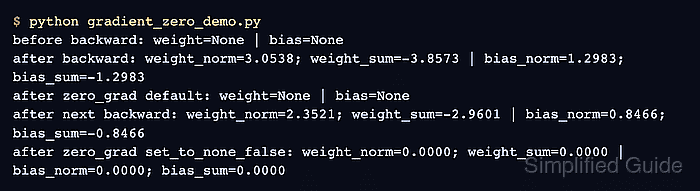
Calling optimizer.zero_grad() resets only the parameters managed by that optimizer. Its default set_to_none=True removes the stored gradient tensors, which uses less memory than filling the tensors with zeros and lets a later backward pass create only the gradients it needs.
A one-batch-one-step loop resets gradients before loss.backward(). Intentional gradient accumulation delays that reset across microbatches, while set_to_none=False is reserved for later code that specifically requires zero-filled .grad tensors.
Related: How to run a training loop in PyTorch
Related: How to run gradient accumulation in PyTorch
Related: How to clip gradients in PyTorch
Steps to zero PyTorch gradients:
- Create the model setup in gradient_zero_demo.py.
- gradient_zero_demo.py
import torch
from torch import nn


torch.manual_seed(11)

features = torch.tensor(
    [[0.0, 0.5], [1.0, -0.5], [2.0, 1.0]],
    dtype=torch.float32,
)
targets = torch.tensor([[0.2], [0.7], [1.6]], dtype=torch.float32)

model = nn.Linear(2, 1)
loss_fn = nn.MSELoss()
optimizer = torch.optim.SGD(model.parameters(), lr=0.05)
- Add a helper below the optimizer to label each parameter gradient as None or a tensor.
def gradient_state():
    return {
        name: "None" if parameter.grad is None else "tensor"
        for name, parameter in model.named_parameters()
    }
- Add the default gradient reset sequence below the helper.
optimizer.zero_grad()
loss = loss_fn(model(features), targets)
loss.backward()

print(f"after backward: {gradient_state()}")

optimizer.zero_grad()
assert all(parameter.grad is None for parameter in model.parameters())

print(f"after zero_grad: {gradient_state()}")
Calling zero_grad() before the forward and backward pass is the normal training-loop position. The second call demonstrates the resulting None state immediately after gradients have been used.
- Add the explicit zero-tensor comparison below the default reset sequence.
loss = loss_fn(model(features), targets)
loss.backward()
optimizer.zero_grad(set_to_none=False)
assert all(
    torch.count_nonzero(parameter.grad).item() == 0
    for parameter in model.parameters()
)

print("set_to_none=False: all gradient tensors contain zero")
A new backward pass must first recreate the gradient tensors because set_to_none=False zeroes existing tensors but does not materialize tensors that are already None.
- Run the completed script to verify both gradient reset modes.
$ python3 gradient_zero_demo.py
after backward: {'weight': 'tensor', 'bias': 'tensor'}
after zero_grad: {'weight': 'None', 'bias': 'None'}
set_to_none=False: all gradient tensors contain zero

Mohd Shakir Zakaria is a cloud architect with deep roots in software development and open-source advocacy. Certified in AWS, Red Hat, VMware, ITIL, and Linux, he specializes in designing and managing robust cloud and on-premises infrastructures.


