How to freeze model layers in PyTorch
Transfer learning often reuses a pretrained feature extractor while a smaller task-specific head learns new weights. PyTorch can keep the frozen layers in the forward path while excluding their parameters from gradient recording and optimizer updates.
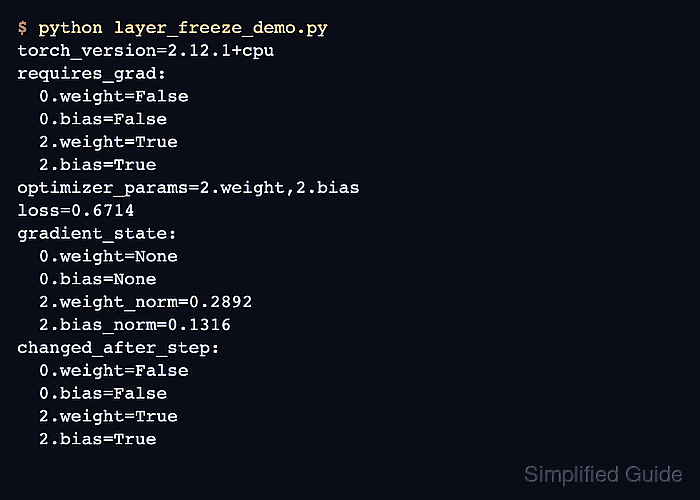
Calling requires_grad_(False) on a module changes the flag for every parameter registered under that module. Build the optimizer from the parameters whose flags remain True so its update set matches the intended training boundary.
Parameter freezing does not switch a module to evaluation mode. Dropout and BatchNorm behavior remains controlled separately by train() and eval(), so choose that mode according to whether the frozen feature extractor should keep training-time state changes.
Related: How to set the Adam optimizer in PyTorch
Related: How to zero gradients in PyTorch
Related: How to run transfer learning in PyTorch
Steps to freeze PyTorch model layers:
- Create layer_freeze_demo.py with a two-layer model and fixed training batch.
- layer_freeze_demo.py
import torch
from torch import nn


torch.manual_seed(23)

model = nn.Sequential(
    nn.Linear(4, 6),
    nn.ReLU(),
    nn.Linear(6, 2),
)

inputs = torch.tensor(
    [
        [0.5, -1.0, 0.3, 2.0],
        [1.0, 0.2, -0.4, 0.7],
        [-0.3, 1.2, 0.8, -1.1],
        [1.5, -0.7, 0.1, 0.4],
    ],
    dtype=torch.float32,
)
targets = torch.tensor([0, 1, 1, 0])
- Append the freeze boundary and optimizer setup to layer_freeze_demo.py.
model[0].requires_grad_(False)

frozen_before = {
    name: parameter.detach().clone()
    for name, parameter in model[0].named_parameters()
}
head_before = {
    name: parameter.detach().clone()
    for name, parameter in model[2].named_parameters()
}

trainable_parameters = {
    name: parameter
    for name, parameter in model.named_parameters()
    if parameter.requires_grad
}
optimizer = torch.optim.SGD(trainable_parameters.values(), lr=0.1)
loss_fn = nn.CrossEntropyLoss()
In a project model, model[0] corresponds to the feature-extractor submodule, such as model.backbone. The model must be on its training device before optimizer construction.
- Append the optimizer-step verification block to layer_freeze_demo.py.
optimizer.zero_grad(set_to_none=True)
loss = loss_fn(model(inputs), targets)
loss.backward()
optimizer.step()

frozen_gradients_none = all(
    parameter.grad is None for parameter in model[0].parameters()
)
frozen_parameters_unchanged = all(
    torch.equal(frozen_before[name], parameter.detach())
    for name, parameter in model[0].named_parameters()
)
trainable_parameters_changed = any(
    not torch.equal(head_before[name], parameter.detach())
    for name, parameter in model[2].named_parameters()
)

assert frozen_gradients_none
assert frozen_parameters_unchanged
assert trainable_parameters_changed

print("frozen=0.weight,0.bias")
print("trainable=" + ",".join(trainable_parameters))
print(f"frozen_gradients_none={frozen_gradients_none}")
print(f"frozen_parameters_unchanged={frozen_parameters_unchanged}")
print(f"trainable_parameters_changed={trainable_parameters_changed}")
- Run the completed script to verify the frozen layer remains unchanged while the trainable head updates.
$ python3 layer_freeze_demo.py
frozen=0.weight,0.bias
trainable=2.weight,2.bias
frozen_gradients_none=True
frozen_parameters_unchanged=True
trainable_parameters_changed=True
The assertions stop the script if the frozen layer receives a gradient, a frozen parameter changes, or no trainable head parameter changes.