How to access a MySQL database using Python
Connecting to a MySQL database from Python is the usual starting point for automation, reporting jobs, validation checks, and application back-end tasks that need to read or update relational data without dropping into an interactive SQL client.
Oracle's MySQL Connector/Python package exposes the mysql.connector module and follows the standard database workflow of opening a connection, creating a cursor, executing SQL, and fetching rows. The same connector path can validate credentials, query schema metadata, or run parameterized application statements from one script.
Use a POSIX shell and a project virtual environment so the connector stays tied to one interpreter. Keep credentials out of the source file, and add connection arguments such as unix_socket, ssl_ca, or other connector options when the server requires socket or TLS access. On Windows, substitute py for python when the launcher is the normal entry point.
Steps to access a MySQL database using Python:
- Activate the project virtual environment before installing the database driver.
$ source .venv/bin/activate
(.venv) $ python -m pip --version
pip 25.1.1 from /home/user/project/.venv/lib/python3.14/site-packages/pip (python 3.14)
The path after from should point inside the intended virtual environment before package installation starts.
Use .\.venv\Scripts\activate on Windows when the project uses the standard virtual-environment layout.
- Install MySQL Connector/Python into the active interpreter and confirm the imported module version.
(.venv) $ python -m pip install mysql-connector-python
Successfully installed mysql-connector-python-9.7.0

(.venv) $ python -c "import mysql.connector; print(mysql.connector.__version__)"
9.7.0
Running python -m pip keeps the install bound to the same interpreter that will execute the script.
The exact version can change with the active package index, but the import check should print the installed connector version without ModuleNotFoundError.
If the environment installs from a private mirror, the package source may come from pip configuration or PIP_INDEX_URL instead of public PyPI.
- Export the connection settings for the target database session.
(.venv) $ export MYSQL_HOST=db01.internal.example
(.venv) $ export MYSQL_PORT=3306
(.venv) $ export MYSQL_USER=report_reader
(.venv) $ export MYSQL_PASSWORD='replace-with-real-password'
(.venv) $ export MYSQL_DATABASE=billing_reporting
Replace the masked host, credentials, and database name before running the script. A least-privilege application account is safer than a full administrative login.
- Save a small Python script that connects, runs a validation query, and lists a few tables from the selected schema.
- access-mysql-database.py
#!/usr/bin/env python3

import os

import mysql.connector
from mysql.connector import Error


config = {
    "host": os.environ.get("MYSQL_HOST", "127.0.0.1"),
    "port": int(os.environ.get("MYSQL_PORT", "3306")),
    "user": os.environ["MYSQL_USER"],
    "password": os.environ["MYSQL_PASSWORD"],
    "database": os.environ["MYSQL_DATABASE"],
}

connection = None
cursor = None

try:
    connection = mysql.connector.connect(**config)
    cursor = connection.cursor()

    cursor.execute("SELECT DATABASE(), CURRENT_USER()")
    database_name, current_account = cursor.fetchone()
    print(f"Connected to database: {database_name}")
    print(f"Current MySQL account: {current_account}")

    cursor.execute(
        """
        SELECT table_name
        FROM information_schema.tables
        WHERE table_schema = %s
        ORDER BY table_name
        LIMIT 5
        """,
        (config["database"],),
    )

    print("Tables:")
    for (table_name,) in cursor.fetchall():
        print(f"  - {table_name}")
except Error as exc:
    raise SystemExit(f"MySQL error: {exc}") from exc
finally:
    if cursor is not None:
        cursor.close()
    if connection is not None and connection.is_connected():
        connection.close()
The metadata queries prove that authentication, schema selection, and query execution all work before application-specific SQL is introduced.
Replace the validation queries with parameterized application statements after the connection path is confirmed.
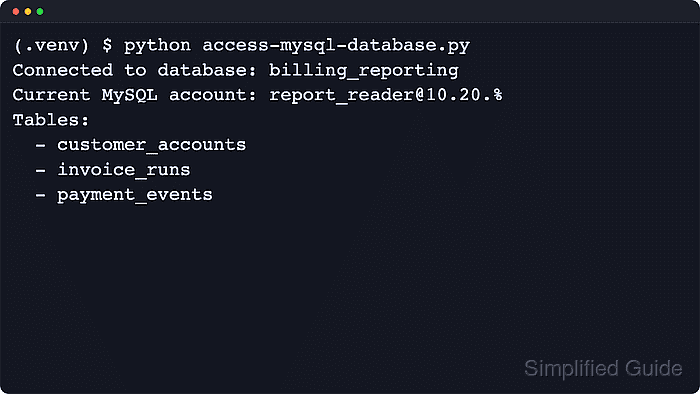
- Run the script through the same interpreter to confirm that Python can authenticate and execute queries.
(.venv) $ python access-mysql-database.py
Connected to database: billing_reporting
Current MySQL account: report_reader@%
Tables:
  - customer_accounts
  - invoice_runs
  - payment_events
The account shown by CURRENT_USER() is the database account that authenticated for the session, and the listed tables confirm that the selected schema is reachable.
For MariaDB or another MySQL-protocol service, verify the driver choice and authentication plugin in that environment before moving application SQL to the script.