How to encrypt PostgreSQL data at rest
Encrypting the PostgreSQL data directory at rest protects table, index, and write-ahead log files when a disk, virtual machine image, or storage snapshot is taken offline. It is a storage-layer control for stolen or retired media, not a replacement for database permissions, host hardening, or encrypted client connections.
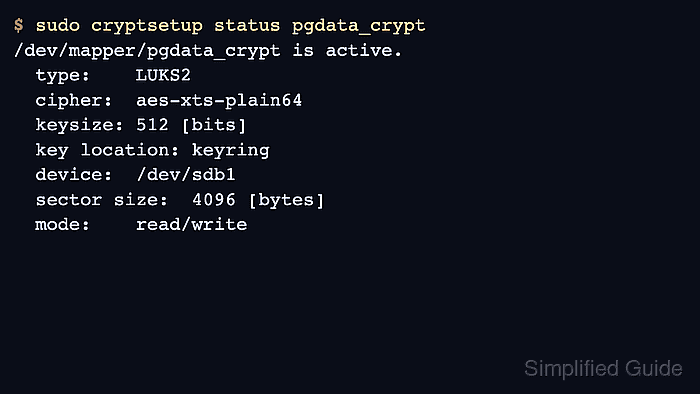
PostgreSQL stores its cluster files under data_directory, and the upstream encryption options describe file-system or block-level encryption for data partition protection. On Linux, dm-crypt with LUKS opens an encrypted device as a normal mapper path such as /dev/mapper/pgdata_crypt, then PostgreSQL continues to use the same data directory after the encrypted filesystem is mounted there.
Plan a maintenance window before moving a production cluster. Use a new empty block device, copy the stopped cluster onto it, add boot-time unlock and mount entries, and verify PostgreSQL after the encrypted volume is active. Use the actual data_directory value from the server, keep an unencrypted rollback copy only until the reboot test passes, and remember that a mounted encrypted filesystem is readable to accounts that already have operating-system access.
Related: How to secure a PostgreSQL server
Related: How to create a PostgreSQL database backup
Steps to encrypt PostgreSQL data at rest using LUKS:
- Confirm the active PostgreSQL data directory.
$ sudo -u postgres psql -tAc "SHOW data_directory;"
/var/lib/postgresql/18/main
Examples use the Debian and Ubuntu packaged layout for PostgreSQL 18. Replace /var/lib/postgresql/18/main with the path returned by the command on the target server.
- Create and verify a current PostgreSQL backup before changing storage.
Formatting the wrong device, copying an incomplete data directory, or losing the LUKS header can make the cluster unrecoverable. Keep a database backup or storage snapshot that is separate from the device being encrypted.
- Identify the empty block device or partition that will hold the encrypted data directory.
$ lsblk -o NAME,SIZE,TYPE,FSTYPE,MOUNTPOINTS
NAME   SIZE TYPE FSTYPE      MOUNTPOINTS
sda    100G disk
├─sda1   1G part vfat        /boot/efi
└─sda2  99G part ext4        /
sdb    200G disk
└─sdb1  200G part
Use a dedicated partition, logical volume, or virtual disk for the PostgreSQL data volume.
- Create a LUKS2 header on the target device.
$ sudo cryptsetup luksFormat --type luks2 /dev/sdb1
WARNING!
========
This will overwrite data on /dev/sdb1 irrevocably.
Are you sure? (Type 'YES' in capital letters): YES
Enter passphrase for /dev/sdb1:
Verify passphrase:
Selecting the wrong device permanently erases data on that device.
- Back up the LUKS header after formatting.
$ sudo cryptsetup luksHeaderBackup /dev/sdb1 --header-backup-file /root/pgdata_crypt.luks-header
Store the header backup and a recovery passphrase somewhere protected but separate from the encrypted disk. A damaged LUKS header can make the encrypted data permanently inaccessible.
- Open the encrypted device with a stable mapper name.
$ sudo cryptsetup open /dev/sdb1 pgdata_crypt
Enter passphrase for /dev/sdb1:
The mapper name pgdata_crypt is referenced later by /etc/crypttab and appears as /dev/mapper/pgdata_crypt after unlock.
- Confirm the mapper device is active.
$ sudo cryptsetup status pgdata_crypt
/dev/mapper/pgdata_crypt is active.
  type:    LUKS2
  cipher:  aes-xts-plain64
  keysize: 512 [bits]
  key location: keyring
  device:  /dev/sdb1
  sector size:  4096 [bytes]
  mode:    read/write
- Create a filesystem on the unlocked mapper device.
$ sudo mkfs.ext4 -L pgdata /dev/mapper/pgdata_crypt
mke2fs 1.47.2 (1-Jan-2025)
Creating filesystem with 52424832 4k blocks and 13107200 inodes
Filesystem UUID: 2a3b4c5d-6e7f-8901-2345-6789abcdef01
##### snipped #####
- Stop PostgreSQL so no files change during the copy.
$ sudo systemctl stop postgresql
- Verify the PostgreSQL service is stopped.
$ sudo systemctl status postgresql ● postgresql.service - PostgreSQL RDBMS Loaded: loaded (/usr/lib/systemd/system/postgresql.service; enabled) Active: inactive (dead) ##### snipped ##### - Move the current data directory aside as a temporary rollback copy.
$ sudo mv /var/lib/postgresql/18/main /var/lib/postgresql/18/main.unencrypted
Use the data_directory path confirmed in the first step.
- Recreate the original data directory path as an empty mount point.
$ sudo mkdir -p /var/lib/postgresql/18/main
- Mount the encrypted filesystem on the PostgreSQL data directory path.
$ sudo mount /dev/mapper/pgdata_crypt /var/lib/postgresql/18/main
- Set ownership on the mounted data directory.
$ sudo chown postgres:postgres /var/lib/postgresql/18/main
- Set restrictive permissions on the mounted data directory.
$ sudo chmod 0700 /var/lib/postgresql/18/main
- Copy the database files into the encrypted filesystem.
$ sudo rsync -aHAX --numeric-ids /var/lib/postgresql/18/main.unencrypted/ /var/lib/postgresql/18/main/
SELinux systems may require restorecon -RF on the data directory after copying.
- Record the LUKS UUID for the boot-time unlock entry.
$ sudo blkid /dev/sdb1
/dev/sdb1: UUID="11111111-2222-3333-4444-555555555555" TYPE="crypto_LUKS" PARTUUID="aaaaaaaa-bbbb-cccc-dddd-eeeeeeeeeeee"
- Add the encrypted device to /etc/crypttab.
/etc/crypttab
pgdata_crypt UUID=11111111-2222-3333-4444-555555555555 none luks
The none key field prompts for a passphrase at boot. Use a protected key file, TPM-backed unlock, or another approved key-management method only when unattended startup is required and the key is protected separately from the data volume.
- Record the filesystem UUID for the mount entry.
$ sudo blkid /dev/mapper/pgdata_crypt
/dev/mapper/pgdata_crypt: LABEL="pgdata" UUID="2a3b4c5d-6e7f-8901-2345-6789abcdef01" BLOCK_SIZE="4096" TYPE="ext4"
- Add the encrypted filesystem mount to /etc/fstab using the original data directory path.
/etc/fstab
UUID=2a3b4c5d-6e7f-8901-2345-6789abcdef01 /var/lib/postgresql/18/main ext4 defaults 0 2
An invalid /etc/fstab entry can stop the system in emergency mode during boot.
- Reload systemd unit generation after editing /etc/crypttab and /etc/fstab.
$ sudo systemctl daemon-reload
- Start PostgreSQL on the encrypted data directory.
$ sudo systemctl start postgresql
- Verify the data directory is mounted from the mapper device.
$ findmnt -no SOURCE,TARGET /var/lib/postgresql/18/main
/dev/mapper/pgdata_crypt /var/lib/postgresql/18/main
- Verify database access after the migration.
$ sudo -u postgres psql -c "SELECT now();" now ------------------------------- 2026-06-07 05:12:34.12345+00 (1 row) - Reboot once to validate boot-time unlock and mounting.
$ sudo reboot
A passphrase-based /etc/crypttab entry prompts on the system console during startup.
- Confirm the encrypted mapper is mounted after reboot.
$ findmnt -no SOURCE,TARGET /var/lib/postgresql/18/main
/dev/mapper/pgdata_crypt /var/lib/postgresql/18/main
- Confirm PostgreSQL still accepts queries after reboot.
$ sudo -u postgres psql -c "SELECT now();" now ------------------------------- 2026-06-07 05:18:20.67890+00 (1 row) - Remove the unencrypted rollback copy only after the reboot validation succeeds.
$ sudo rm -rf /var/lib/postgresql/18/main.unencrypted
Removing the rollback copy is irreversible, but keeping it leaves an unencrypted copy of the database on disk.