How to use Playwright role locators
Role locators in Playwright target the semantic controls, landmarks, and headings that a user or assistive technology can identify. They fit tests that should click a button, check a box, or assert a heading without depending on CSS classes that may change during UI refactors.
The page.getByRole() API combines an ARIA role with an accessible name, and it can also narrow headings by level or controls by state. Native controls often expose implicit roles, so a normal button or checkbox can be located without adding duplicate role attributes to the markup.
Use role locators when visible UI semantics are part of the behavior being tested. Use getByLabel() for form fields whose label is the main target, and keep getByTestId() for internal hooks when visible names are intentionally unstable.
Steps to use Playwright role locators:
- Open an existing Playwright project.
$ cd ~/projects/playwright-demo
- Open the spec file that owns the selector.
$ vi tests/home.spec.ts
- Replace the brittle selector with role locators that name the UI element.
import { test, expect } from '@playwright/test';

test('home page exposes role locators', async ({ page }) => {
  await page.setContent(`
    <main>
      <h1>Playwright fixture ready</h1>
      <nav aria-label="Primary navigation">
        <a href="/docs">Docs</a>
      </nav>
      <label><input type="checkbox" /> Subscribe</label>
      <button class="btn primary">Save settings</button>
    </main>
  `);

  await expect(page.getByRole('heading', {
    name: 'Playwright fixture ready',
    level: 1,
  })).toBeVisible();

  const primaryNav = page.getByRole('navigation', { name: 'Primary navigation' });
  await expect(primaryNav.getByRole('link', { name: 'Docs' })).toHaveAttribute('href', '/docs');

  await page.getByRole('checkbox', { name: 'Subscribe' }).check();
  await expect(page.getByRole('checkbox', { name: 'Subscribe', checked: true })).toBeVisible();
  await page.getByRole('button', { name: 'Save settings' }).click();
});
The fixture markup only makes the locator behavior easy to see. In an application test, keep the real navigation or user action and replace the selector with the role and accessible name exposed by that page.
- Run the focused spec in Chromium.
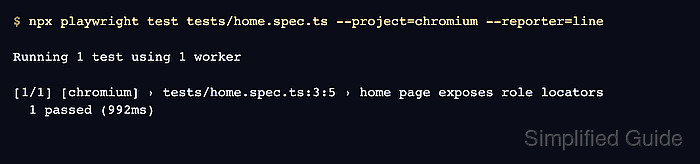
$ npx playwright test tests/home.spec.ts --project=chromium --reporter=line

Running 1 test using 1 worker

[1/1] [chromium] › tests/home.spec.ts:3:5 › home page exposes role locators
  1 passed (992ms)
Use the browser project that normally covers the component or page under test. The line reporter keeps the output compact enough to confirm the spec file, project, and final pass count.
Related: How to run specific Playwright tests
- Temporarily change one role locator to a name the page does not expose.
await expect(page.getByRole('button', { name: 'Submit' })).toBeVisible(); - Run the focused spec again and read the locator failure.
$ npx playwright test tests/home.spec.ts --project=chromium --reporter=line

Running 1 test using 1 worker

[1/1] [chromium] › tests/home.spec.ts:3:5 › home page exposes role locators
  1) [chromium] › tests/home.spec.ts:3:5 › home page exposes role locators

    Error: expect(locator).toBeVisible() failed

    Locator: getByRole('button', { name: 'Submit' })
    Expected: visible
    Timeout: 5000ms
    Error: element(s) not found

    Call log:
      - Expect "toBeVisible" with timeout 5000ms
      - waiting for getByRole('button', { name: 'Submit' })

  1 failed
The failure points at the role and accessible name Playwright waited for. Fix the locator when it names the wrong UI text, or fix the page markup when the intended control lacks the accessible name a user should get.
- Restore the accessible name that matches the UI and rerun the spec.
$ npx playwright test tests/home.spec.ts --project=chromium --reporter=line

Running 1 test using 1 worker

[1/1] [chromium] › tests/home.spec.ts:3:5 › home page exposes role locators
  1 passed (780ms)