How to set the PHP timezone
Setting the correct PHP timezone keeps log timestamps, scheduled jobs, cache expiry, and generated dates aligned with the same local time reference. When the runtime falls back to the wrong zone, incident timelines drift, queued work appears late or early, and application output stops matching the system or database clocks it is compared against.
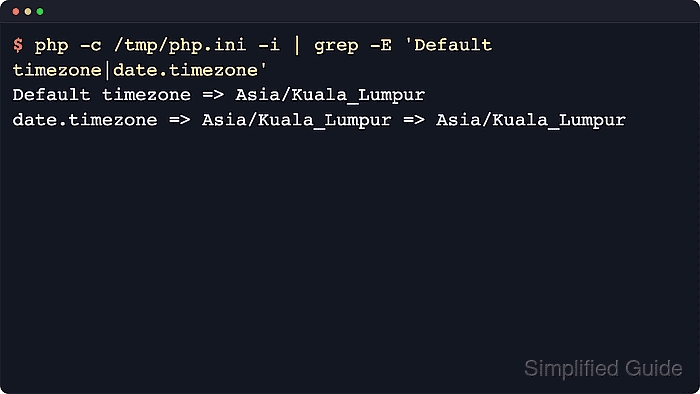
PHP resolves its default timezone from the runtime that executes the request. Code that calls date_default_timezone_set() overrides the runtime value for that request, otherwise the loaded date.timezone directive is used, and UTC is used when no valid timezone is available. The important operational detail is that CLI, PHP-FPM, and Apache module runtimes can each load a different php.ini and additional .ini files, so the active SAPI has to be identified before editing anything.
A full Region/City identifier such as Asia/Kuala_Lumpur keeps daylight-saving and historical offset data consistent, while invalid date.timezone values trigger a startup warning and fall back to UTC. Examples below use common package-managed Linux paths, but the same flow applies on other platforms once the loaded configuration file, override layers, and served runtime are confirmed.
Related: How to check PHP version
Steps to set the PHP timezone:
- Check which php.ini file the current CLI binary loads.
$ php --ini
Configuration File (php.ini) Path: "/etc/php/8.5/cli"
Loaded Configuration File:         "/etc/php/8.5/cli/php.ini"
Scan for additional .ini files in: "/etc/php/8.5/cli/conf.d"
Additional .ini files parsed:      /etc/php/8.5/cli/conf.d/10-pdo.ini,
                                   /etc/php/8.5/cli/conf.d/20-readline.ini,
##### snipped #####
Package-managed Linux hosts commonly use paths such as /etc/php/8.5/cli/php.ini, /etc/php/8.5/fpm/php.ini, /etc/php/8.5/apache2/php.ini, or /etc/php.ini.
Related: How to find PHP configuration files
- Check the current default timezone from the same PHP binary.
$ php -r 'echo date_default_timezone_get(), PHP_EOL;'
UTC
If this command already returns the required timezone, check the served runtime separately before changing files. CLI output does not prove what PHP-FPM or an Apache module uses.
- Check runtime-specific override layers before editing php.ini.
$ sudoedit /etc/php/8.5/fpm/pool.d/www.conf
For PHP-FPM, an uncommented php_value[date.timezone] or php_admin_value[date.timezone] line in a pool file overrides the value loaded from php.ini. For an Apache module, check the virtual host or included Apache configuration for php_value date.timezone.
On CGI or FastCGI deployments, a .user.ini file can still replace the value inside part of the application tree.
- Back up the target php.ini file before changing the timezone directive.
$ sudo cp /etc/php/8.5/fpm/php.ini /etc/php/8.5/fpm/php.ini.bak
Replace the sample path with the actual file for the CLI, PHP-FPM, or Apache runtime that needs the new default.
- Set the date.timezone directive to the required timezone identifier in the target php.ini file.
$ sudoedit /etc/php/8.5/fpm/php.ini
[Date]
date.timezone = Asia/Kuala_Lumpur
Use a full Region/City identifier from the supported timezone list instead of abbreviations such as EST or BST.
Leaving the directive empty or setting an invalid identifier makes current PHP warn and use UTC during startup.
- Load the target php.ini file directly and confirm that PHP now reports the expected timezone.
$ php -c /etc/php/8.5/fpm/php.ini --ri date
date

date/time support => enabled
##### snipped #####
Default timezone => Asia/Kuala_Lumpur

Directive => Local Value => Master Value
date.timezone => Asia/Kuala_Lumpur => Asia/Kuala_Lumpur
##### snipped #####
The -c option tests the selected configuration file with the CLI parser. It confirms the file value before the serving process reloads it.
- Reload the service that serves PHP requests when the change applies to PHP-FPM or an Apache module.
$ sudo systemctl reload php8.5-fpm
Reload Apache instead with sudo systemctl reload apache2 when PHP runs as an Apache module. No service reload is required for a CLI-only change because new CLI processes read the updated php.ini automatically.
- Check that the reloaded service stayed active.
$ systemctl is-active php8.5-fpm
active
Use the matching Apache unit when the site runs as an Apache module instead of PHP-FPM.
- Create a temporary probe file in the document root when the application runs through a web-facing SAPI that differs from the CLI binary.
$ sudoedit /var/www/example.com/public/timezone-check.php
<?php
header('Content-Type: text/plain');
echo date_default_timezone_get(), PHP_EOL;
?>
Use the document root served by the same virtual host or PHP-FPM pool that handles the application.
Create the probe only for the brief verification window because it exposes runtime behavior over HTTP.
- Request the probe URL and confirm that the served runtime returns the expected timezone.
$ curl -s http://example.com/timezone-check.php
Asia/Kuala_Lumpur
The response confirms the default timezone seen by the served runtime, not just the CLI binary. Replace the URL with the target site.
- Remove the temporary probe file immediately after the check.
$ sudo rm /var/www/example.com/public/timezone-check.php
Leaving the probe reachable exposes runtime details that should not remain available over HTTP.