How to configure PHP OPcache memory
Undersized OPcache shared memory forces PHP workers to evict cached bytecode sooner, rebuild scripts more often, and spend extra CPU on work that should stay in memory between requests. Tuning the cache size matters most on busy sites, large frameworks, and hosts where several applications share the same OPcache instance.
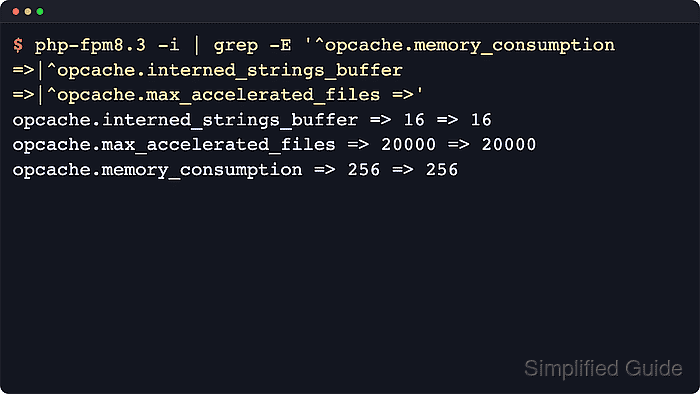
The main sizing directives are opcache.memory_consumption for bytecode storage, opcache.interned_strings_buffer for deduplicated strings, and opcache.max_accelerated_files for the script hash table. The PHP manual keeps all three at INI_SYSTEM scope, so the effective values must come from the loaded Server API configuration, a later .ini drop-in, PHP-FPM pool overrides, or web-server FastCGI parameters rather than from application code.
Current distro packages do not all place those directives in the same file. Recent Ubuntu packages can expose OPcache without a separate opcache.ini module file, while the commented sizing defaults still live in the Server API-specific php.ini. The safe workflow is to query the runtime that serves requests, check for existing overrides, put the change in the last-loaded active layer, test the runtime configuration, and then reload the service.
Steps to configure PHP OPcache memory:
- Check the current OPcache memory values in the runtime that serves the application.
$ php-fpm8.5 -i
##### snipped #####
Loaded Configuration File => /etc/php/8.5/fpm/php.ini
Scan this dir for additional .ini files => /etc/php/8.5/fpm/conf.d
##### snipped #####
opcache.interned_strings_buffer => 8 => 8
opcache.max_accelerated_files => 10000 => 10000
opcache.memory_consumption => 128 => 128
Use the matching binary name such as php-fpm or php-fpm8.4 when the installed package uses a different branch. If Apache mod_php, per-pool php_admin_value[] entries, or web-server PHP_ADMIN_VALUE headers can override the same directives, confirm the final values from a temporary request handled by that site instead of relying on the binary alone.
- Search the active configuration tree for every place that defines the OPcache sizing directives before editing anything.
$ sudo grep -REn 'opcache.(memory_consumption|interned_strings_buffer|max_accelerated_files)' /etc/php/8.5/fpm /etc/php/8.5/mods-available
/etc/php/8.5/fpm/php.ini:1690:;opcache.memory_consumption=128
/etc/php/8.5/fpm/php.ini:1693:;opcache.interned_strings_buffer=8
/etc/php/8.5/fpm/php.ini:1697:;opcache.max_accelerated_files=10000
These lines are commented package defaults, so a later FPM drop-in can hold the active site value. If the search returns an uncommented value in /etc/php/<version>/fpm/conf.d, a PHP-FPM pool file, or a web-server override, edit that winning layer instead of adding a duplicate earlier in the load order. On Fedora, RHEL, Rocky, AlmaLinux, or CentOS Stream, search /etc/php.ini, /etc/php.d, and /etc/php-fpm.d instead.
Related: How to find PHP configuration files
- Open a PHP-FPM drop-in that loads after the package defaults.
$ sudoedit /etc/php/8.5/fpm/conf.d/99-opcache-memory.ini
If the previous search found an existing active override, open that file instead. A dedicated Server API drop-in keeps the memory sizing change separate from the packaged php.ini file and can be removed to roll back the change.
- Set OPcache memory values that fit the application footprint and script count.
opcache.memory_consumption=256
opcache.interned_strings_buffer=16
opcache.max_accelerated_files=20000
opcache.memory_consumption cannot be set below 8 MB. opcache.max_accelerated_files is clamped to 200 through 1000000, and the runtime rounds the requested value up to the next supported prime-sized hash table.
Raise opcache.memory_consumption when the cache stays short on free memory after normal traffic warms it. Raise opcache.max_accelerated_files when the number of cached keys approaches the maximum or the cache records hash restarts, and raise opcache.interned_strings_buffer when interned string free space stays tight.
- Test the PHP-FPM configuration before reloading the service.
$ sudo php-fpm8.5 -t
[06-Jun-2026 01:51:31] NOTICE: configuration file /etc/php/8.5/fpm/php-fpm.conf test is successful
Use the matching binary for the installed package, such as php-fpm on RHEL-family hosts. If Apache mod_php serves the site, validate the surrounding web-server configuration before reloading it.
Do not reload the service until the configuration test succeeds.
- Reload the runtime that serves PHP requests so new workers pick up the updated OPcache limits.
$ sudo systemctl reload php8.5-fpm
Reload Apache instead with sudo systemctl reload apache2 or sudo systemctl reload httpd when PHP runs as an Apache module. On Ubuntu and Debian, the PHP-FPM unit is usually versioned such as php8.5-fpm, while RHEL-family systems commonly use php-fpm.
- Verify the new OPcache limits from the same runtime after the reload.
$ php-fpm8.5 -i
##### snipped #####
opcache.interned_strings_buffer => 16 => 16
opcache.max_accelerated_files => 20000 => 20000
opcache.memory_consumption => 256 => 256
If a request-handled probe is available, check opcache_get_status(false) after normal traffic warms the cache and review memory_usage.free_memory, interned_strings_usage.free_memory, opcache_statistics.num_cached_keys, opcache_statistics.max_cached_keys, oom_restarts, and hash_restarts before deciding to increase the limits again. A fresh reload starts with an empty cache, so immediate post-reload headroom is only a baseline.
Related: How to find PHP configuration files