How to increase the PHP max_input_vars limit
Large admin forms, product variation editors, menu builders, and settings pages can silently lose part of a submission when the request contains more fields than PHP accepts. Raising max_input_vars keeps legitimate large forms from dropping checkboxes, repeated rows, or nested options during save.
The PHP manual describes max_input_vars as the limit on accepted input variables and notes that the cap is applied separately to $_GET, $_POST, and $_COOKIE. The same manual marks the directive as INI_PERDIR, so the effective value can come from the loaded web-runtime php.ini, a PHP-FPM pool override, a per-directory .user.ini on CGI/FastCGI, or an Apache php_value override when PHP runs as a module.
The safest workflow is to confirm the live site runtime first, then raise the directive in the layer that actually wins for that request path. .user.ini files are ignored when the site runs through the Apache module, while CGI/FastCGI deployments re-read them on the default user_ini.cache_ttl interval of 300 seconds, so the new value may not appear immediately. Keep the new ceiling close to the largest legitimate form instead of setting it arbitrarily high because PHP has to parse every accepted variable, and the directive exists partly to reduce hash-collision request abuse.
Related: How to increase PHP upload size limit
Related: How to increase PHP memory limit
Related: How to increase PHP maximum execution time
Steps to increase the PHP max_input_vars limit:
- Create a temporary diagnostic script in the same document root or application path that needs the higher field limit.
<?php
header('Content-Type: text/plain');
printf("SAPI=%s\n", PHP_SAPI);
printf("Loaded php.ini=%s\n", php_ini_loaded_file() ?: 'none');
printf("max_input_vars=%s\n", ini_get('max_input_vars'));
printf("user_ini.filename=%s\n", ini_get('user_ini.filename'));
printf("user_ini.cache_ttl=%s\n", ini_get('user_ini.cache_ttl'));
?>
Keep the filename unguessable or place it in a restricted path when the site is public, and remove it after the new limit is confirmed because it exposes runtime details.
- Request the diagnostic script through the same URL path, virtual host, or pool that serves the application.
$ curl -s https://app.example.test/php-input-vars-check.php
SAPI=apache2handler
Loaded php.ini=/etc/php/8.5/apache2/php.ini
max_input_vars=1000
user_ini.filename=.user.ini
user_ini.cache_ttl=300
If the response shows apache2handler, follow the Apache module configuration tree and any Apache php_value overrides. .user.ini files do not apply to that SAPI even though the runtime can still report the user_ini.* directive values.
If the response shows fpm-fcgi or cgi-fcgi, also inspect PHP-FPM pool overrides and any nearer application-level .user.ini file before changing the main php.ini.
Related: How to find PHP configuration files
- Search the override layers that can beat the base web-runtime php.ini for the same request path.
$ sudo grep -R "max_input_vars" /etc/php/8.5/fpm/pool.d /etc/php-fpm.d 2>/dev/null
$ sudo grep -R "max_input_vars" /etc/apache2 /etc/httpd 2>/dev/null
$ find /var/www/app.example.test \( -name .user.ini -o -name .htaccess \) -print
No output from the PHP-FPM or Apache grep means that layer is not currently overriding max_input_vars. On CGI/FastCGI, a nearer .user.ini can still override the base php.ini for only one application tree. On Apache module deployments, a local .htaccess can do the same when overrides are allowed.
Related: How to find PHP configuration files
Related: Locate Apache configuration files - Back up the file that currently controls the effective value before changing it.
$ sudo cp /etc/php/8.5/apache2/php.ini /etc/php/8.5/apache2/php.ini.bak-$(date +%Y%m%d%H%M%S)
Back up the file reported by the diagnostic and override checks, such as the active Apache or PHP-FPM php.ini, a pool file, a virtual-host file, .htaccess, or a nearby .user.ini instead of assuming the global FPM php.ini always wins.
Keep the rollback copy until the higher limit is confirmed from the diagnostic request.
- Open the same file in a text editor.
$ sudoedit /etc/php/8.5/apache2/php.ini
On the verified Ubuntu 26.04 package set, the Apache module uses /etc/php/8.5/apache2/php.ini and PHP-FPM uses /etc/php/8.5/fpm/php.ini. Open the versioned path shown by the diagnostic script, or open the pool file, virtual-host file, .htaccess, or .user.ini when an override layer already owns the active value.
Related: How to find PHP configuration files
- Set max_input_vars in the active layer to the smallest value that still fits the largest legitimate submission.
; In php.ini or .user.ini
max_input_vars = 3000

; In a PHP-FPM pool file
php_admin_value[max_input_vars] = 3000

# In an Apache virtual host or .htaccess
php_value max_input_vars 3000
Because the directive is INI_PERDIR, the supported syntax depends on the layer that actually controls the request. When a PHP-FPM pool file already owns the value, keep the existing php_value[] or php_admin_value[] style instead of moving the change to the global php.ini.
The limit is applied separately to $_GET, $_POST, and $_COOKIE, so set it only high enough for the real form shape instead of using an arbitrary large number.
- Test the runtime configuration before reloading when the change was made in PHP-FPM or an Apache main configuration file.
$ sudo php-fpm8.5 -t
[06-Jun-2026 01:29:27] NOTICE: configuration file /etc/php/8.5/fpm/php-fpm.conf test is successful
$ sudo apachectl configtest
AH00558: apache2: Could not reliably determine the server's fully qualified domain name, using 203.0.113.10. Set the 'ServerName' directive globally to suppress this message
Syntax OK
Run only the command that matches the edited runtime file. Skip this syntax test when the change lives only in .user.ini or .htaccess because those files are parsed during requests instead of by a service reload. The AH00558 message is a global ServerName warning; Syntax OK still confirms that Apache parsed the edited configuration.
Do not reload the matching service until the configuration test succeeds.
- Apply the new value in the layer that serves the site.
$ sudo systemctl reload php8.5-fpm
$ sudo systemctl reload apache2
Reload only when the edited file is php.ini, a PHP-FPM pool file, or an Apache main configuration file. A .htaccess change is read on the next request, while a .user.ini change appears after the user_ini.cache_ttl interval instead of a service reload.
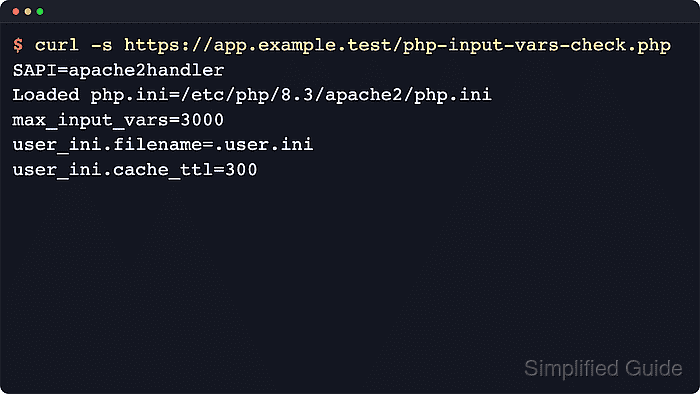
- Request the same diagnostic script again and confirm the higher limit from the live site runtime.
$ curl -s https://app.example.test/php-input-vars-check.php
SAPI=apache2handler
Loaded php.ini=/etc/php/8.5/apache2/php.ini
max_input_vars=3000
user_ini.filename=.user.ini
user_ini.cache_ttl=300
If the old value still appears, inspect later PHP-FPM pool overrides, Apache php_value overrides, a nearer .user.ini or .htaccess, or a different virtual host or pool than the one serving the application path.
Related: How to find PHP configuration files
- Remove the temporary diagnostic script after the higher limit is confirmed.
$ sudo rm /var/www/app.example.test/public/php-input-vars-check.php
Leaving the script in place keeps the site's SAPI, loaded php.ini path, and active runtime limit visible to anyone who can reach the URL.