How to configure PHP error logging
Configuring PHP error logging keeps warnings, notices, and fatal failures available for troubleshooting without sending stack traces, internal paths, or query fragments back to the client. A dedicated script-error log also separates application diagnostics from web-server access logs and the PHP-FPM master log, which makes production failures easier to triage.
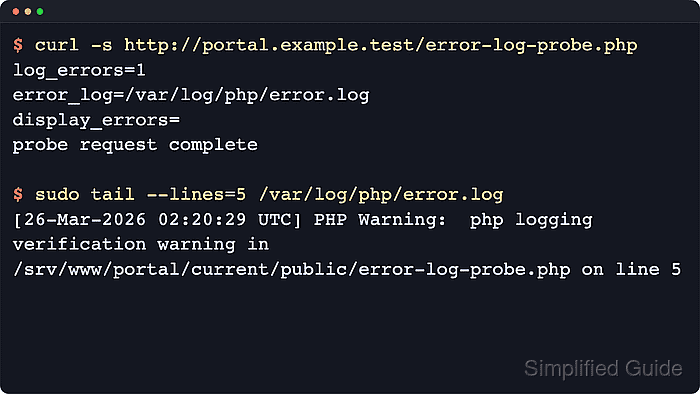
PHP writes script diagnostics only when log_errors is enabled, and the error_log directive decides whether those events go to a file or to syslog. On PHP-FPM hosts, the effective values can still be overridden later by pool-level php_value[] or php_admin_value[] directives, or by FastCGI PHP_VALUE and PHP_ADMIN_VALUE headers from the web server, so the active request path has to be checked before assuming one php.ini file controls everything.
Examples use the packaged PHP-FPM layout common on Ubuntu or Debian hosts, where web requests use a versioned binary such as php-fpm8.5 and a matching file such as /etc/php/8.5/fpm/php.ini. Substitute the branch installed on the target host, keep display_errors = Off on internet-facing applications, create a log path writable by the pool user, and reload the matching PHP-FPM service only after the configuration test succeeds.
Steps to configure PHP error logging:
- Check which PHP-FPM php.ini file is loaded for the runtime that serves the site.
$ php-fpm8.5 -i | grep 'Loaded Configuration File'
Loaded Configuration File => /etc/php/8.5/fpm/php.ini
Use php-fpm instead of php-fpm8.5 when the local binary is not versioned. php --ini reports the CLI configuration only, which can differ from the file used by PHP-FPM.
Related: How to find PHP configuration files
- Search the active PHP-FPM pool files for logging directives that can override the error-log settings from php.ini.
$ sudo grep -R "error_log\|log_errors\|display_errors" /etc/php/8.5/fpm/pool.d
/etc/php/8.5/fpm/pool.d/www.conf:;php_flag[display_errors] = off
/etc/php/8.5/fpm/pool.d/www.conf:;php_admin_value[error_log] = /var/log/fpm-php.www.log
/etc/php/8.5/fpm/pool.d/www.conf:;php_admin_flag[log_errors] = on
Lines beginning with ; are examples or comments. If an uncommented php_value[], php_admin_value[], php_flag[], or php_admin_flag[] line appears for one of these settings, adjust that pool setting or keep it intentionally because it can override the php.ini value for requests served by the pool. Web-server FastCGI PHP_VALUE or PHP_ADMIN_VALUE headers can still override the request path later, so check those as well if the final probe does not match the edited values.
- Back up the active php.ini file before editing it.
$ sudo cp /etc/php/8.5/fpm/php.ini /etc/php/8.5/fpm/php.ini.bak-$(date +%Y%m%d%H%M%S)
- Open the active PHP-FPM php.ini file in a text editor.
$ sudo vi /etc/php/8.5/fpm/php.ini
Replace the sample path with the file reported in the first step when the host uses a different PHP branch or packaging layout.
- Set the logging directives so PHP writes script errors to a dedicated file.
log_errors = On
error_log = /var/log/php/error.log
error_log_mode = 0640
display_errors = Off
The PHP manual documents error_log_mode as available from PHP 8.2 onward. On older runtimes, omit that line and create the file with the required mode ahead of time.
Set error_log = syslog instead of a file path when the host forwards PHP diagnostics to the system logger or a centralized collector.
Add error_reporting = E_ALL when notices and deprecations should be logged as well as warnings and fatal errors.
Keeping display_errors = On on an internet-facing application can leak internal paths, queries, and stack details to clients.
- Create the log directory and log file with ownership that matches the PHP-FPM pool user.
$ sudo install -d -o root -g www-data -m 0755 /var/log/php
$ sudo install -o www-data -g www-data -m 0640 /dev/null /var/log/php/error.log
Replace www-data if the pool uses a different user or group in the matching file under /etc/php/8.5/fpm/pool.d/.
- Run a PHP-FPM configuration test before reloading the service.
$ sudo php-fpm8.5 -t
[05-Jun-2026 21:32:30] NOTICE: configuration file /etc/php/8.5/fpm/php-fpm.conf test is successful
Some distributions expose the generic binary name php-fpm instead of a versioned binary. Use php-fpm -tt only when a resolved dump of global and pool settings is needed.
Do not reload the service until the configuration test succeeds.
- Reload PHP-FPM so the new logging directives apply to new requests.
$ sudo systemctl reload php8.5-fpm
On Fedora, Red Hat, or CentOS, the service unit is commonly php-fpm.
- Create a temporary probe script inside the document root served by the edited PHP-FPM pool.
$ sudo tee /var/www/html/error-log-probe.php >/dev/null <<'PHP'
<?php
printf("log_errors=%s\n", ini_get("log_errors"));
printf("error_log=%s\n", ini_get("error_log"));
printf("display_errors=%s\n", ini_get("display_errors"));
trigger_error('php logging verification warning', E_USER_WARNING);
echo "probe request complete", PHP_EOL;
PHP
Replace /var/www/html with the real document root for the site that uses this pool. Using a served probe confirms the same PHP-FPM pool and web-server override layers that handle live traffic.
Remove the probe file after the log entry is confirmed so a diagnostic endpoint is not left exposed.
- Request the probe file through the same host and path that reach the edited pool.
$ curl -s http://portal.example.test/error-log-probe.php
log_errors=1
error_log=/var/log/php/error.log
display_errors=
probe request complete
If the application is only reachable through HTTPS, a local vhost name, or an internal reverse proxy, use that exact URL instead of the masked example URL.
An empty display_errors value or 0 both mean the directive is disabled for that request. If the output still shows an old error_log path or log_errors state, re-check pool and web-server overrides before assuming the php.ini edit failed.
- Inspect the configured log file for the matching warning entry.
$ sudo cat /var/log/php/error.log
##### snipped
[05-Jun-2026 21:32:30 UTC] PHP Warning:  php logging verification warning in /var/www/html/error-log-probe.php on line 5
The timestamp, document root, and line number vary, but the warning text and probe path should match the temporary script.
- Remove the temporary probe file after the log entry is confirmed.
$ sudo rm /var/www/html/error-log-probe.php