How to track video motion with optical flow in OpenCV
Sparse optical flow follows selected image points through consecutive video frames so motion can be measured or drawn without detecting the object again in every frame. In OpenCV, the Lucas-Kanade tracker works on visible feature points and is suited to clips where movement between adjacent frames stays within the search window.
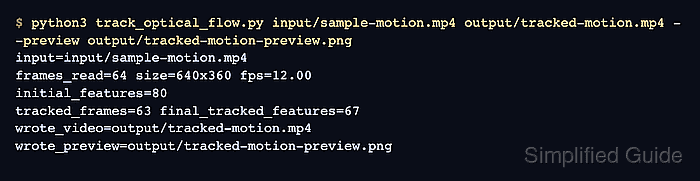
The Python workflow reads a source clip with VideoCapture, finds corners in the first frame with goodFeaturesToTrack(), and passes each frame pair to calcOpticalFlowPyrLK(). It writes an annotated MP4 and a PNG preview of the last tracked frame so the tracks can be checked before the coordinates feed another measurement or filtering step.
Start with footage that has visible texture, steady lighting, and no hard scene cuts. Fast blur, large occlusions, or a moving camera can drop points, so the run report prints the initial feature count, tracked frame count, and final retained feature count.
Steps to track video motion with OpenCV optical flow:
- Create folders for the source clip and tracked output.
$ mkdir -p input output
- Copy the video into the input folder.
$ cp ~/Videos/sample-motion.mp4 input/sample-motion.mp4
Replace ~/Videos/sample-motion.mp4 with the clip to track. Keep the later command path aligned with the copied filename.
- Save the sparse optical-flow script as track_optical_flow.py.
- track_optical_flow.py
#!/usr/bin/env python3
from argparse import ArgumentParser
from pathlib import Path

import cv2 as cv
import numpy as np


parser = ArgumentParser(description="Track sparse optical flow points in a video with OpenCV.")
parser.add_argument("input_video", help="Input video path.")
parser.add_argument("output_video", help="Output video path with optical-flow tracks drawn on frames.")
parser.add_argument("--preview", default="output/optical-flow-preview.png", help="Output PNG path for the last tracked frame.")
parser.add_argument("--max-corners", type=int, default=80, help="Maximum feature points to detect in the first frame.")
parser.add_argument("--quality", type=float, default=0.01, help="Corner quality threshold for goodFeaturesToTrack().")
parser.add_argument("--min-distance", type=float, default=7.0, help="Minimum pixel distance between detected features.")
args = parser.parse_args()

capture = cv.VideoCapture(args.input_video)
if not capture.isOpened():
    raise SystemExit(f"Could not open video: {args.input_video}")

ok, first_frame = capture.read()
if not ok or first_frame is None:
    raise SystemExit(f"Could not read the first frame from: {args.input_video}")

height, width = first_frame.shape[:2]
fps = capture.get(cv.CAP_PROP_FPS) or 25.0
old_gray = cv.cvtColor(first_frame, cv.COLOR_BGR2GRAY)

feature_params = dict(
    maxCorners=args.max_corners,
    qualityLevel=args.quality,
    minDistance=args.min_distance,
    blockSize=7,
)
old_points = cv.goodFeaturesToTrack(old_gray, mask=None, **feature_params)
if old_points is None or len(old_points) == 0:
    raise SystemExit("No trackable feature points were found in the first frame.")

output_path = Path(args.output_video)
preview_path = Path(args.preview)
output_path.parent.mkdir(parents=True, exist_ok=True)
preview_path.parent.mkdir(parents=True, exist_ok=True)

writer = cv.VideoWriter(str(output_path), cv.VideoWriter_fourcc(*"mp4v"), fps, (width, height))
if not writer.isOpened():
    raise SystemExit(f"Could not open VideoWriter for: {output_path}")

rng = np.random.default_rng(7)
colors = rng.integers(80, 255, size=(args.max_corners, 3), dtype=np.uint8)
track_mask = np.zeros_like(first_frame)
lk_params = dict(
    winSize=(21, 21),
    maxLevel=3,
    criteria=(cv.TERM_CRITERIA_EPS | cv.TERM_CRITERIA_COUNT, 10, 0.03),
)

initial_features = len(old_points)
tracked_frames = 0
final_tracked_features = initial_features
frame_count = 1
preview_frame = first_frame.copy()

for point in old_points.reshape(-1, 2):
    x, y = point.astype(int)
    cv.circle(preview_frame, (x, y), 4, (0, 255, 255), -1)
writer.write(preview_frame)

while True:
    ok, frame = capture.read()
    if not ok or frame is None:
        break

    frame_count += 1
    frame_gray = cv.cvtColor(frame, cv.COLOR_BGR2GRAY)
    new_points, status, _ = cv.calcOpticalFlowPyrLK(old_gray, frame_gray, old_points, None, **lk_params)
    if new_points is None or status is None:
        break

    keep = status.reshape(-1) == 1
    good_new = new_points[keep]
    good_old = old_points[keep]
    if len(good_new) == 0:
        break

    for index, (new, old) in enumerate(zip(good_new, good_old)):
        x_new, y_new = new.ravel().astype(int)
        x_old, y_old = old.ravel().astype(int)
        color = tuple(int(value) for value in colors[index % len(colors)])
        cv.line(track_mask, (x_new, y_new), (x_old, y_old), color, 2)
        cv.circle(frame, (x_new, y_new), 4, color, -1)

    preview_frame = cv.add(frame, track_mask)
    writer.write(preview_frame)
    tracked_frames += 1
    final_tracked_features = len(good_new)
    old_gray = frame_gray
    old_points = good_new.reshape(-1, 1, 2)

capture.release()
writer.release()

if not cv.imwrite(str(preview_path), preview_frame):
    raise SystemExit(f"Could not write preview image: {preview_path}")

print(f"input={args.input_video}")
print(f"frames_read={frame_count} size={width}x{height} fps={fps:.2f}")
print(f"initial_features={initial_features}")
print(f"tracked_frames={tracked_frames} final_tracked_features={final_tracked_features}")
print(f"wrote_video={output_path}")
print(f"wrote_preview={preview_path}")
goodFeaturesToTrack() selects corners from the first frame. calcOpticalFlowPyrLK() then returns each point's next position and a status flag for whether the point was found.
- Run the tracker against the input clip.
$ python3 track_optical_flow.py input/sample-motion.mp4 output/tracked-motion.mp4 --preview output/tracked-motion-preview.png
input=input/sample-motion.mp4
frames_read=64 size=640x360 fps=12.00
initial_features=80
tracked_frames=63 final_tracked_features=67
wrote_video=output/tracked-motion.mp4
wrote_preview=output/tracked-motion-preview.png
- Review the tracked-frame preview.
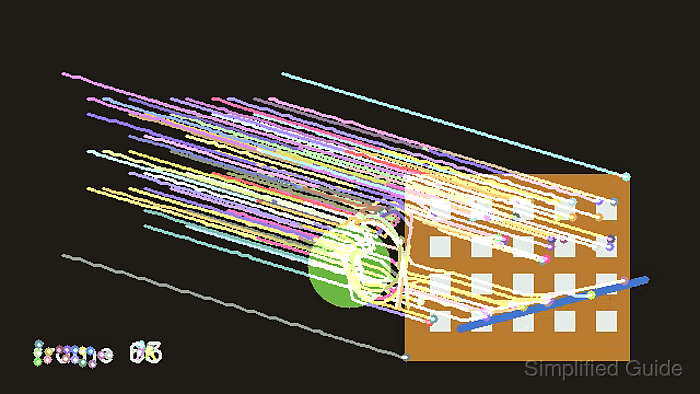
Colored lines show where retained points moved through the clip. If most tracks vanish early, try a shorter clip, slower motion, a larger --max-corners value, or a source frame with more visible corners.
- Verify that the tracked video and preview can be reopened.
$ python3 - <<'PY'
from pathlib import Path
import cv2 as cv

tracked_video = Path("output/tracked-motion.mp4")
preview = Path("output/tracked-motion-preview.png")
capture = cv.VideoCapture(str(tracked_video))
ok, frame = capture.read()
print(f"tracked_video_exists={tracked_video.is_file()}")
print(f"preview_exists={preview.is_file()}")
print(f"first_frame_read={ok}")
if ok:
    print(f"first_frame_shape={frame.shape[1]}x{frame.shape[0]}")
capture.release()
PY
tracked_video_exists=True
preview_exists=True
first_frame_read=True
first_frame_shape=640x360