Background subtraction separates moving pixels from a mostly fixed video scene. In OpenCV, the resulting foreground mask can feed motion counters, object trackers, or activity alerts without retaining the original frame colors.
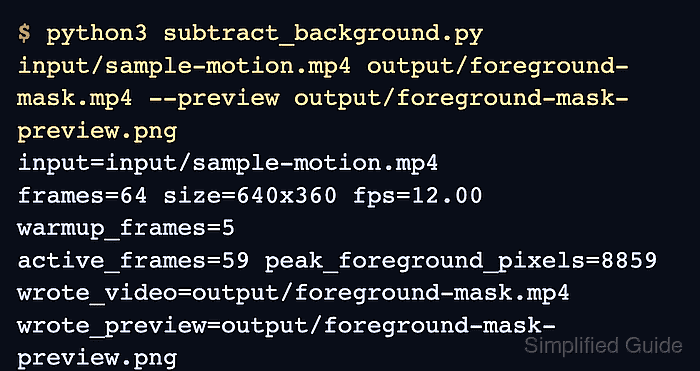
The Python program uses cv.VideoCapture for input, cv.createBackgroundSubtractorMOG2 for the adaptive background model, and cv.VideoWriter for the mask video. It also saves the strongest post-settling mask as a PNG so the detected shape can be inspected without playing the output clip.
A stationary camera produces the clearest separation. Camera movement, sudden lighting changes, or objects that stop for long periods can shift the model, so the program reports its settling period, active-frame count, and peak foreground-pixel count before the mask is used elsewhere.
Steps to subtract a video background with OpenCV:
- Place the source clip at input/sample-motion.mp4.
Footage from a mostly stationary camera produces the clearest mask. The run command accepts another source path when needed.
- Create subtract_background.py with the argument parser and input-video checks.
- subtract_background.py
from argparse import ArgumentParser
from pathlib import Path

import cv2 as cv


parser = ArgumentParser(description="Subtract a video background with OpenCV MOG2.")
parser.add_argument("input_video", help="Input video path.")
parser.add_argument("mask_video", help="Output video path for the foreground mask.")
parser.add_argument(
    "--preview",
    default="output/foreground-mask-preview.png",
    help="Output PNG path for the strongest mask frame.",
)
parser.add_argument("--history", type=int, default=80)
parser.add_argument("--var-threshold", type=float, default=25.0)
parser.add_argument("--warmup", type=int, default=12)
args = parser.parse_args()

capture = cv.VideoCapture(args.input_video)
if not capture.isOpened():
    raise SystemExit(f"Could not open video: {args.input_video}")

fps = capture.get(cv.CAP_PROP_FPS) or 25.0
width = int(capture.get(cv.CAP_PROP_FRAME_WIDTH))
height = int(capture.get(cv.CAP_PROP_FRAME_HEIGHT))
if width <= 0 or height <= 0:
    raise SystemExit("Could not read frame size from the input video.")
- Append the background-subtraction initialization block after the frame-size check.
- subtract_background.py
mask_path = Path(args.mask_video)
preview_path = Path(args.preview)
mask_path.parent.mkdir(parents=True, exist_ok=True)
preview_path.parent.mkdir(parents=True, exist_ok=True)

writer = cv.VideoWriter(
    str(mask_path),
    cv.VideoWriter_fourcc(*"mp4v"),
    fps,
    (width, height),
)
if not writer.isOpened():
    raise SystemExit(f"Could not create mask video: {mask_path}")

subtractor = cv.createBackgroundSubtractorMOG2(
    history=args.history,
    varThreshold=args.var_threshold,
    detectShadows=True,
)

frame_count = 0
active_frames = 0
peak_pixels = 0
peak_mask = None
MOG2 uses 127 for detected shadows and 255 for foreground by default. The processing loop thresholds at 254 so the saved mask keeps only definite foreground pixels.
- Append the frame-processing loop after the MOG2 initialization block.
- subtract_background.py
while True:
    ok, frame = capture.read()
    if not ok:
        break

    frame_count += 1
    raw_mask = subtractor.apply(frame)
    _, foreground_mask = cv.threshold(raw_mask, 254, 255, cv.THRESH_BINARY)
    writer.write(cv.cvtColor(foreground_mask, cv.COLOR_GRAY2BGR))

    if frame_count > args.warmup:
        foreground_pixels = cv.countNonZero(foreground_mask)
        if foreground_pixels:
            active_frames += 1
        if foreground_pixels > peak_pixels:
            peak_pixels = foreground_pixels
            peak_mask = foreground_mask.copy()
- Append the output finalization and run-report block after the frame loop.
- subtract_background.py
capture.release()
writer.release()

if frame_count == 0:
    raise SystemExit(f"No frames were read from: {args.input_video}")
if peak_mask is None:
    peak_mask = foreground_mask
if not cv.imwrite(str(preview_path), peak_mask):
    raise SystemExit(f"Could not write preview image: {preview_path}")

print(f"input={args.input_video}")
print(f"frames={frame_count} size={width}x{height} fps={fps:.2f}")
print(f"warmup_frames={min(args.warmup, frame_count)}")
print(f"active_frames={active_frames} peak_foreground_pixels={peak_pixels}")
print(f"wrote_video={mask_path}")
print(f"wrote_preview={preview_path}")
- Run the completed script against the input clip.
$ python3 subtract_background.py input/sample-motion.mp4 output/foreground-mask.mp4
input=input/sample-motion.mp4
frames=64 size=640x360 fps=12.00
warmup_frames=12
active_frames=52 peak_foreground_pixels=7144
wrote_video=output/foreground-mask.mp4
wrote_preview=output/foreground-mask-preview.png
- Inspect the strongest foreground-mask preview.
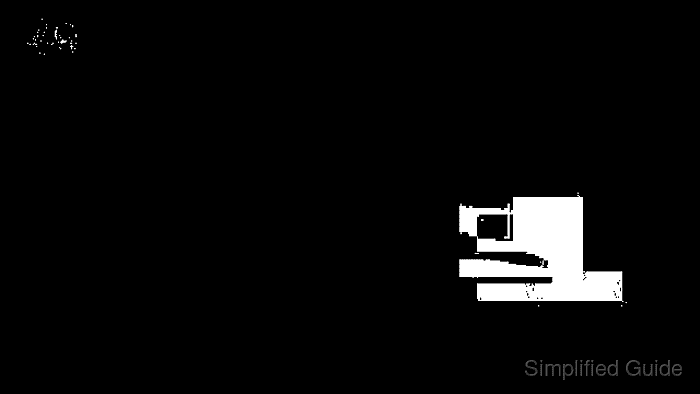
White pixels are foreground motion after the model-settling frames. A mostly white preview indicates camera movement, a sharp lighting change, or too short a settling period.
- Verify the generated foreground-mask artifacts with an independent Python check.
$ python3 - <<'PY'
from pathlib import Path

import cv2 as cv
import numpy as np

mask_video = Path("output/foreground-mask.mp4")
preview_path = Path("output/foreground-mask-preview.png")

capture = cv.VideoCapture(str(mask_video))
output_frames = int(capture.get(cv.CAP_PROP_FRAME_COUNT))
ok, first_frame = capture.read()
capture.release()

preview = cv.imread(str(preview_path), cv.IMREAD_GRAYSCALE)
if preview is None:
    raise SystemExit(f"Could not read preview: {preview_path}")

print(f"mask_video_exists={mask_video.is_file()}")
print(f"preview_exists={preview_path.is_file()}")
print(f"output_frames={output_frames}")
print(f"first_frame_read={ok}")
if ok:
    print(f"first_frame_shape={first_frame.shape[1]}x{first_frame.shape[0]}")
print(f"preview_nonzero_pixels={cv.countNonZero(preview)}")
print(f"preview_values={np.unique(preview).tolist()}")
PY
mask_video_exists=True
preview_exists=True
output_frames=64
first_frame_read=True
first_frame_shape=640x360
preview_nonzero_pixels=7144
preview_values=[0, 255]

Mohd Shakir Zakaria is a cloud architect with deep roots in software development and open-source advocacy. Certified in AWS, Red Hat, VMware, ITIL, and Linux, he specializes in designing and managing robust cloud and on-premises infrastructures.


