How to apply a perspective transform with OpenCV
Perspective transforms in OpenCV remap a four-corner image region into a new rectangular view. They are useful when a flat surface such as a document, sign, whiteboard, label, or screen was captured from an angle and needs to be straightened before measurement, OCR, matching, or annotation.
Python code uses four ordered source points and four matching destination points for the warp. cv.getPerspectiveTransform() creates the 3×3 transform matrix, and cv.warpPerspective() samples the input image through that matrix into the requested output size.
Point order matters. Match the same physical corners in both arrays, usually top-left, top-right, bottom-right, and bottom-left, and keep the warpPerspective size argument in width, height order even though image.shape reports height, width, channels.
Steps to apply a perspective transform with OpenCV:
- Create the input directory for the source image.
$ mkdir -p input
- Copy the image into the expected path.
$ cp scene.png input/scene.png
Replace scene.png with the image that contains the skewed planar region. Keep input_path aligned with the project layout when the image already lives somewhere else.
- Create the perspective transform script.
- apply_perspective_transform.py
from pathlib import Path

import cv2 as cv
import numpy as np


input_path = Path("input/scene.png")
output_path = Path("output/scene-perspective.png")

image = cv.imread(str(input_path))
if image is None:
    raise SystemExit(f"Could not read {input_path}")

source_points = np.float32([
    [125, 82],
    [600, 62],
    [670, 398],
    [35, 360],
])
output_size = (640, 360)
target_points = np.float32([
    [0, 0],
    [output_size[0] - 1, 0],
    [output_size[0] - 1, output_size[1] - 1],
    [0, output_size[1] - 1],
])

matrix = cv.getPerspectiveTransform(source_points, target_points)
warped = cv.warpPerspective(
    image,
    matrix,
    output_size,
    flags=cv.INTER_LINEAR,
    borderMode=cv.BORDER_CONSTANT,
    borderValue=(245, 245, 245),
)

output_path.parent.mkdir(parents=True, exist_ok=True)
if not cv.imwrite(str(output_path), warped):
    raise SystemExit(f"Could not write {output_path}")

print(f"source shape: {image.shape}")
print("matrix:")
print(np.array2string(matrix, precision=6, suppress_small=True))
print(f"output size: {output_size[0]}x{output_size[1]}")
print(f"output shape: {warped.shape}")
print(f"wrote: {output_path}")
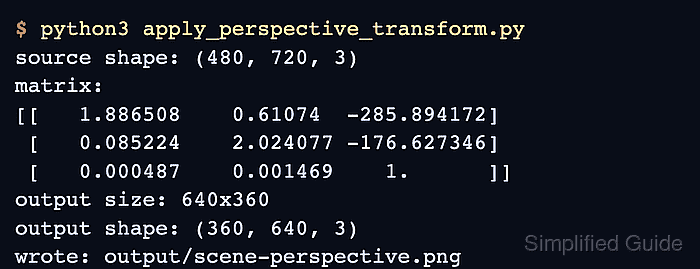
- Run the script and confirm that OpenCV wrote the warped image.
$ python3 apply_perspective_transform.py
source shape: (480, 720, 3)
matrix:
[[   1.886508    0.61074  -285.894172]
 [   0.085224    2.024077 -176.627346]
 [   0.000487    0.001469    1.      ]]
output size: 640x360
output shape: (360, 640, 3)
wrote: output/scene-perspective.png
- Replace the source points with the four corners of the planar region.
source_points = np.float32([
    [125, 82],    # top-left source corner
    [600, 62],    # top-right source corner
    [670, 398],   # bottom-right source corner
    [35, 360],    # bottom-left source corner
])
Use the same corner order in target_points. At least three of the four source points must not sit on one straight line, or getPerspectiveTransform() cannot solve a usable matrix.
- Set the destination rectangle size.
output_size = (640, 360)
target_points = np.float32([
    [0, 0],
    [output_size[0] - 1, 0],
    [output_size[0] - 1, output_size[1] - 1],
    [0, output_size[1] - 1],
])
output_size is passed to warpPerspective() as width, height. Increase it when the rectified region needs more detail, and keep the point coordinates inside that same output rectangle.
- Choose the interpolation and border behavior for the warp.
warped = cv.warpPerspective(
    image,
    matrix,
    output_size,
    flags=cv.INTER_LINEAR,
    borderMode=cv.BORDER_CONSTANT,
    borderValue=(245, 245, 245),
)
cv.INTER_LINEAR is a general-purpose interpolation choice for perspective warps. cv.BORDER_CONSTANT fills pixels outside the source image with borderValue.
- Review the transformed output image.
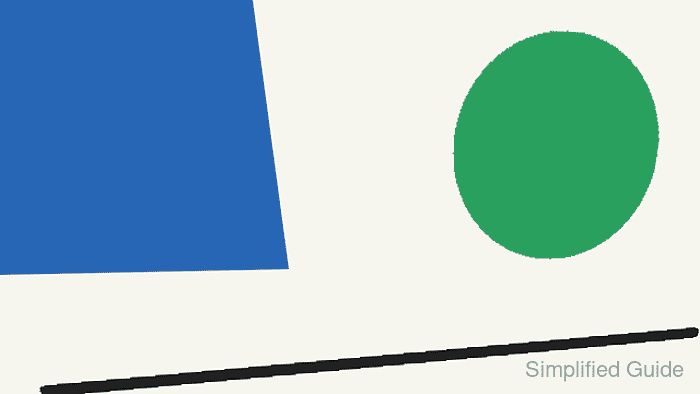
The selected quadrilateral should fill the rectangular output, and straight edges should remain straight after the warp.
- Remove the sample script after adapting the transform.
$ rm apply_perspective_transform.py