How to convert image color spaces with OpenCV
Computer-vision code often has to move the same pixels between display, masking, and analysis formats. OpenCV stores normal color images as BGR arrays, while plotting libraries, PIL, and many model inputs expect RGB, grayscale, or another channel layout.
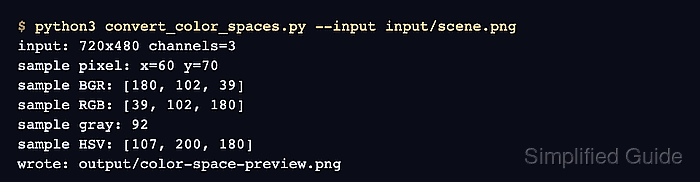
cv.cvtColor() applies a conversion code such as cv.COLOR_BGR2RGB, cv.COLOR_BGR2GRAY, or cv.COLOR_BGR2HSV to the loaded image matrix. The converted array keeps the same width and height for these conversions, while the channel count or channel meaning changes.
A file-based Python run keeps the conversion observable before the same pattern is moved into a larger pipeline. The run writes display-safe and processing-oriented outputs under output, then prints one saturated sample pixel so the BGR to RGB channel swap and the HSV values are visible in terminal output.
Related: How to read and write an image with OpenCV
Related: How to mask an image by color with OpenCV
Related: How to install OpenCV on Ubuntu
Steps to convert image color spaces with OpenCV:
- Create input and output directories.
$ mkdir -p input output
- Copy the source image into the input directory.
$ cp scene.png input/scene.png
Replace scene.png with the image to convert. Keep the input/scene.png path or update the script command to point at the project image.
- Create the color-space conversion script.
- convert_color_spaces.py
from argparse import ArgumentParser
from pathlib import Path

import cv2 as cv
import numpy as np


parser = ArgumentParser()
parser.add_argument("--input", required=True, help="Source image")
parser.add_argument("--output-dir", default="output", help="Directory for converted images")
args = parser.parse_args()

input_path = Path(args.input)
output_dir = Path(args.output_dir)
output_dir.mkdir(parents=True, exist_ok=True)

image = cv.imread(str(input_path))
if image is None:
    raise SystemExit(f"could not read input image: {input_path}")

rgb = cv.cvtColor(image, cv.COLOR_BGR2RGB)
gray = cv.cvtColor(image, cv.COLOR_BGR2GRAY)
hsv = cv.cvtColor(image, cv.COLOR_BGR2HSV)

height, width = image.shape[:2]
sample_y, sample_x = np.unravel_index(np.argmax(hsv[:, :, 1]), hsv[:, :, 1].shape)


def write_image(path, data):
    if not cv.imwrite(str(path), data):
        raise SystemExit(f"could not write output image: {path}")


rgb_path = output_dir / "scene-rgb-display.png"
gray_path = output_dir / "scene-gray.png"
hue_path = output_dir / "scene-hsv-hue.png"
preview_path = output_dir / "color-space-preview.png"

write_image(rgb_path, cv.cvtColor(rgb, cv.COLOR_RGB2BGR))
write_image(gray_path, gray)
write_image(hue_path, hsv[:, :, 0])

hue_display = cv.convertScaleAbs(hsv[:, :, 0], alpha=255 / 179)
hue_display = cv.applyColorMap(hue_display, cv.COLORMAP_HSV)
gray_display = cv.cvtColor(gray, cv.COLOR_GRAY2BGR)


def labeled_tile(tile, label):
    resized = cv.resize(tile, (360, 240), interpolation=cv.INTER_AREA)
    cv.rectangle(resized, (0, 0), (360, 34), (0, 0, 0), thickness=-1)
    cv.putText(
        resized,
        label,
        (12, 24),
        cv.FONT_HERSHEY_SIMPLEX,
        0.7,
        (255, 255, 255),
        2,
        cv.LINE_AA,
    )
    return resized


preview = cv.vconcat(
    [
        cv.hconcat(
            [
                labeled_tile(image, "BGR input"),
                labeled_tile(cv.cvtColor(rgb, cv.COLOR_RGB2BGR), "RGB display"),
            ]
        ),
        cv.hconcat(
            [
                labeled_tile(gray_display, "Grayscale"),
                labeled_tile(hue_display, "HSV hue"),
            ]
        ),
    ]
)
write_image(preview_path, preview)

print(f"input: {width}x{height} channels={image.shape[2]}")
print(f"sample pixel: x={sample_x} y={sample_y}")
print(f"sample BGR: {image[sample_y, sample_x].tolist()}")
print(f"sample RGB: {rgb[sample_y, sample_x].tolist()}")
print(f"sample gray: {int(gray[sample_y, sample_x])}")
print(f"sample HSV: {hsv[sample_y, sample_x].tolist()}")
print(f"wrote: {rgb_path}")
print(f"wrote: {gray_path}")
print(f"wrote: {hue_path}")
print(f"wrote: {preview_path}")
cv.imread() returns color images in BGR order. The script converts the RGB array back to BGR only when saving scene-rgb-display.png with cv.imwrite(), because cv.imwrite() expects OpenCV channel order.
- Run the script and confirm the channel-order changes.
$ python3 convert_color_spaces.py --input input/scene.png
input: 720x480 channels=3
sample pixel: x=60 y=70
sample BGR: [180, 102, 39]
sample RGB: [39, 102, 180]
sample gray: 92
sample HSV: [107, 200, 180]
wrote: output/scene-rgb-display.png
wrote: output/scene-gray.png
wrote: output/scene-hsv-hue.png
wrote: output/color-space-preview.png
For 8-bit HSV images, OpenCV stores hue on 0-179 and saturation/value on 0-255. Normalize those ranges when comparing values with software that uses degrees or floating-point HSV values.
- Review the conversion preview.
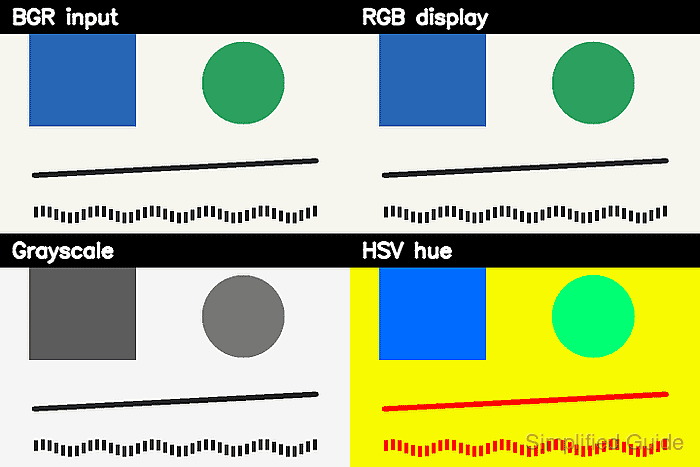
The BGR input and RGB display tiles should look alike when each array is displayed with the matching channel order. The grayscale tile has one intensity channel, and the HSV hue tile visualizes hue instead of natural color.
- Reopen the output files to confirm their shapes.
$ python3 - <<'PY' import cv2 as cv for path in [ "output/scene-rgb-display.png", "output/scene-gray.png", "output/scene-hsv-hue.png", "output/color-space-preview.png", ]: image = cv.imread(path, cv.IMREAD_UNCHANGED) if image is None: raise SystemExit(f"could not read {path}") print(f"{path}: shape={image.shape}") PY output/scene-rgb-display.png: shape=(480, 720, 3) output/scene-gray.png: shape=(480, 720) output/scene-hsv-hue.png: shape=(480, 720) output/color-space-preview.png: shape=(480, 720, 3) - Remove the sample script after adapting the conversion code.
$ rm convert_color_spaces.py