Color-based masking isolates pixels whose color falls inside a chosen range so later OpenCV steps can ignore the rest of the image. It is useful before contour detection, object tracking, measurement, or cutout creation when the target has a recognizable color.
OpenCV reads normal color images as BGR arrays, so the image is converted to HSV before thresholding. HSV keeps hue separate from saturation and brightness, which makes the range easier to tune than raw blue, green, and red channel limits.
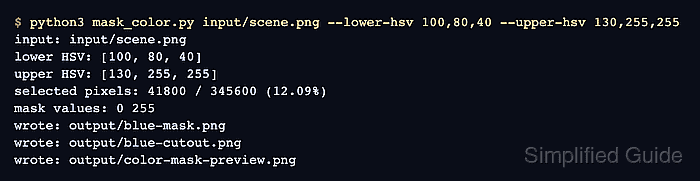
A file-based Python run masks the blue rectangle in input/scene.png with cv.inRange(), applies that binary mask with cv.bitwise_and(), and writes both the mask and a visual preview. Adjust the lower and upper HSV values for another target color, then verify that the selected-pixel count and preview match the object before passing the mask into contour or tracking code.
Related: How to convert image color spaces with OpenCV
Related: How to threshold an image with OpenCV
Related: How to find contours with OpenCV
Steps to mask an image by color with OpenCV:
- Create input and output directories.
$ mkdir -p input output
- Copy the source image into the input directory.
$ cp scene.png input/scene.png
Replace scene.png with the image to mask. Keep the input/scene.png path or update the run command to point at the project image.
- Create the color-mask script.
- mask_color.py
from argparse import ArgumentParser, ArgumentTypeError
from pathlib import Path

import cv2 as cv
import numpy as np


def parse_hsv(value):
    parts = value.split(",")
    if len(parts) != 3:
        raise ArgumentTypeError("HSV values must use H,S,V format")

    try:
        hue, saturation, brightness = [int(part) for part in parts]
    except ValueError as exc:
        raise ArgumentTypeError("HSV values must be integers") from exc

    if not 0 <= hue <= 179:
        raise ArgumentTypeError("Hue must be between 0 and 179 for 8-bit OpenCV HSV images")
    if not 0 <= saturation <= 255 or not 0 <= brightness <= 255:
        raise ArgumentTypeError("Saturation and value must be between 0 and 255")

    return np.array([hue, saturation, brightness], dtype=np.uint8)


def write_image(path, image):
    if not cv.imwrite(str(path), image):
        raise SystemExit(f"could not write image: {path}")


def labeled_tile(tile, label):
    tile = cv.resize(tile, (360, 240), interpolation=cv.INTER_AREA)
    cv.rectangle(tile, (0, 0), (360, 34), (0, 0, 0), thickness=-1)
    cv.putText(
        tile,
        label,
        (12, 24),
        cv.FONT_HERSHEY_SIMPLEX,
        0.7,
        (255, 255, 255),
        2,
        cv.LINE_AA,
    )
    return tile


parser = ArgumentParser(description="Mask an image by HSV color range with OpenCV.")
parser.add_argument("input_image", type=Path)
parser.add_argument("--output-dir", type=Path, default=Path("output"))
parser.add_argument("--lower-hsv", type=parse_hsv, default=parse_hsv("100,80,40"))
parser.add_argument("--upper-hsv", type=parse_hsv, default=parse_hsv("130,255,255"))
args = parser.parse_args()

image = cv.imread(str(args.input_image), cv.IMREAD_COLOR)
if image is None:
    raise SystemExit(f"could not read image: {args.input_image}")

hsv = cv.cvtColor(image, cv.COLOR_BGR2HSV)
mask = cv.inRange(hsv, args.lower_hsv, args.upper_hsv)
masked = cv.bitwise_and(image, image, mask=mask)

args.output_dir.mkdir(parents=True, exist_ok=True)
mask_path = args.output_dir / "blue-mask.png"
masked_path = args.output_dir / "blue-cutout.png"
preview_path = args.output_dir / "color-mask-preview.png"

mask_preview = cv.cvtColor(mask, cv.COLOR_GRAY2BGR)
preview = cv.vconcat(
    [
        cv.hconcat(
            [
                labeled_tile(image.copy(), "BGR input"),
                labeled_tile(mask_preview, "HSV mask"),
            ]
        ),
        cv.hconcat(
            [
                labeled_tile(masked.copy(), "Masked result"),
                labeled_tile(cv.cvtColor(hsv[:, :, 0], cv.COLOR_GRAY2BGR), "Hue channel"),
            ]
        ),
    ]
)

write_image(mask_path, mask)
write_image(masked_path, masked)
write_image(preview_path, preview)

selected_pixels = int(cv.countNonZero(mask))
total_pixels = int(mask.size)
coverage = selected_pixels / total_pixels * 100
unique_values = " ".join(str(int(value)) for value in np.unique(mask))

print(f"input: {args.input_image}")
print(f"lower HSV: {args.lower_hsv.tolist()}")
print(f"upper HSV: {args.upper_hsv.tolist()}")
print(f"selected pixels: {selected_pixels} / {total_pixels} ({coverage:.2f}%)")
print(f"mask values: {unique_values}")
print(f"wrote: {mask_path}")
print(f"wrote: {masked_path}")
print(f"wrote: {preview_path}")
The default range selects a saturated blue target in an 8-bit OpenCV HSV image. For another object, set --lower-hsv and --upper-hsv with H,S,V values where hue uses 0-179 and saturation/value use 0-255.
- Run the script with the blue HSV range.
$ python3 mask_color.py input/scene.png --lower-hsv 100,80,40 --upper-hsv 130,255,255
input: input/scene.png
lower HSV: [100, 80, 40]
upper HSV: [130, 255, 255]
selected pixels: 41800 / 345600 (12.09%)
mask values: 0 255
wrote: output/blue-mask.png
wrote: output/blue-cutout.png
wrote: output/color-mask-preview.png
- Review the preview image.
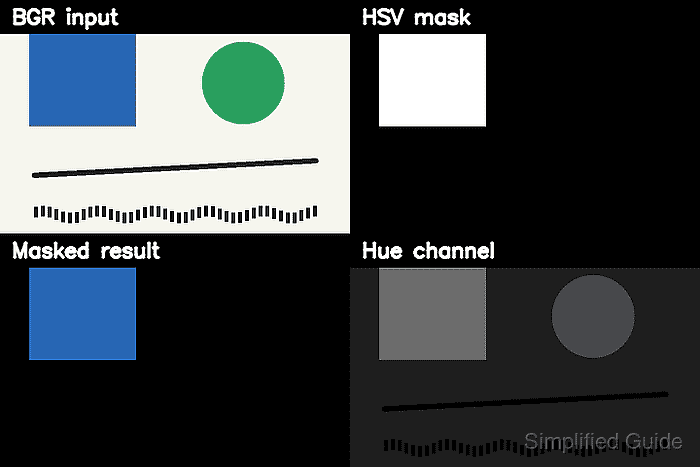
The HSV mask tile should show the selected target in white and the rejected background in black. The Masked result tile should keep only the blue object from the original image.
- Verify the saved mask and cutout.
$ python3 - <<'PY'
import cv2 as cv
import numpy as np

mask = cv.imread("output/blue-mask.png", cv.IMREAD_GRAYSCALE)
cutout = cv.imread("output/blue-cutout.png", cv.IMREAD_COLOR)

if mask is None:
    raise SystemExit("could not read output/blue-mask.png")
if cutout is None:
    raise SystemExit("could not read output/blue-cutout.png")

print(f"mask shape: {mask.shape}")
print(f"mask values: {np.unique(mask).tolist()}")
print(f"selected pixels: {cv.countNonZero(mask)}")
print(f"cutout shape: {cutout.shape}")
PY
mask shape: (480, 720)
mask values: [0, 255]
selected pixels: 41800
cutout shape: (480, 720, 3)
A two-value mask confirms cv.inRange() produced a binary selection. A selected-pixel count of 0 means the HSV range does not include the target color.
- Remove the sample script after adapting the masking code.
$ rm mask_color.py

Mohd Shakir Zakaria is a cloud architect with deep roots in software development and open-source advocacy. Certified in AWS, Red Hat, VMware, ITIL, and Linux, he specializes in designing and managing robust cloud and on-premises infrastructures.


