How to equalize an image histogram with OpenCV
Low-contrast image frames can hide edges, marks, printed text, and surface defects inside a narrow grayscale range. OpenCV histogram equalization remaps those pixel values so contrast is easier to inspect before thresholding, recognition, OCR, or measurement.
cv.equalizeHist() works on an 8-bit single-channel image and applies one global remapping to the whole frame. Loading the input with cv.IMREAD_GRAYSCALE keeps the script focused on brightness instead of color channels.
CLAHE, or contrast limited adaptive histogram equalization, adjusts local tiles and limits amplification so bright and dark regions are not stretched as aggressively. Use a representative image when tuning the clip limit, because both global equalization and CLAHE can make sensor noise more visible.
Related: How to read and write an image with OpenCV
Related: How to threshold an image with OpenCV
Related: How to install OpenCV on Ubuntu
Steps to equalize an image histogram with OpenCV:
- Create an input directory for the source image.
$ mkdir -p input
- Copy a low-contrast image into the expected path.
$ cp low-contrast.png input/low-contrast.png
Replace low-contrast.png with the image to enhance. The script reads input/low-contrast.png as grayscale, so update input_path when the project uses a different layout.
- Create the histogram equalization script.
- equalize_histogram.py
from pathlib import Path

import cv2 as cv
import numpy as np


input_path = Path("input/low-contrast.png")
output_dir = Path("output")
output_path = output_dir / "histogram-equalized.png"
clahe_path = output_dir / "histogram-clahe.png"
preview_path = output_dir / "histogram-equalize-preview.png"


def write_image(path, data):
    path.parent.mkdir(parents=True, exist_ok=True)
    if not cv.imwrite(str(path), data):
        raise SystemExit(f"Could not write {path}")


image = cv.imread(str(input_path), cv.IMREAD_GRAYSCALE)
if image is None:
    raise SystemExit(f"Could not read {input_path}")

equalized = cv.equalizeHist(image)

clahe = cv.createCLAHE(clipLimit=2.0, tileGridSize=(8, 8))
clahe_image = clahe.apply(image)

preview = np.hstack((image, equalized, clahe_image))
write_image(output_path, equalized)
write_image(clahe_path, clahe_image)
write_image(preview_path, preview)

print(f"input:     min={image.min():3d} max={image.max():3d} std={image.std():5.2f}")
print(f"equalized: min={equalized.min():3d} max={equalized.max():3d} std={equalized.std():5.2f}")
print(f"clahe:     min={clahe_image.min():3d} max={clahe_image.max():3d} std={clahe_image.std():5.2f}")
print(f"saved: {output_path}")
print(f"saved: {clahe_path}")
print(f"saved: {preview_path}")
- Run the script and confirm the intensity range changes.
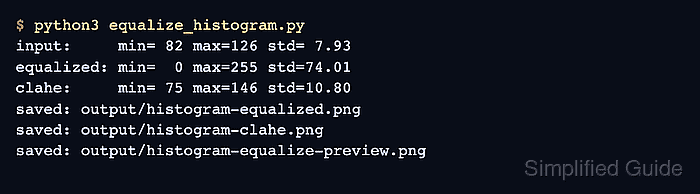
$ python3 equalize_histogram.py
input:     min= 82 max=126 std= 7.93
equalized: min=  0 max=255 std=74.01
clahe:     min= 75 max=146 std=10.80
saved: output/histogram-equalized.png
saved: output/histogram-clahe.png
saved: output/histogram-equalize-preview.png
- Keep cv.equalizeHist() on grayscale 8-bit input.
image = cv.imread(str(input_path), cv.IMREAD_GRAYSCALE)
equalized = cv.equalizeHist(image)
cv.equalizeHist() expects an 8-bit single-channel image. For color-specific enhancement, equalize a brightness channel such as Y or L instead of applying the function independently to B, G, and R.
- Use CLAHE when local contrast needs gentler adjustment.
clahe = cv.createCLAHE(clipLimit=2.0, tileGridSize=(8, 8))
clahe_image = clahe.apply(image)
Lower clipLimit values reduce noise amplification. Smaller tileGridSize values make the adjustment more local and can reveal tile artifacts on smooth gradients.
- Review the side-by-side output image.
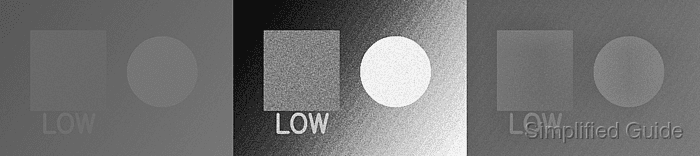
The left panel is the input image, the middle panel is global histogram equalization, and the right panel is CLAHE. The global output should span 0 to 255 here, while CLAHE keeps a narrower range.
- Verify that OpenCV can reopen the preview image.
$ python3 - <<'PY' import cv2 as cv image = cv.imread("output/histogram-equalize-preview.png", cv.IMREAD_GRAYSCALE) print(f"preview readable: {image.shape[1]}x{image.shape[0]}") PY preview readable: 1620x360 - Remove the one-off script after moving the logic into the project.
$ rm equalize_histogram.py