How to find contours with OpenCV
Contours turn a binary image into object boundaries that can be counted, measured, and drawn with OpenCV. They are useful when a vision script needs the outline of parts, printed marks, UI shapes, or other foreground regions before measurement or masking.
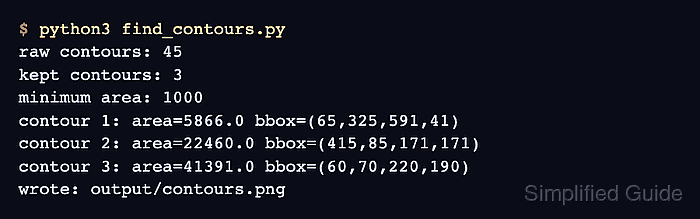
The Python path starts by loading an image, converting it to grayscale, and thresholding it so foreground pixels are white and the background is black. cv.findContours() returns boundary point arrays, and cv.drawContours() can write an annotated image for review.
The script uses cv.RETR_EXTERNAL for outer boundaries and cv.CHAIN_APPROX_SIMPLE to keep compressed contour points. An area threshold keeps tiny foreground marks out of the final measurement list; lower or remove it when small objects are the target.
Steps to find contours with OpenCV:
- Create an input directory for the image.
$ mkdir -p input
- Copy the source image into the expected path.
$ cp scene.png input/scene.png
Replace scene.png with the image that contains the objects to outline. Update input_path in the script when the project uses a different layout.
- Create the contour detection script.
- find_contours.py
from pathlib import Path

import cv2 as cv


input_path = Path("input/scene.png")
output_path = Path("output/contours.png")

image = cv.imread(str(input_path))
if image is None:
    raise SystemExit(f"Could not read {input_path}")

gray = cv.cvtColor(image, cv.COLOR_BGR2GRAY)
_, mask = cv.threshold(gray, 240, 255, cv.THRESH_BINARY_INV)

contours, _ = cv.findContours(
    mask,
    cv.RETR_EXTERNAL,
    cv.CHAIN_APPROX_SIMPLE,
)

min_area = 1000
kept_contours = [
    contour for contour in contours if cv.contourArea(contour) >= min_area
]

annotated = image.copy()
cv.drawContours(annotated, kept_contours, -1, (0, 0, 255), 3)
output_path.parent.mkdir(parents=True, exist_ok=True)
cv.imwrite(str(output_path), annotated)

print(f"raw contours: {len(contours)}")
print(f"kept contours: {len(kept_contours)}")
print(f"minimum area: {min_area}")

for index, contour in enumerate(kept_contours, start=1):
    x, y, width, height = cv.boundingRect(contour)
    area = cv.contourArea(contour)
    print(
        f"contour {index}: area={area:.1f} "
        f"bbox=({x},{y},{width},{height})"
    )

print(f"wrote: {output_path}")
- Run the script and confirm the retained contour measurements.
$ python3 find_contours.py
raw contours: 45
kept contours: 3
minimum area: 1000
contour 1: area=5866.0 bbox=(65,325,591,41)
contour 2: area=22460.0 bbox=(415,85,171,171)
contour 3: area=41391.0 bbox=(60,70,220,190)
wrote: output/contours.png
- Use the threshold block to create a binary mask for contour detection.
gray = cv.cvtColor(image, cv.COLOR_BGR2GRAY)
_, mask = cv.threshold(gray, 240, 255, cv.THRESH_BINARY_INV)
cv.findContours() treats nonzero pixels as foreground. cv.THRESH_BINARY_INV works for darker objects on a light background; use cv.THRESH_BINARY when the objects are lighter than the background.
- Change the retrieval mode only when nested boundaries matter.
contours, _ = cv.findContours(
    mask,
    cv.RETR_EXTERNAL,
    cv.CHAIN_APPROX_SIMPLE,
)
cv.RETR_EXTERNAL returns outer contours only. Use cv.RETR_TREE and keep the hierarchy return value when holes, parent contours, or child contours must stay linked.
- Tune the area filter before using contour measurements downstream.
min_area = 1000
kept_contours = [
    contour for contour in contours if cv.contourArea(contour) >= min_area
]
Area filtering keeps small foreground marks from crowding the output. Remove the filter when every detected mark should be counted.
- Review the annotated output image.
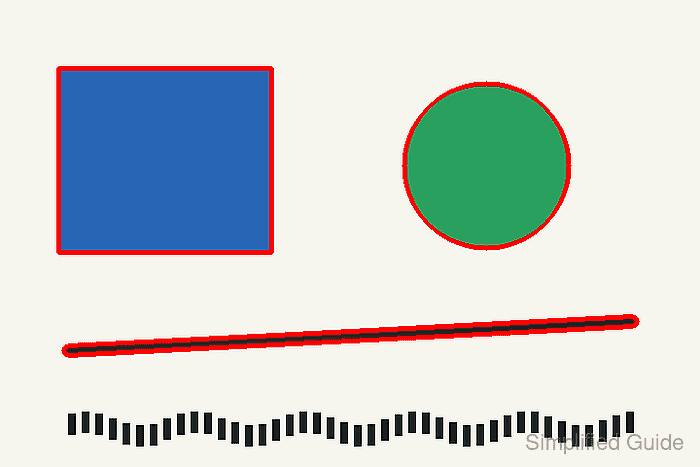
The retained rectangle, circle, and line should be outlined in red. Missing outlines usually mean the threshold value or polarity does not match the source image.
- Remove the sample script after adapting the pattern.
$ rm find_contours.py