How to enable web search in Open WebUI
Open WebUI web search adds a retrieval step to chat so answers can use search results instead of only the model's stored knowledge. It is useful for source-sensitive questions, current events, and internal search indexes exposed through a compatible search API.
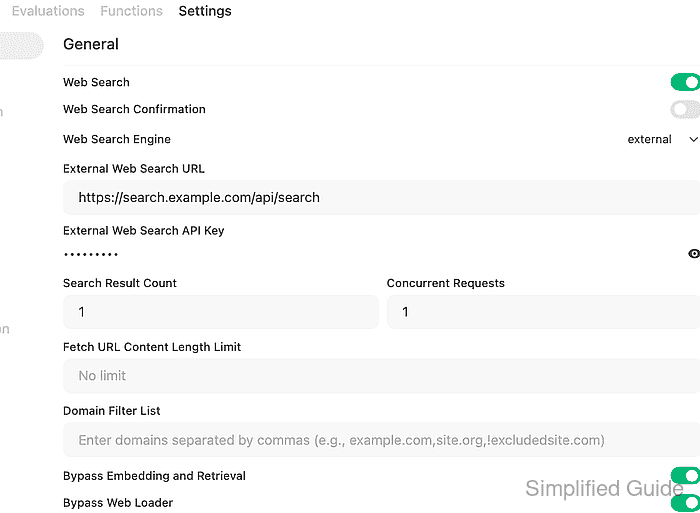
The setting lives under Admin Panel → Settings → Web Search. Open WebUI supports several provider engines, and each engine exposes its own fields for API keys, search URLs, result counts, loader behavior, and rate limits.
The external-provider path fits a private search service or API gateway because it uses one URL and one bearer key. The snippet-only bypass settings used here prove the search-provider connection without asking Open WebUI to fetch result pages or build an embedding collection; leave those bypasses off when the search results should be loaded into the normal retrieval pipeline.
Steps to enable Open WebUI web search with an external provider:
- Prepare an external search endpoint and API key.
The external engine sends POST requests with a JSON body containing query and count. The response should be a JSON array of objects with link, title, and snippet fields.
- Sign in to Open WebUI as an administrator.
- Open Admin Panel → Settings → Web Search.
- Turn on Web Search.
- Set Web Search Engine to external.
- Enter the provider External Web Search URL and External Web Search API Key.
Keep the provider key out of screenshots, tickets, shared transcripts, and browser recordings. Rotate the key if it was exposed while testing the search endpoint.
- Set Search Result Count to the number of results each query should return.
- Set Concurrent Requests to 1 when the provider has a low rate limit.
Use a higher value only when the provider allows parallel searches from the Open WebUI server.
- Turn on Bypass Web Loader and Bypass Embedding and Retrieval when the provider snippets are enough for the first smoke test.
With both bypasses enabled, Open WebUI uses returned snippets directly. Disable them later when answers should use fetched page content and normal retrieval ranking.
- Click Save.
- Read an Open WebUI API key into a protected shell variable for the backend check.
$ read -r -s OPEN_WEBUI_API_KEY
Related: How to enable API keys in Open WebUI
- Set the Open WebUI base URL for the terminal session.
$ export OPEN_WEBUI_URL="https://openwebui.example.com"
- Send a direct web-search request through Open WebUI.
$ curl --fail-with-body --silent --show-error "$OPEN_WEBUI_URL/api/v1/retrieval/process/web/search" \
  -H "Authorization: Bearer $OPEN_WEBUI_API_KEY" \
  -H "Content-Type: application/json" \
  --data '{"queries":["Open WebUI web search configuration"]}'
{
  "status": true,
  "filenames": [
    "https://search.example.com/results/openwebui-web-search"
  ],
  "items": [
    {
      "title": "Open WebUI web search example result",
      "link": "https://search.example.com/results/openwebui-web-search",
      "snippet": "External web search returned a current result that Open WebUI can attach to a chat request."
    }
  ],
  "docs": [
    {
      "content": "External web search returned a current result that Open WebUI can attach to a chat request.",
      "metadata": {
        "source": "https://search.example.com/results/openwebui-web-search",
        "title": "Open WebUI web search example result"
      }
    }
  ],
  "loaded_count": 1
}
A 403 response usually means web search is still disabled or the user lacks the Web Search feature permission. A 400 response usually points to the provider URL, API key, response format, network reachability from the Open WebUI server, or a provider-side rate limit.
Related: How to troubleshoot Open WebUI provider connection errors
Tool: API Testing Tool