How to connect Ollama to Open WebUI
Open WebUI can use Ollama as a model provider when its backend can reach the Ollama HTTP API. The connection matters most in Docker deployments, where a URL that works from the host shell can point at the wrong network namespace from inside the Open WebUI container.
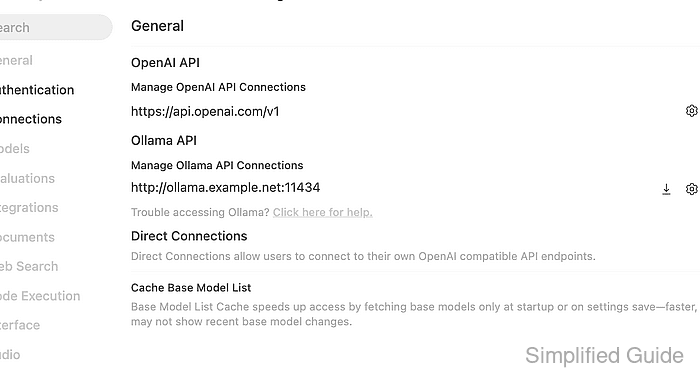
Ollama exposes its native API on port 11434 and does not use the OpenAI-compatible /v1 route for this connection type. Save the base URL only, such as http://host.docker.internal:11434 for a host-running Ollama service or http://ollama:11434 when both services share a Docker Compose network.
Start with Ollama running and at least one model already pulled. The connection is ready when Open WebUI can list the model through the Ollama connection and a short chat returns a response from that selected model.
Steps to connect Ollama to Open WebUI:
- Confirm that Ollama lists a model from the machine where it runs.
$ curl --fail-with-body --silent --show-error "http://127.0.0.1:11434/api/tags"
{
  "models": [
    {
      "name": "llama3.2:latest",
      "model": "llama3.2:latest",
      "modified_at": "2026-07-05T09:30:00+08:00",
      "size": 2019393189,
      "details": {
        "family": "llama",
        "parameter_size": "3.2B",
        "quantization_level": "Q4_K_M"
      }
    }
  ]
}
If the list is empty, pull a model in Ollama before changing Open WebUI.
- Probe the Ollama API from the Open WebUI runtime.
$ docker exec open-webui curl --fail-with-body --silent --show-error "http://host.docker.internal:11434/api/tags"
{
  "models": [
    {
      "name": "llama3.2:latest",
      "model": "llama3.2:latest",
      "modified_at": "2026-07-05T09:30:00+08:00",
      "size": 2019393189,
      "details": {
        "family": "llama",
        "parameter_size": "3.2B",
        "quantization_level": "Q4_K_M"
      }
    }
  ]
}
Use http://host.docker.internal:11434 when Open WebUI runs in a Docker container and Ollama runs on the host. On Linux, the container may need --add-host=host.docker.internal:host-gateway or a Compose service name such as http://ollama:11434.
Related: How to run Open WebUI with Docker - Open Admin Panel → Settings → Connections → Ollama and save the reachable Ollama base URL.
Enter the base URL without /api/tags or /v1. Disable or remove older unreachable Ollama URLs before testing, because each saved backend can delay model-list refreshes.
- Refresh the Open WebUI model list and confirm the Ollama model appears.
$ curl --fail-with-body --silent --show-error "https://openwebui.example.com/api/models?refresh=true" \
  -H "Authorization: Bearer <open-webui-token>"
{
  "data": [
    {
      "id": "llama3.2:latest",
      "name": "llama3.2:latest",
      "object": "model",
      "owned_by": "ollama"
    }
  ]
}
The request uses an Open WebUI token. If the API response includes the model but the browser picker still looks stale, reload the chat page or sign in again.
Related: How to refresh the Open WebUI model list - Open a new chat, select the Ollama model, and send a short prompt.
Reply with one short sentence that says the Ollama connection works.
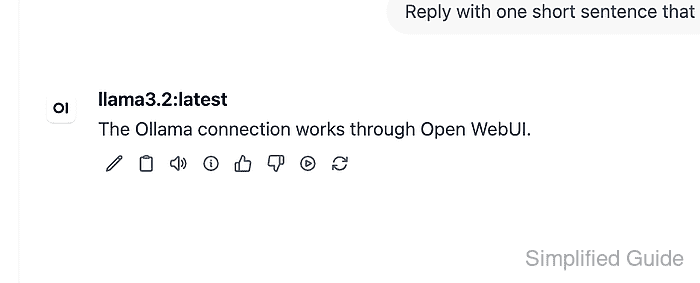
The selected model should answer through Ollama. A visible response proves more than saved settings because it exercises Open WebUI, the saved base URL, the model ID, and the Ollama chat route together.
Related: How to troubleshoot Open WebUI provider connection errors