How to enable code interpreter in Open WebUI
Open WebUI Code Interpreter lets a chat model hand Python work to the built-in execution tool for calculations, small data checks, and generated code snippets. Enabling it is useful when trusted users need in-chat analysis without giving the model a full terminal or external tool server.
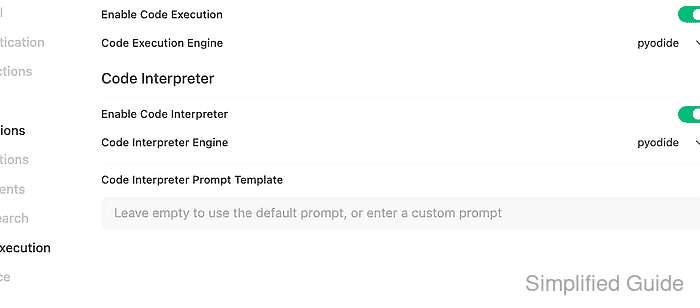
The setting has two layers. Admin Panel → Settings → Code Execution controls the global Code Interpreter switch and engine, while the chat composer control activates Code Interpreter for an individual conversation.
The current pyodide and jupyter engines are legacy paths. Use pyodide for zero-setup browser execution, and prefer Open Terminal or a separate tool integration for workloads that need shell access, native packages, long-running jobs, or stronger isolation boundaries.
Steps to enable Open WebUI code interpreter:
- Sign in to Open WebUI as an administrator.
- Open Admin Panel → Settings → Code Execution.
- Turn on Enable Code Execution and keep Code Execution Engine set to pyodide unless a separate Jupyter runtime is already managed for the site.
- Turn on Enable Code Interpreter and keep Code Interpreter Engine set to pyodide for browser-based execution.
Jupyter runs code on the configured server-side notebook environment. Do not point a shared production site at an unrestricted notebook server unless user isolation, network access, package installation, and cleanup are already controlled.
- Click Save.
- Confirm the target model allows Code Interpreter under its Capabilities if the model has a custom profile.
Open Admin Panel → Settings → Models and select the model. Models without a custom profile normally use the default capability state, but a custom profile can disable Code Interpreter for that model.
- Start a new chat with the target model and enable Code Interpreter from the chat controls.
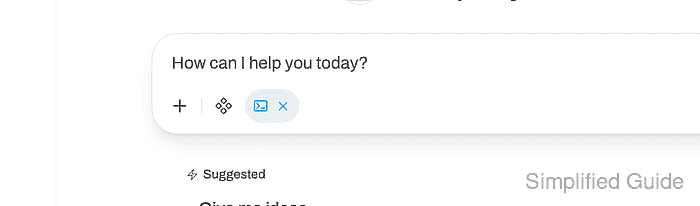
The active control changes to the Code Interpreter button state whose hover label is Disable Code Interpreter.
- Send a small calculation prompt that requires executed Python output.
Use Code Interpreter to calculate 19 * 23. Print only the integer result.
- Confirm the response shows View Result from execute_code and returns the expected value.
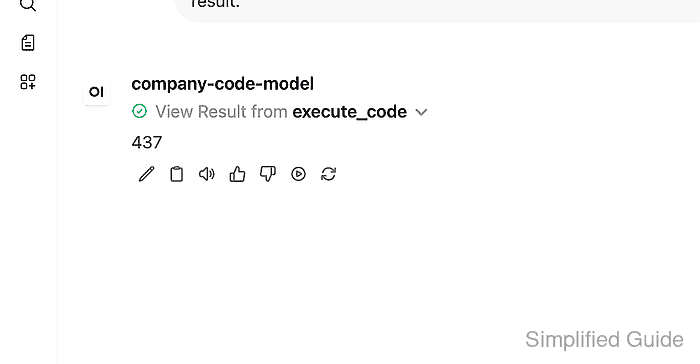
437
If the response only explains the calculation, check the global Code Interpreter setting, the selected model's Capabilities, the user's Code Interpreter feature permission, and browser support for Pyodide or WebAssembly.