How to export a chat from Open WebUI
Open WebUI conversations often become records for support handoffs, audit notes, or offline review. Exporting one chat downloads the selected conversation without taking a full account export or changing the rest of the chat history.
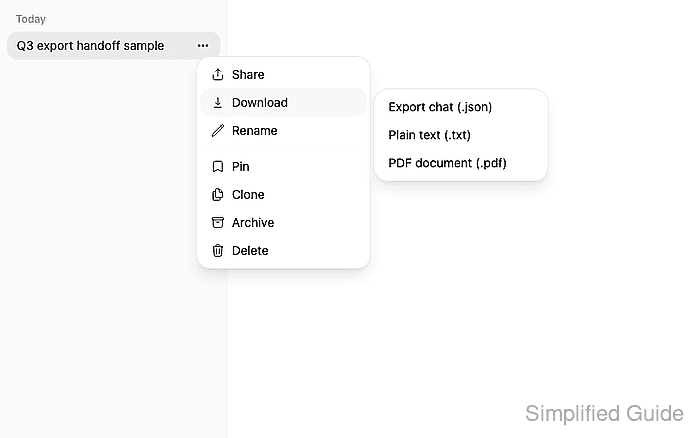
The per-chat export lives in the chat history row menu in the left sidebar. The JSON option preserves structured conversation data, including the chat title, message roles, content, model identifiers, and message relationships that Open WebUI uses to rebuild the thread.
The menu depends on the account's chat export permission. If Download or Export chat (.json) is missing, use an administrator account or ask an administrator to allow chat export for the account that owns the conversation.
Steps to export an Open WebUI chat:
- Open the conversation that needs to be saved.
- Open the left sidebar if the chat history is hidden.
- Open the selected chat row's Chat Menu.
- Select Download from the chat menu.
- Click Export chat (.json).
- Save the downloaded .json file in the handoff or records location.
The export can contain prompts, responses, uploaded-file references, model names, user IDs, and timestamps. Treat it as sensitive conversation data before attaching it to tickets or sharing it outside the workspace.
- Open the exported file and confirm the selected title and messages are present.
[
  {
    "title": "Q3 export handoff sample",
    "chat": {
      "title": "Q3 export handoff sample",
      "history": {
        "currentId": "<message-id>",
        "messages": {
          "<user-message-id>": {
            "role": "user",
            "content": "Prepare the Q3 support summary for export."
          },
          "<assistant-message-id>": {
            "role": "assistant",
            "content": "The export should preserve this response for offline review.",
            "model": "company-chat"
          }
        }
      }
    }
  }
]