How to replace NaN and infinite values in NumPy
Non-finite readings can enter a NumPy array through missing data, division by zero, or overflow. Many downstream calculations and file formats need finite numbers while preserving the array's original shape.
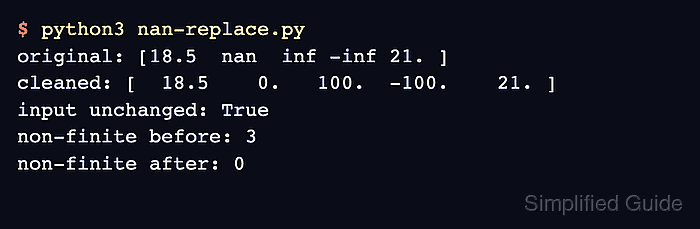
NumPy's np.nan_to_num() replaces NaN, positive infinity, and negative infinity in one pass. Explicit nan, posinf, and neginf arguments keep the replacement policy visible; the default infinity replacements are the largest and most negative finite values supported by the array's data type.
The default copy=True behavior leaves the source array available for comparison. A final np.isfinite() guard turns any surviving non-finite marker into a failing run instead of letting incomplete cleanup pass silently.
Related: Filter NaN values
Related: Replace values conditionally
Related: Convert array dtype
Steps to replace NaN and infinite values in NumPy:
- Create nan-replace.py with the source readings defined as a NumPy array.
- nan-replace.py
import numpy as np

readings = np.array([18.5, np.nan, np.inf, -np.inf, 21.0])
- Add the explicit non-finite replacement policy below the readings definition.
cleaned = np.nan_to_num(
    readings,
    nan=0.0,
    posinf=100.0,
    neginf=-100.0,
)
Replacement values should match the data's meaning. A missing measurement and an overflow boundary may need different finite values.
- Append the validation block after the replacement call.
if not np.isfinite(cleaned).all():
    raise RuntimeError("cleaned array still contains non-finite values")

print("original:", readings)
print("cleaned:", cleaned)
print("non-finite before:", np.count_nonzero(~np.isfinite(readings)))
print("non-finite after:", np.count_nonzero(~np.isfinite(cleaned)))
- Run the completed script to confirm that the cleaned array contains no non-finite values.
$ python3 nan-replace.py
original: [18.5  nan  inf -inf 21. ]
cleaned: [  18.5    0.   100.  -100.    21. ]
non-finite before: 3
non-finite after: 0
A nonzero final count raises RuntimeError before the report is printed, so an incomplete replacement cannot produce this success output.