How to create a meshgrid with NumPy
A coordinate grid turns separate x and y vectors into aligned arrays, so a formula can evaluate every coordinate pair with NumPy array operations. The np.meshgrid() function fits contour data, sampled surfaces, and other calculations where rows represent y positions and columns represent x positions.
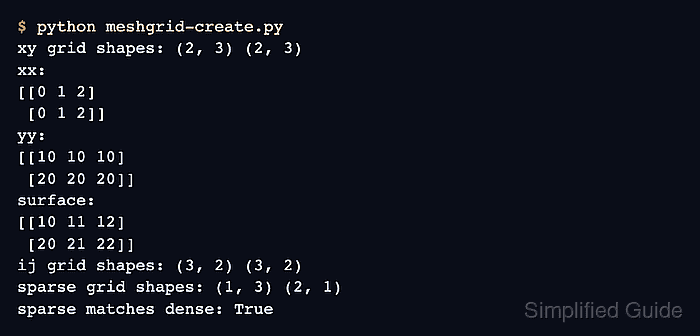
The default indexing=“xy” convention returns two-dimensional arrays with shape (len(y), len(x)). Values from x repeat across rows, while values from y repeat down columns. Use indexing=“ij” when downstream code expects the first array axis to follow the first input vector instead.
Dense grids allocate a full array for every coordinate direction. With sparse=True, each coordinate keeps singleton dimensions and expands through broadcasting only when it participates in a calculation; the calculated surface is still a full two-dimensional array.
Related: Create linearly spaced values
Related: Create an array
Steps to create a meshgrid with NumPy:
- Create meshgrid-create.py with the x and y coordinate vectors.
- meshgrid-create.py
import numpy as np

x = np.array([0, 1, 2])
y = np.array([10, 20])
- Add the dense Cartesian grid and its output below the coordinate vectors.
xx, yy = np.meshgrid(x, y, indexing="xy")

print("xy grid shapes:", xx.shape, yy.shape)
print("xx:")
print(xx)
print("yy:")
print(yy)
- Run the partial script to confirm the Cartesian grid orientation.
$ python meshgrid-create.py
xy grid shapes: (2, 3) (2, 3)
xx:
[[0 1 2]
 [0 1 2]]
yy:
[[10 10 10]
 [20 20 20]]
The two y coordinates determine the rows, and the three x coordinates determine the columns under indexing=“xy”.
- Complete meshgrid-create.py with the surface calculation, matrix-indexed grid, sparse grid, and assertions.
- meshgrid-create.py
import numpy as np

x = np.array([0, 1, 2])
y = np.array([10, 20])

xx, yy = np.meshgrid(x, y, indexing="xy")
surface = xx + yy

ii, jj = np.meshgrid(x, y, indexing="ij")

xs, ys = np.meshgrid(x, y, indexing="xy", sparse=True)
sparse_surface = xs + ys

assert xx.shape == (2, 3)
assert yy.shape == (2, 3)
assert surface.shape == (2, 3)
assert ii.shape == (3, 2)
assert jj.shape == (3, 2)
assert xs.shape == (1, 3)
assert ys.shape == (2, 1)
assert np.array_equal(surface, sparse_surface)

print("xy grid shapes:", xx.shape, yy.shape)
print("xx:")
print(xx)
print("yy:")
print(yy)
print("surface:")
print(surface)
print("ij grid shapes:", ii.shape, jj.shape)
print("sparse grid shapes:", xs.shape, ys.shape)
print("sparse matches dense:", np.array_equal(surface, sparse_surface))
indexing=“ij” produces shape (3, 2) because its first axis follows x. The sparse arrays use shapes (1, 3) and (2, 1), which broadcast to the same (2, 3) surface.
Related: Calculate with broadcasting - Run the completed script to execute the shape and equality assertions.
$ python meshgrid-create.py
xy grid shapes: (2, 3) (2, 3)
xx:
[[0 1 2]
 [0 1 2]]
yy:
[[10 10 10]
 [20 20 20]]
surface:
[[10 11 12]
 [20 21 22]]
ij grid shapes: (3, 2) (3, 2)
sparse grid shapes: (1, 3) (2, 1)
sparse matches dense: True