Business arrays often mix values recorded at different granularities, such as quantities per store and product prices shared by every store. NumPy broadcasting applies that arithmetic without copying the smaller values into manually repeated arrays.
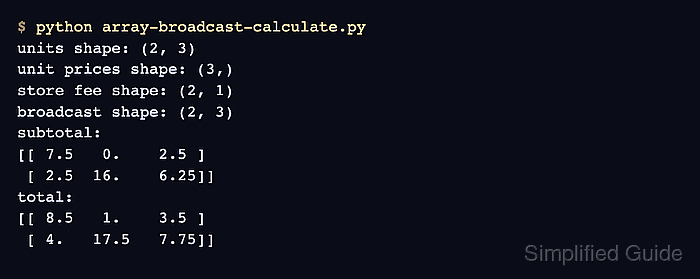
Broadcasting compares NumPy shapes from the right. A (3,) price vector matches the three columns of a (2, 3) units matrix, while a (2, 1) fee column keeps one fee aligned with each row. A (2,) fee vector would instead collide with the matrix's three-column trailing dimension.
Shape validation with np.broadcast_shapes() can reject incompatible inputs before arithmetic begins. A separate np.testing.assert_allclose() check can then stop the calculation if the resulting matrix differs from known totals.
Related: Reshape an array
Related: Create an array
Related: Vectorize a calculation
Steps to calculate with NumPy broadcasting:
- Create the script with the units matrix and per-product price vector.
- array-broadcast-calculate.py
import numpy as np

units = np.array([[3, 0, 2], [1, 4, 5]], dtype=np.float64)
unit_prices = np.array([2.50, 4.00, 1.25])
- Append the row-fee shape check below the input arrays.
store_fee = np.array([1.00, 1.50])[:, np.newaxis]
broadcast_shape = np.broadcast_shapes(
    units.shape, unit_prices.shape, store_fee.shape
)
[:, np.newaxis] changes the two fee values from shape (2,) to (2, 1) so each value expands across one row.
- Append the broadcasting calculations below the shape check.
subtotal = units * unit_prices
total = subtotal + store_fee
- Add the expected total assertion below the calculations.
expected_total = np.array([[8.50, 1.00, 3.50], [4.00, 17.50, 7.75]])
np.testing.assert_allclose(total, expected_total)
assert_allclose() raises an exception when a changed input or expression produces different totals.
- Append the result-reporting section after the assertion.
print("units shape:", units.shape)
print("unit prices shape:", unit_prices.shape)
print("store fee shape:", store_fee.shape)
print("broadcast shape:", broadcast_shape)
print("subtotal:")
print(subtotal)
print("total:")
print(total)
- Run the completed script to confirm the broadcast shape and calculated matrices.
$ python3 array-broadcast-calculate.py
units shape: (2, 3)
unit prices shape: (3,)
store fee shape: (2, 1)
broadcast shape: (2, 3)
subtotal:
[[ 7.5   0.    2.5 ]
 [ 2.5  16.    6.25]]
total:
[[ 8.5   1.    3.5 ]
 [ 4.   17.5   7.75]]
The command exits with an assertion error instead of printing these matrices when the broadcast calculation no longer matches the expected totals.

Mohd Shakir Zakaria is a cloud architect with deep roots in software development and open-source advocacy. Certified in AWS, Red Hat, VMware, ITIL, and Linux, he specializes in designing and managing robust cloud and on-premises infrastructures.


