How to create linearly spaced values with NumPy
Evenly spaced coordinates keep plots, interpolation points, and simulation inputs tied to a fixed sample count. NumPy np.linspace() creates those values from interval endpoints, so the result can include the right boundary without calculating the step by hand.
Unlike np.arange(), which advances by a step size, np.linspace() starts from the number of samples to return. The default output is floating point, and retstep=True exposes the spacing NumPy used for the interval.
Choose endpoint=False for half-open intervals such as periodic bins where the stop value would duplicate the next cycle. Checking the size, spacing, and adjacent differences before reusing the array catches off-by-one mistakes while the sample grid is still small.
Related: Create an array
Related: Create a meshgrid
Related: Calculate an FFT
Steps to create linearly spaced values with NumPy:
- Create a Python script that builds a closed interval, a half-open interval, and a calculation that uses the generated samples.
- linear-spacing-create.py
import numpy as np

samples, spacing = np.linspace(-1.0, 1.0, num=5, retstep=True)
half_open = np.linspace(-1.0, 1.0, num=5, endpoint=False)
curve = samples**2

print("samples:", samples)
print("count:", samples.size)
print("spacing:", spacing)
print("dtype:", samples.dtype)
print("diffs:", np.diff(samples))
print("half-open:", half_open)
print("curve:", curve)
retstep=True returns the generated array and the spacing between adjacent samples.
- Run the script.
$ python linear-spacing-create.py
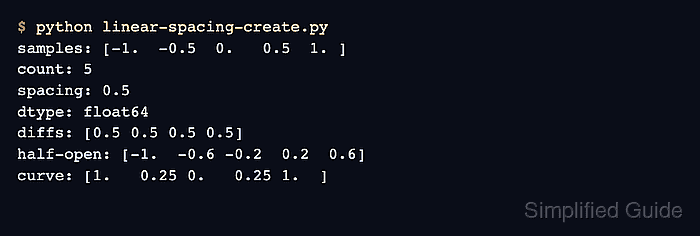
samples: [-1.  -0.5  0.   0.5  1. ]
count: 5
spacing: 0.5
dtype: float64
diffs: [0.5 0.5 0.5 0.5]
half-open: [-1.  -0.6 -0.2  0.2  0.6]
curve: [1.   0.25 0.   0.25 1.  ]
- Check the closed interval output.
The samples row has five values, reaches both -1.0 and 1.0, and the diffs row confirms the same 0.5 spacing between adjacent values.
- Compare the half-open interval output before using endpoint=False.
The half-open row still has five values, but 1.0 is excluded and the spacing changes to 0.4 across the half-open interval.
- Keep the default floating dtype unless integer rounding is intended.
Supplying an integer dtype rounds generated values. Keep a floating array for plotting, interpolation, and simulations that need fractional coordinates.
- Verify that the generated samples feed the next calculation.
The curve row is samples**2 calculated from the same linearly spaced coordinates.