How to calculate a histogram with NumPy
Numeric measurements often need counts per range before they become a chart or a report. NumPy calculates those counts with np.histogram(), returning the values per bin separately from the bin edges used to define each range.
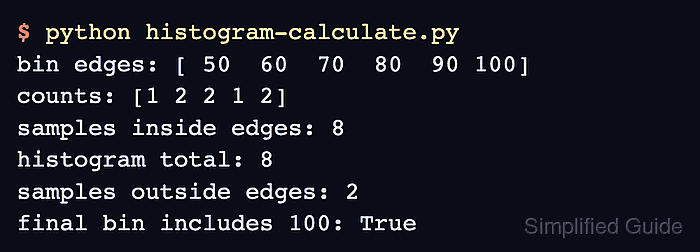
Explicit bin edges keep the distribution repeatable across runs and datasets. A sequence passed to bins defines the left and right edges, so the returned count array is one item shorter than the edge array.
Values outside the selected edge range are ignored, not clipped into the first or last bin. All bins except the final one are left-inclusive and right-exclusive; the final bin includes the right edge, which matters when a value is exactly equal to the last boundary.
Related: Calculate statistics
Related: Sort an array
Related: Generate random arrays
Steps to calculate a histogram with NumPy:
- Create a Python script with sample values and explicit bin edges.
- histogram-calculate.py
import numpy as np

scores = np.array([48, 52, 60, 67, 71, 74, 88, 95, 100, 102])
bin_edges = np.array([50, 60, 70, 80, 90, 100])

counts, edges = np.histogram(scores, bins=bin_edges)
inside_edges = (scores >= edges[0]) & (scores <= edges[-1])

print("bin edges:", edges)
print("counts:", counts)
print("samples inside edges:", int(inside_edges.sum()))
print("histogram total:", int(counts.sum()))
print("samples outside edges:", int(scores.size - inside_edges.sum()))
print("final bin includes 100:", bool(counts[-1] == 2))
np.histogram() flattens the input before counting. A one-dimensional sample keeps each printed count mapped to one score bucket.
- Run the script to verify that the histogram total matches the values inside the selected edges.
$ python histogram-calculate.py
bin edges: [ 50  60  70  80  90 100]
counts: [1 2 2 1 2]
samples inside edges: 8
histogram total: 8
samples outside edges: 2
final bin includes 100: True
The counts map to [50, 60), [60, 70), [70, 80), [80, 90), and [90, 100]. The last range includes 100, while 48 and 102 are outside the selected edges.