How to run default Nmap NSE scripts
Nmap Scripting Engine, or NSE, adds service-aware checks to an approved scan. The default script set fits reviews where a basic port table does not give enough context and the operator needs bounded service evidence such as HTTP titles, SSH host keys, TLS certificate fields, or anonymous-login banners.
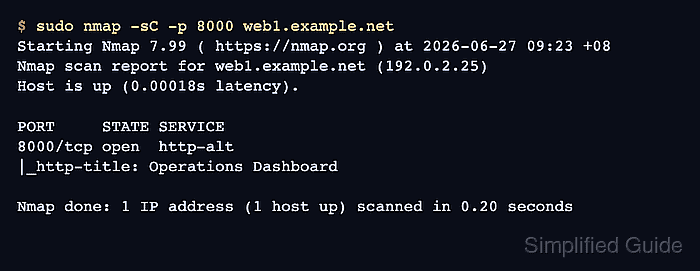
The -sC option runs the default NSE category and is equivalent to --script default when no other script selection is supplied. Script results appear under the host or port that triggered them, so a completed scan can still show no script block when none of the selected default scripts returned data.
Run default scripts only against hosts and ports covered by written authorization. Some scripts in the default category may still be intrusive, and service recognition affects which service scripts are eligible to run on unusual ports.
Steps to run default Nmap NSE scripts:
- Confirm the approved target and port scope before enabling NSE.
Do not run NSE scans against Internet hosts, customer networks, or neighboring subnets unless the written scope explicitly includes them. Default scripts are narrower than broad vulnerability categories, but they still interact with remote services.
- Run the default script set with -sC against the approved host.
$ sudo nmap -sC -p 8000 web1.example.net
Starting Nmap 7.99 ( https://nmap.org ) at 2026-06-27 09:23 +08
Nmap scan report for web1.example.net (192.0.2.25)
Host is up (0.00018s latency).

PORT     STATE SERVICE
8000/tcp open  http-alt
|_http-title: Operations Dashboard

Nmap done: 1 IP address (1 host up) scanned in 0.20 seconds
Replace web1.example.net and 8000 with the authorized host and ports. Lines beginning with | or |_ are NSE script output attached to the matching service.
- Use the explicit --script default form when the scan record should name the category.
$ sudo nmap --script default -p 8000 web1.example.net
Starting Nmap 7.99 ( https://nmap.org ) at 2026-06-27 09:24 +08
Nmap scan report for web1.example.net (192.0.2.25)
Host is up (0.00034s latency).

PORT     STATE SERVICE
8000/tcp open  http-alt
|_http-title: Operations Dashboard

Nmap done: 1 IP address (1 host up) scanned in 0.15 seconds
-sC is ignored when another --script selection is supplied, so use one script-selection style per scan unless the broader expression is intentional.
- Add service version detection when an approved service runs on a nonstandard port and no default script block appears.
$ sudo nmap -sV -sC -p 8000 web1.example.net
Starting Nmap 7.99 ( https://nmap.org ) at 2026-06-27 09:25 +08
Nmap scan report for web1.example.net (192.0.2.25)
Host is up (0.00018s latency).

PORT     STATE SERVICE VERSION
8000/tcp open  http    SimpleHTTPServer 0.6 (Python 3.14.6)
|_http-title: Operations Dashboard
|_http-server-header: SimpleHTTP/0.6 Python/3.14.6

Service detection performed. Please report any incorrect results at https://nmap.org/submit/ .
Nmap done: 1 IP address (1 host up) scanned in 6.17 seconds
Service scripts use host and service rules. -sV can give NSE enough service identity to run default scripts that would not trigger from a bare port number alone.
Related: How to detect service versions with Nmap - Save the default-script scan when the result needs a reviewable record.
$ sudo nmap -sC -oN nmap-default-scripts.txt -p 8000 web1.example.net
Starting Nmap 7.99 ( https://nmap.org ) at 2026-06-27 09:27 +08
Nmap scan report for web1.example.net (192.0.2.25)
Host is up (0.00022s latency).

PORT     STATE SERVICE
8000/tcp open  http-alt
|_http-title: Operations Dashboard

Nmap done: 1 IP address (1 host up) scanned in 0.21 seconds
-oN writes normal Nmap output to the named file while still printing the interactive result.
Related: How to save Nmap scan output - Confirm the saved report contains the target, port table, and default-script block.
$ cat nmap-default-scripts.txt
# Nmap 7.99 scan initiated Sat Jun 27 09:27:00 2026 as: nmap -sC -oN nmap-default-scripts.txt -p 8000 web1.example.net
Nmap scan report for web1.example.net (192.0.2.25)
Host is up (0.00022s latency).

PORT     STATE SERVICE
8000/tcp open  http-alt
|_http-title: Operations Dashboard

# Nmap done at Sat Jun 27 09:27:00 2026 -- 1 IP address (1 host up) scanned in 0.21 seconds