Open ports only show where a host accepts connections; service version detection asks what software appears to answer there. Nmap uses -sV to probe approved open ports and report application names, versions, protocol details, and related service information when the target reveals enough data.
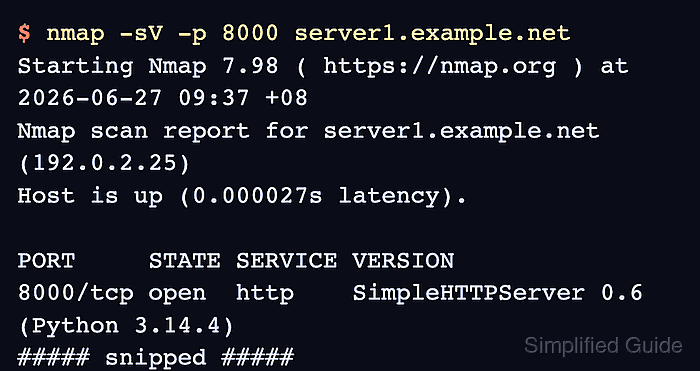
Version detection runs after port discovery and can take longer than a basic port scan because Nmap sends service-specific probes. It is best used against a narrow host and port list that is already inside the written scan scope.
Treat the VERSION column as identification evidence, not as a vulnerability verdict. Backported security fixes, hidden banners, proxies, and custom service responses can make a visible version incomplete or misleading, so use the result to guide patch review, asset ownership checks, or a more focused follow-up test.
Related: How to scan an authorized host with Nmap
Related: How to scan a port range with Nmap
Related: How to run default Nmap NSE scripts
Related: How to save Nmap scan output
Steps to detect service versions with Nmap:
- Confirm the target host and service ports are inside the approved scan scope.
Do not run service detection against Internet hosts, customer systems, neighboring subnets, or shared infrastructure unless the written authorization includes those targets and ports.
- Run service version detection against the approved ports.
$ nmap -sV -p 22,8000 server1.example.net
Starting Nmap 7.98 ( https://nmap.org ) at 2026-06-27 09:37 +08
Nmap scan report for server1.example.net (192.0.2.25)
Host is up (0.000027s latency).

PORT     STATE SERVICE VERSION
22/tcp   open  ssh     OpenSSH 10.2p1 Ubuntu 2ubuntu3.2 (Ubuntu Linux; protocol 2.0)
8000/tcp open  http    SimpleHTTPServer 0.6 (Python 3.14.4)
Service Info: OS: Linux; CPE: cpe:/o:linux:linux_kernel

Service detection performed. Please report any incorrect results at https://nmap.org/submit/ .
Nmap done: 1 IP address (1 host up) scanned in 6.22 seconds
Replace server1.example.net and the -p value with the approved target and ports. A prior basic scan or ticket scope should define that list.
Related: How to scan an authorized host with Nmap
Related: How to scan a port range with Nmap - Read the SERVICE and VERSION columns for each open port.
SERVICE is the detected protocol or application family. VERSION can include the product, release string, operating system hint, protocol version, or extra banner detail when the service reveals it.
- Use light probing when the scan window is tight.
$ nmap -sV --version-light -p 22,8000 server1.example.net
Starting Nmap 7.98 ( https://nmap.org ) at 2026-06-27 09:39 +08
Nmap scan report for server1.example.net (192.0.2.25)
Host is up (0.000032s latency).

PORT     STATE SERVICE VERSION
22/tcp   open  ssh     OpenSSH 10.2p1 Ubuntu 2ubuntu3.2 (Ubuntu Linux; protocol 2.0)
8000/tcp open  http    SimpleHTTPServer 0.6 (Python 3.14.4)
Service Info: OS: Linux; CPE: cpe:/o:linux:linux_kernel

Service detection performed. Please report any incorrect results at https://nmap.org/submit/ .
Nmap done: 1 IP address (1 host up) scanned in 6.21 seconds
--version-light is the same as --version-intensity 2. It sends fewer probes, so it can finish sooner but may identify fewer unusual services.
- Retry one unclear port with every version probe when the result needs more effort.
$ nmap -sV --version-all -p 8000 server1.example.net
Starting Nmap 7.98 ( https://nmap.org ) at 2026-06-27 09:41 +08
Nmap scan report for server1.example.net (192.0.2.25)
Host is up (0.000049s latency).

PORT     STATE SERVICE VERSION
8000/tcp open  http    SimpleHTTPServer 0.6 (Python 3.14.4)

Service detection performed. Please report any incorrect results at https://nmap.org/submit/ .
Nmap done: 1 IP address (1 host up) scanned in 6.21 seconds
--version-all is the same as --version-intensity 9. Use it on a narrow port list because it attempts more probes against each selected port.
- Verify the result contains the expected target, selected ports, VERSION values, and service-detection footer.
Review unexpected products, stale-looking banners, missing versions, or service fingerprints with the service owner before treating the output as a patch-status finding. Save the result only when the scan record needs handoff or comparison.
Related: How to save Nmap scan output
Related: How to run default Nmap NSE scripts

Mohd Shakir Zakaria is a cloud architect with deep roots in software development and open-source advocacy. Certified in AWS, Red Hat, VMware, ITIL, and Linux, he specializes in designing and managing robust cloud and on-premises infrastructures.


