Nmap Scripting Engine vulnerability checks add service-specific tests to an approved scan. They fit controlled security reviews where a basic port result is not enough and the operator needs evidence from one selected script against a known host and port.
The --script option can select one script, a script category, a directory, or a Boolean expression. A named NSE script is easier to review and approve than the whole vuln category because the script help shows its categories, arguments, and service rule before any probe reaches the target.
NSE scripts are not sandboxed, and some vulnerability scripts are also marked intrusive, exploit, or dos. Keep the written scope, target list, ports, script names, and required script arguments together, then treat each script block in the output as assessment evidence rather than as a generic port-state line.
Related: How to scan an authorized host with Nmap
Related: How to run default Nmap NSE scripts
Related: How to save Nmap scan output
Steps to run authorized Nmap NSE vulnerability scripts:
- Confirm the approved target, port, script name, and test window.
Do not run the vuln category, intrusive, exploit, dos, brute-force, or third-party NSE scripts unless the written scope names that activity.
- Review the selected script before running it.
$ nmap --script-help http-csrf
Starting Nmap 7.98 ( https://nmap.org ) at 2026-06-27 09:31 +08

http-csrf
Categories: intrusive exploit vuln
https://nmap.org/nsedoc/scripts/http-csrf.html
  This script detects Cross Site Request Forgeries (CSRF) vulnerabilities.
##### snipped #####
--script-help shows the NSEDoc URL, categories, summary, and supported arguments. In this example, http-csrf is in intrusive, exploit, and vuln, so written approval needs to cover active web-application testing.
- Keep broad category selectors out of routine checks unless the scope permits every matching script.
nmap --script vuln can select many scripts, including scripts with intrusive, exploit, service-crash, external-query, or denial-of-service behavior. Prefer named scripts for routine checks and broaden the selector only inside a lab or an assessment plan that names the allowed categories.
- Run the named script against the approved service.
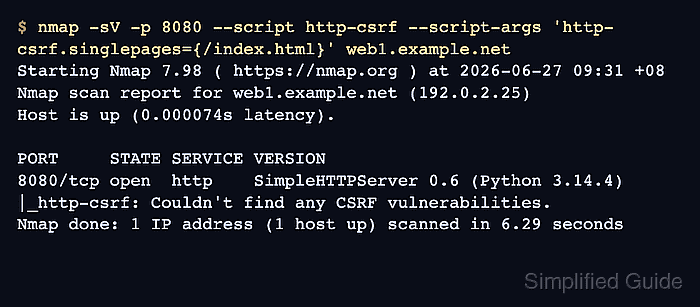
$ nmap -sV -p 8080 --script http-csrf --script-args 'http-csrf.singlepages={/index.html}' web1.example.net
Starting Nmap 7.98 ( https://nmap.org ) at 2026-06-27 09:31 +08
Nmap scan report for web1.example.net (192.0.2.25)
Host is up (0.000074s latency).

PORT     STATE SERVICE VERSION
8080/tcp open  http    SimpleHTTPServer 0.6 (Python 3.14.4)
|_http-csrf: Couldn't find any CSRF vulnerabilities.
Nmap done: 1 IP address (1 host up) scanned in 6.29 seconds
-sV lets Nmap confirm the service type before HTTP scripts run, and -p keeps the scan on the approved port. Replace the target, port, script name, and script arguments with the approved test case. http-csrf: Couldn't find any CSRF vulnerabilities. means that script did not report a CSRF issue for the tested page. A VULNERABLE block, State: VULNERABLE line, CVE ID, or reference list needs owner review with the target, port, script name, and timestamp preserved.
Related: How to save Nmap scan output

Mohd Shakir Zakaria is a cloud architect with deep roots in software development and open-source advocacy. Certified in AWS, Red Hat, VMware, ITIL, and Linux, he specializes in designing and managing robust cloud and on-premises infrastructures.


